AI Engineering - RAG, AI Agents, Context Engineer, MCP, Fine-tuning (Weight Optimization, LoRA)
Here is all concepts about AI Engineering: RAG, AI Agents, Context Engineer, MCP, Fine-tuning (Weight Optimization, LoRA).
1. Transformer, Fine-tunning
AI Engineer
- Transformer: predict the next token in a sequence.
- Before LLMs, each AI system do 1 task ⇒ 1 Translation, 1 Summarizer, 1 Classifier.
- Now 1 LLM can do multiple domains.
What make LLM large
- Number of parameters: chỉ số để adjust tham số để predict kết quả của model.
- Amount of data.
- Compute used to train this.
Transformer Architecture
- Transformer
- Identify each words to related to each others.
- Tokenization
- Split the docs into multiple words.
- Transformer Layers
- Mask the words and self-learn.
- Positional Encoding
- Give the model the order of the token ⇒ generate by order.
- Parameters
- Patterns mà cái model learn được.
- Distributed training setup
- Use to train data in multiple GPUs.
How to train LLM
- Stage 0: randomly initialized model
- Hỏi thẳng không train.
- Stage 1: Pre-training
- Bỏ data vô train.
- Cons: nó chỉ biết continue the question theo data chứ không phù hợp với conversation.
- Stage 2: Instruction fine-tuning
- Hướng dẫn cách trả lời
- Pros: giúp nó biết cách response theo human behavior: summary, answering.
- Stage 3: Preference fine-tuning
- Priority các response.
- Pros: apply RLHF (reinforcement learning with human feedback) ⇒ learn để đưa response match với human.
- Stage 4: Reasoning fine-tuning
- Đảm bảo có reason khi đưa ra kết quả.
- Pros: case này không cần cảm xúc của human, cần chính xác ⇒ đúng thì cho rewards.
- Probabilistic thinking
- Predict the next words based on probability.
- Sampling instead of the selecting the highest
- T cao, gần nhau nhiều thì random
- T thấp thì lấy cái gần nhất.
LLM Generation Parameters
- Max tokens
- Too low: short output
- Too long: waste compute time.
- Temperature
- Higher Temperature: boost creativity.
- Low temperature: makes the model deterministic.
- Top-k:
- Only consider top k most likely next tokens during sampling.
- Use case: recommend app.
- Top-p
- Only consider the tokens with a 90% probability are considered.
- Use case: Q & A for high accuracy app.
- Frequency penalty
- Dùng trong summary.
- Positive nghĩa là lặp lại, negative thì nghĩa là chưa gặp lại.
- Use case: summary text.
- Presence penalty
- Encourage the model to bring new tokens that have not been seen in the text.
- Use case: exploration generation ideas.
- Stop sequence:
- 1 số ký tự đặc biệt để model stop generate.
- Ví dụ dấu JSON ⇒ không split over text.
- Use case: gen ra JSON.
- min-p sampling
- Tìm min-p bằng việc đầu tiên cho 90% trước.
- Ít hơn thì dời xuống top-2, top-3, top-4,…
LLM Text Generation Strategies
- Approach 1: Greedy strategy
- Chọn word có xác suất cao nhất.
- Dẫn đến các câu bị lặp lại.
- Approach 2: Multinomial sampling strategy
- Pick top token để generate multiple sampling strategy.
- Dùng chỉ số temperature cho trường hợp này.
- Approach 3: Beam search
- Đoán trước next response của người dùng.
- Để đưa ra câu trả lời hợp lý nhất.
- Second-order thinking đúng nghĩa
- Approach 4: Contrastive search
- Tìm các câu trả lời mà các token khác nhau.
- Đa dạng góc nhìn.
- SLED architect - Self-logits evolution decoding & Transformer
- Thay vì cộng dồn tất cả tính toán sang layer cuối.
- Nó dùng thông tin từ các layer trung gian.
Train LLM Model
- LLM model learn from another LLM.
- LLama 4 Scount and Maverick ⇒ learn from LLama 4 Behemoth.
- Gemma 2 and 3 were trained using Gemini.
- Pre-training
- Train the bigger and smaller model together.
- LLama 4 did it.
- Post-training
- Train the bigger model first, train smaller model later
- Deepseek did it for Qwen and Llama 3.1
9.1. Soft-label distillation
- Using teacher LLM to create softmax probabilities for data.
- Use this data to train for student LLM.
- Thằng lớn nó process nhanh hơn, xong lấy đó bỏ cho thằng nhỏ.
- Ví dụ có 5 triệu tỷ tokens data ⇒ train ra 500 triệu GB memory (float8 precision) ⇒ lấy đó bỏ vô thằng nhỏ.
⇒ Softmax kiểu đối với token A, next token B xác suất là bao nhiêu.
Question: Nếu dùng 1 con LLM lớn hơn train cho 1 con LLM nhỏ hơn, có làm phình size con LLM nhỏ hơn ngang LLM lớn hơn không ?
- Không
- Do tham số cũng y vậy, mỗi cái hành vi + data là mới hơn thôi.
- LLM nhỏ học cách process theo tham số đó.
- Knowledge nằm trong weights của pattern.
- Lôi mấy cái pattern của LLM lớn vào LLM nhỏ.
Question: So is the teacher pattern transferred?
- No pattern is transferred.
- Only constraints are transferred.
- Token probabilities (logits)
- Output sequences
- Preferences between alternatives
- Reasoning traces (if you expose them)
Question: Parameter không phải là pattern, nhưng càng có nhiều parameter thì sẽ càng biểu diễn được pattern.
Note:
- “70B có thể biểu diễn những pattern mà 7B không thể”
- Ví dụ:
- Long-chain reasoning
- Multi-level abstraction
- Cross-domain transfer
- Tool planning nhiều bước
9.2. Hard-label distillation
- Label do teacher giăng ra.
- Thay vì học theo xác suất, này học theo hard label.
- DeepSeek did it to Deepseek-R1 into Qwen and Llama 3.1.
- Soft-label distillation
- Paris: 0.85
- Lyon: 0.1
- Marseille: 0.05
- Hard-label distillation
- The capital of France is Paris.
9.3. Co-distillation
- Hard-label: data thật.
- Soft-label: data dự đoán ra.
- Train 2+ models song song, mỗi model vừa:
- học từ hard labels (data thật)
- vừa học từ soft predictions của các model còn lại
- Một kiểu peer-learning.
How to run LLMs locally
- Reason
- Privacy data.
- Testing things before moving to the cloud and more.
- Ollama
- Use like Docker to run model locally.
- Or use Ollama to pull the model when deployment.
- Giống cái máy ảo thôi.
- LMStudio
- Dùng để test model local như chat.
- Giống kiểu chatGPT-like interface.
- vLLM
- 1 thư viện để tương tác với vLLM interface trong code.
- Run tối đa GPU.
- LlamaCPP
- Run bằng CPU của máy tính local.
Transformer and Mixture of Experts
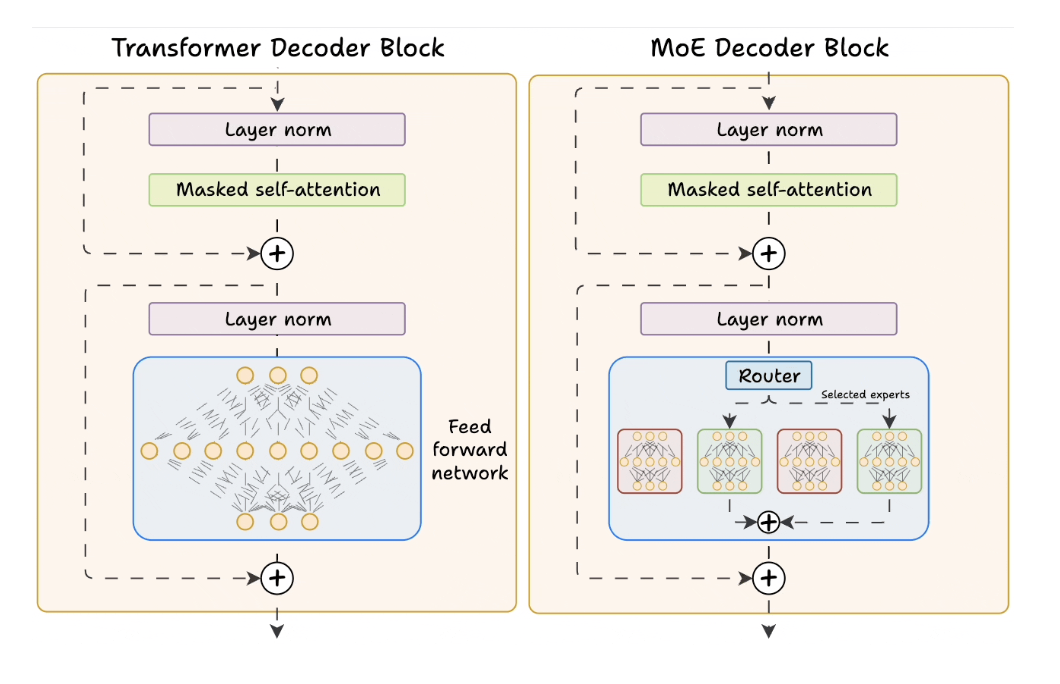
- Transformer
- Nhân hết ma trận đến layer cuối cùng tổng hợp.
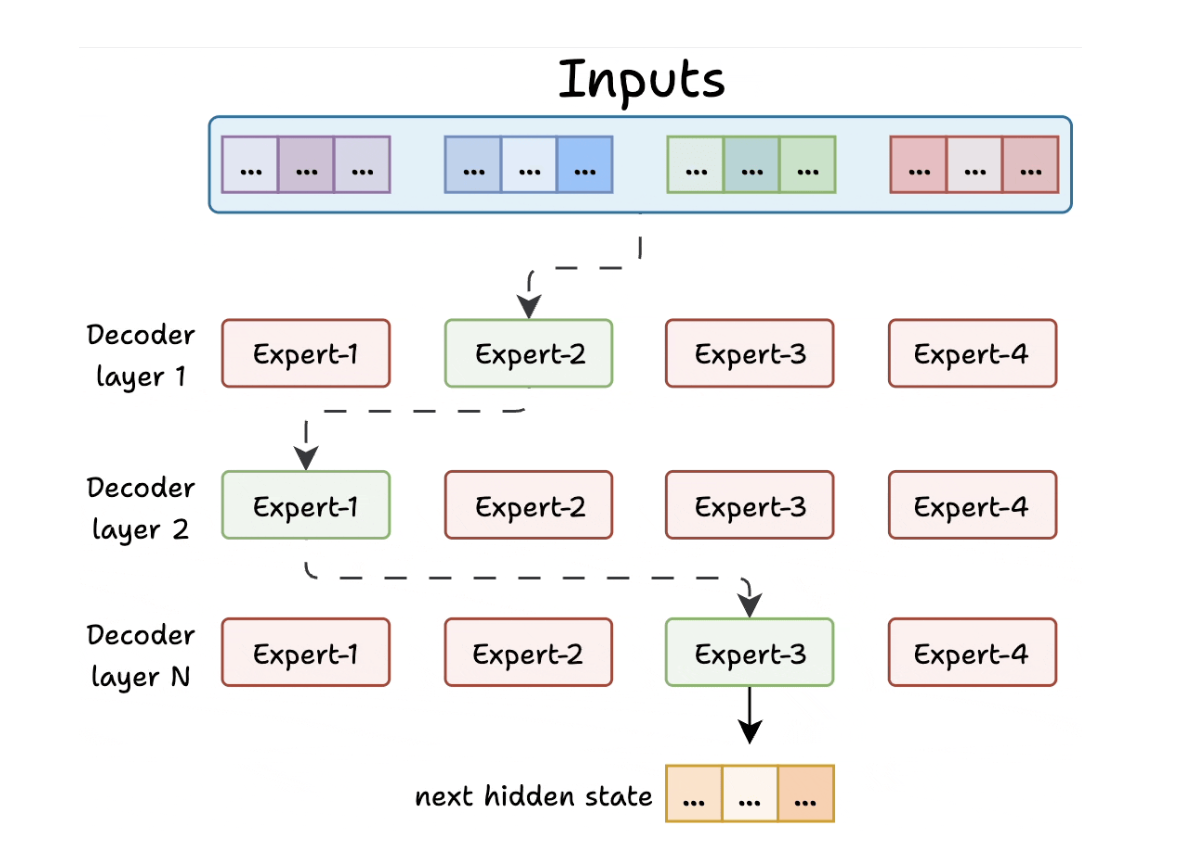
- Mixture of experts
- Có nhiều tham số nhưng sử dụng small subset of tham số để biểu diễn pattern cần dùng theo chuyên môn thôi.
- Compare
- Transformer uses a feed-forward network.
- MoE uses experts, which are feed-forward networks but smaller compared to that in Transformer.
- Cons:
- Sẽ có 1 số route luôn đi vào 1 expert duy nhất.
- Các expert còn lại bị under-trained.
- Do nó train theo cái hỏi của người dùng nữa.
- Con expert giỏi càng ngày càng lên.
- Solve
- Có limit tối đa số tokens the expert can process.
- Some of experts used to process the tokens.
- Question: Notes
- Experts không pre-defined từ đầu.
- Mà bộ router route từ từ ⇒ để mỗi con expert chuyên các tham số xử lý nó.
- Khi xử lý quá nhiều token
- Expert đó sẽ bị overload.
- Nó horizontal ra nhiều expert cho syntax / generic
-
Qustion: Mỗi expert params khác nhau cho 1 case prompt khác nhau
Token type Expert có thể dùng “Write” syntax / generic “Python” programming-ish “parse” logic “JSON” structured data - Càng nhiều tham số thì càng biểu diễn được nhiều patterns.
- Question: Tại sao MoE ra đời thay cho Transformer ?
- Observation thực tế:
- 80% token:
- syntax
- common patterns
- low entropy
- 20% token:
- reasoning
- rare knowledge
- edge cases
- 80% token:
- Observation thực tế:
- Question: Các params define by feature selection từ đầu hay qua learned from data ?
- KHÔNG có feature selection thủ công cho expert.
- Toàn bộ params của expert được học end-to-end từ data.
- Chỉ có Machine Learning là Feature Selection thôi.
- Question: dimension x1, x2 và params ?
- x1, x2: là số chiều vector
- params là weight cho dimension
- Pattern: grammar, tense
- 👉 Dimension = 4096
- 👉 Params = 134 triệu
- Tại 1 thời điểm, vector biểu diễn có 4096 dimensions nhưng số params tham gia tạo ra vector đó có thể là HÀNG TRIỆU.
- Trong không gian 4096D:
- Mỗi pattern ≈ một vector hướng
- Các pattern không cần orthogonal
- Chúng có thể chồng lên nhau
- Question: FFN (Feedforward Neural Network) architecture
- Giả sử 1 FFN layer tiêu chuẩn:
d_model = 4096d_hidden = 16384
h1= the intermediate hidden activation inside the FFN-
y= the output representation of the FFN (same size as input)h1 = GeLU(W1 · z_l + b1) y = W2 · h1 + b2 - Hidden state:
- Do model ban đầu quy định.
- Càng nhiều data thì hidden state này ổn hơn.
- Giả sử 1 FFN layer tiêu chuẩn:
Prompt Engineering
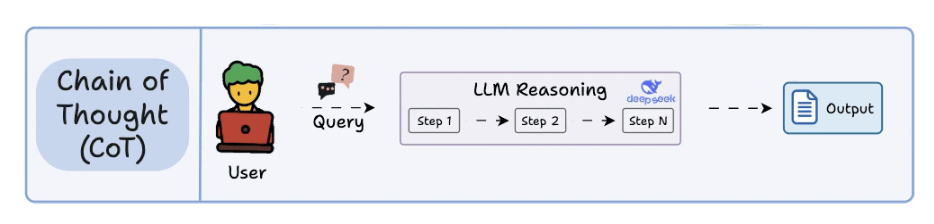
1. Chain Of Thought (CoT)
- Think kiểu chain of thought sẽ reasoning từng bước.
- Không xảy ra biases.
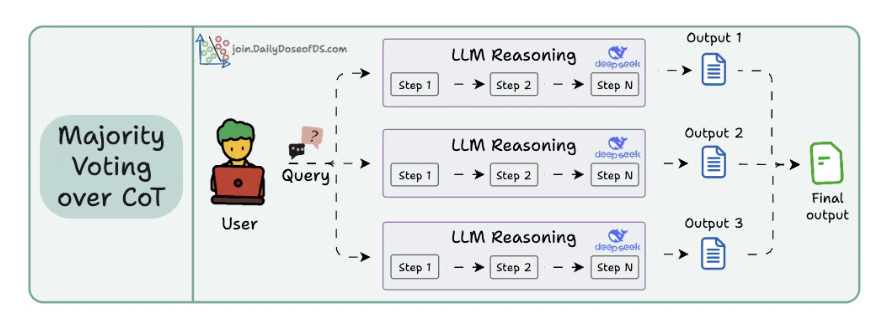
2. Self-Consistency (a.k.a. Majority Voting over CoT)
- Với cùng 1 câu hỏi, nó gen nhiều câu trả lời khác nhau.
- Là do chỉ số temperature cao.
- Multiple reasoning paths và chọn theo số đông.
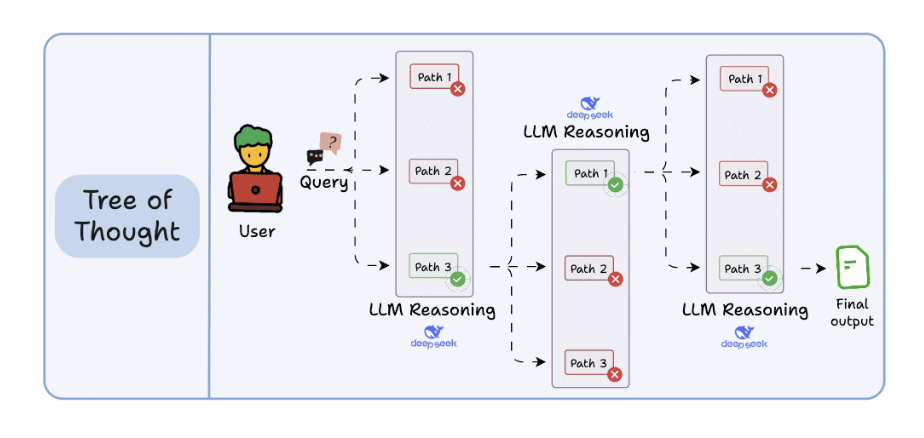
3. Tree of Thoughts (ToT)
- Mỗi bước gen N options ra, xong chọn cái optimize nhất.
-
Không chốt được option thì lấy theo cái đông nhất hoặc thực tế nhất.
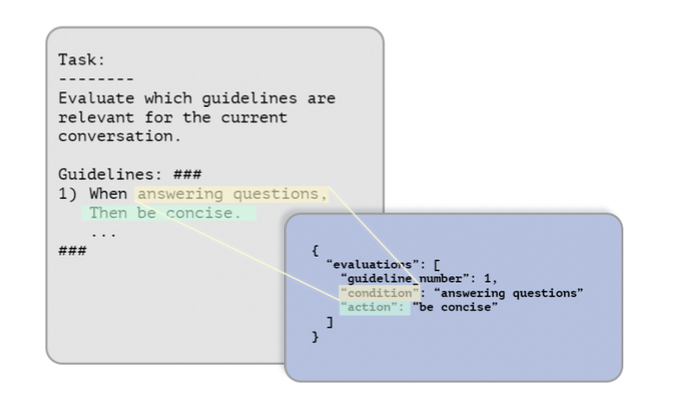
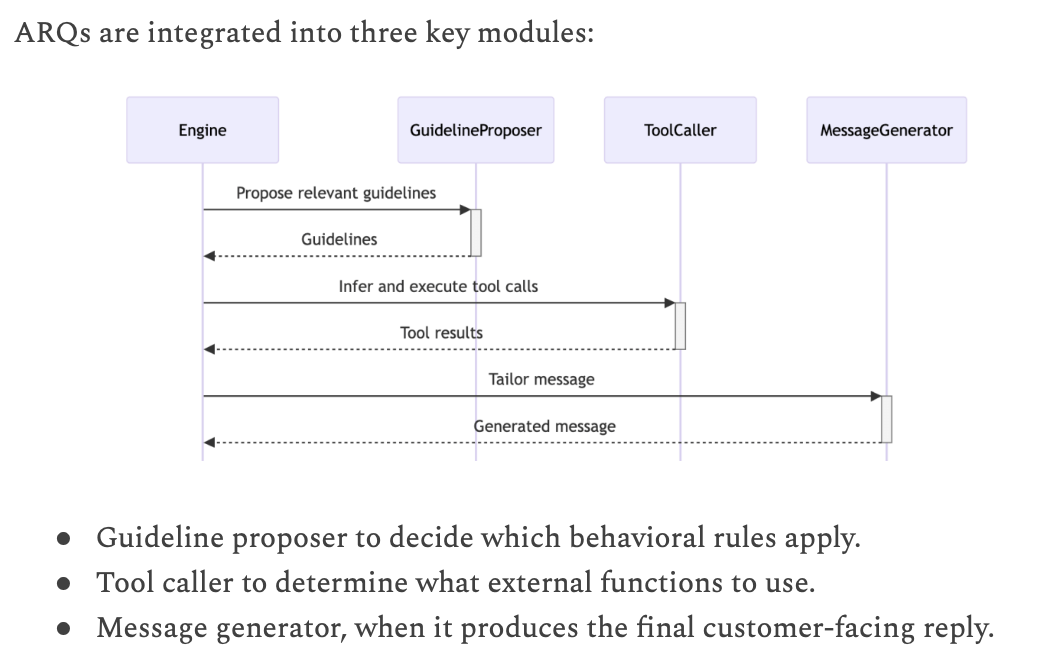
4. ARQ (Attentive Reasoning Queries)
- Nếu không cho suy nghĩ tự do ⇒ sẽ dẫn đến Hallucianting.
- Force nó theo rules
- Quy định các step for reasoning.
- ARQ - 90.2%
- CoT reasoning - 86.1%
- Direct response generation - 81.5%
Verbalized Sampling
- 2 version of model
- The original model: learned the rich possibilities during pre-training.
- The safety-focused: typically bias, trả lời các câu hỏi nó giống với người dùng.
- Cách dùng
- “Generate 5 responses with their corresponding possibilities”
- Nó sẽ đi đào hết logic ra làm.
JSON prompting for LLMs
- Using JSON prompt and natural processing prompt
- Text prompt: can lead to hallucinations.
- JSON prompts: force to consistent output.
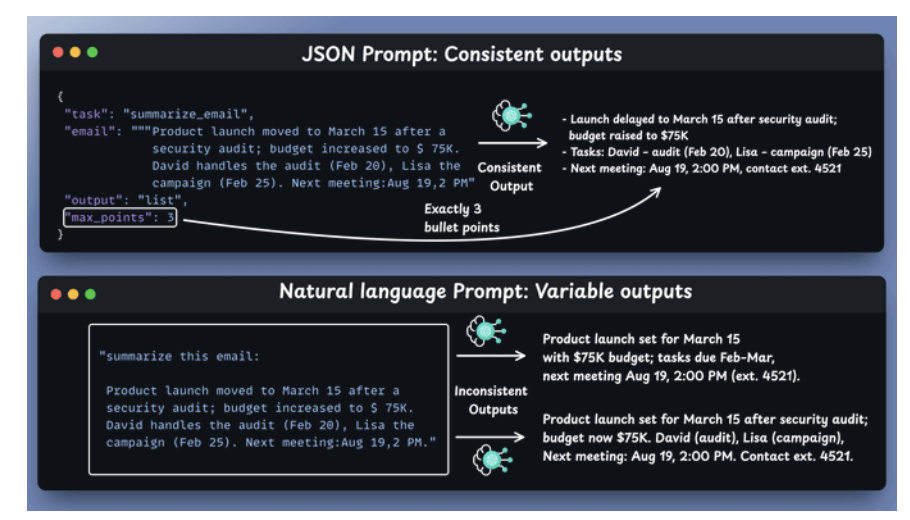
- Structure means certainty
- JSON forces you to think in terms of fields and values, which is a gift.
- It eliminates gray areas and guesswork.
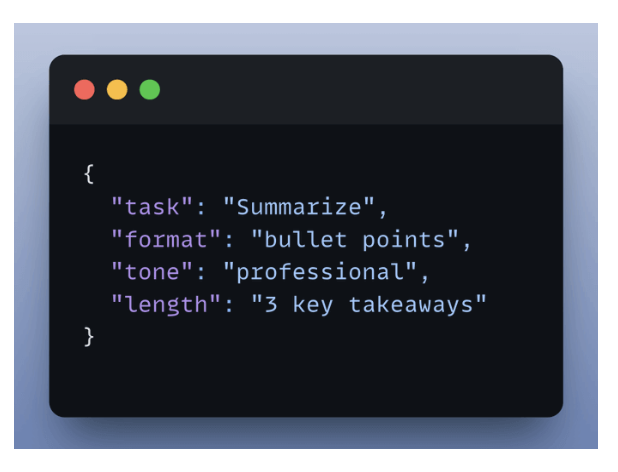
- You control the outputs
-
Structure the generated output.
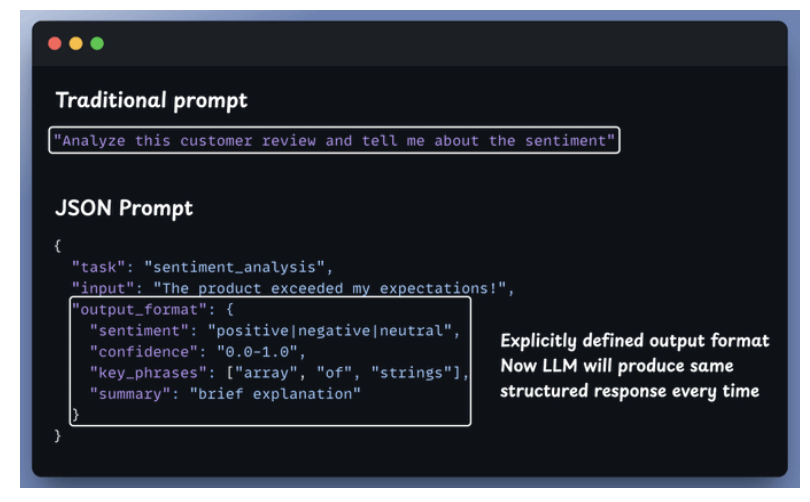
-
- Turn the output to JSON for APIs, Databases and Apps.
- Return JSON for BE APIs.
BERT and GPT-3
🔹 BERT
- Tên đầy đủ: Bidirectional Encoder Representations from Transformers
- Kiến trúc: Transformer Encoder
- Cách học: Masked Language Modeling (che từ rồi đoán lại)
- Hiểu ngữ cảnh: Hai chiều (trái ↔ phải)
- Mục tiêu chính: Hiểu văn bản
Giỏi nhất khi làm:
- Phân loại văn bản
- Phân tích cảm xúc
- Question Answering
- Search / ranking / NLU
🔹 GPT-3
- Tên đầy đủ: Generative Pre-trained Transformer 3
- Kiến trúc: Transformer Decoder
- Cách học: Autoregressive (đoán token kế tiếp)
- Hiểu ngữ cảnh: Một chiều (trái → phải)
- Mục tiêu chính: Sinh văn bản
Giỏi nhất khi làm:
- Chatbot
- Viết bài / code / email
- Hỏi đáp mở
- Sáng tạo nội dung
| Tiêu chí | BERT | GPT-3 |
|---|---|---|
| Kiến trúc | Encoder | Decoder |
| Hướng ngữ cảnh | 2 chiều | 1 chiều |
| Huấn luyện | Masked LM | Next-token prediction |
| Sinh text dài | ❌ Không | ✅ Rất tốt |
| Hiểu ý nghĩa | ✅ Rất mạnh | ⚠️ Tốt nhưng phụ thuộc prompt |
| Fine-tune | Dễ | Ít fine-tune (prompt-based) |
| Quy mô | ~110M–340M params | ~175B params |
Fine-tunning
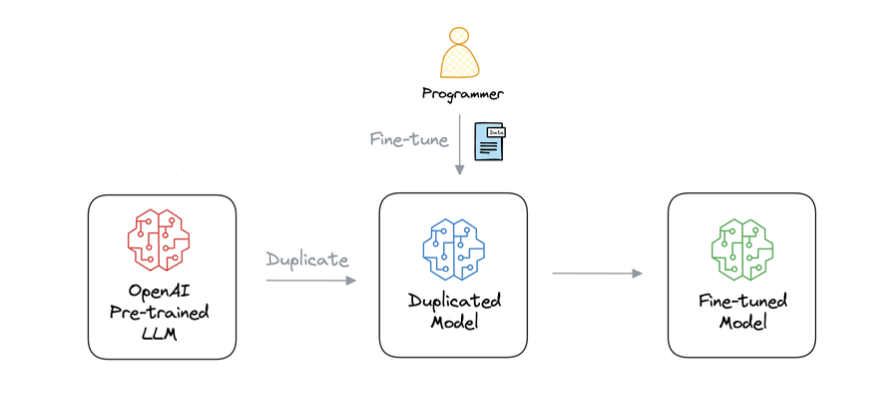
- GPT-3, which has 175B parameters.
- That’ s 350GB of memory just to store model weights (float16 precision).
- Size of parameters ⇒ size of memory to load models.
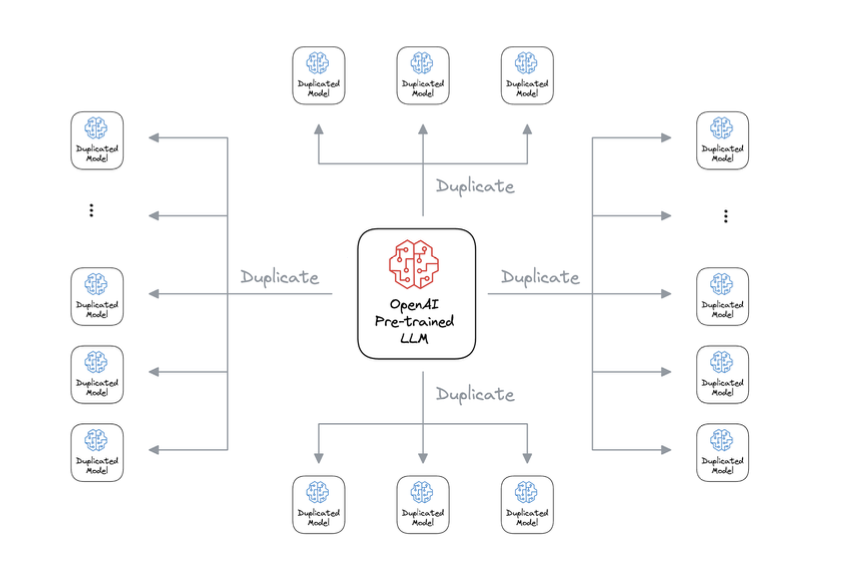
- If 10 users fine-tuned GPT-3 → 3500 GB to store weights.
- If 1000 users fine-tuned GPT-3 → 350k GB to store weights.
- If 100k users fine-tuned GPT-3 → 35M GB to store weights.
Fine-tunning Method
LoRA idea: don’t update W, add a low-rank correction
input-> A -> bottleneck -> B -> useful update
- LoRA
- Thêm low-rank matrices vào attention
- Train ~0.1–2% params
- Hiệu quả & rẻ
-
LLMs for user A and user B
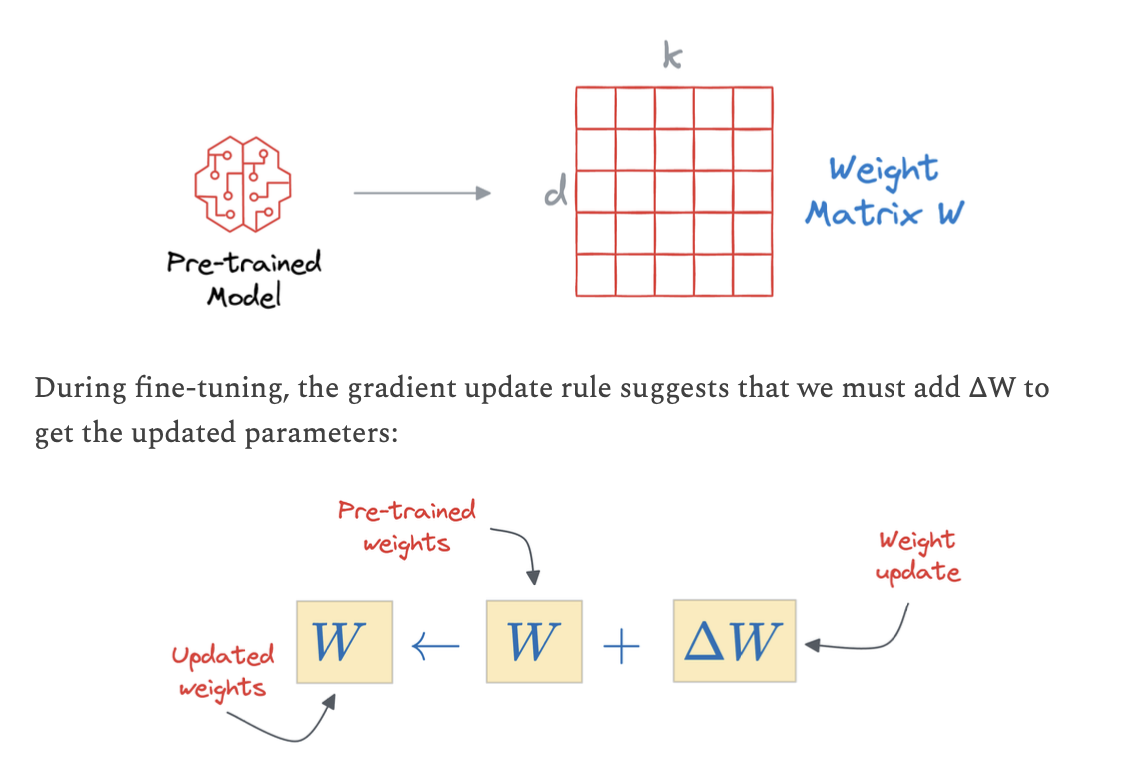
Weffective(u) = Wbase + ΔWu
-
For User A
load base weights W load adapter ΔW_A ← user A only -
For User B
  load base weights W
  load adapter ΔW_B   ← user B only
- Methods for LoRA training
- LoRA
- LoRA-FA
- VeRA
- Delta-LoRA.
- LoRA+
- Bonus: LoRA-drop
- QLoRA
- DoRA
- When to use LoRA, when to RAG ?
- Need the model to know facts that change often? → RAG
- Need the model to behave differently (style, rules, format)? → LoRA
- LLMs stored token embedding and weights in file.
-
Implement LoRA from Scratch
### 🧠 Matrix A
- Selects which directions of the input space matter
- Acts like a feature extractor
- Compresses input into a small subspace
### 🧠 Matrix B
- Decides how strongly to modify the output
- Re-expands compressed features
- Controls impact on model behavior
Fine-tunning using third LLMs
- Generate response from LLM 1, LLM2
- LLM3 judge and rating for each response.
- Choose the right response.
SFT and RFT
- SFT Process
- It starts with a static labeled dataset of prompt–completion pairs.
- Adjust the model weights to match these completions.
- The best model (LoRA checkpoint) is then deployed for inference.
- Supervised-learning: bắt học theo cái đúng đó, kiểu gia trường nhét chữ kêu nó copy đi.
- RFT Process
- RFT uses an online “reward” approach - no static labels required.
- The model explores different outputs, and a Reward Function scores their correctness.
- Over time, the model learns to generate higher-reward answers using GRPO.
- Reward-system: có thể 1 thằng human đi judge xem cái nào là đúng.
- About data
- If you have data right with fact, use SFT.
- If data chưa được label, RFT gọi qua 1 con thứ ba để check độ chính xác và score.
Build a Reasoning LLM using GRPO
1. GRPO
- Group Relative Policy Optimization: dạy 1 model học toán theo kiểu reinforce learning with rewards system.
2. Architect
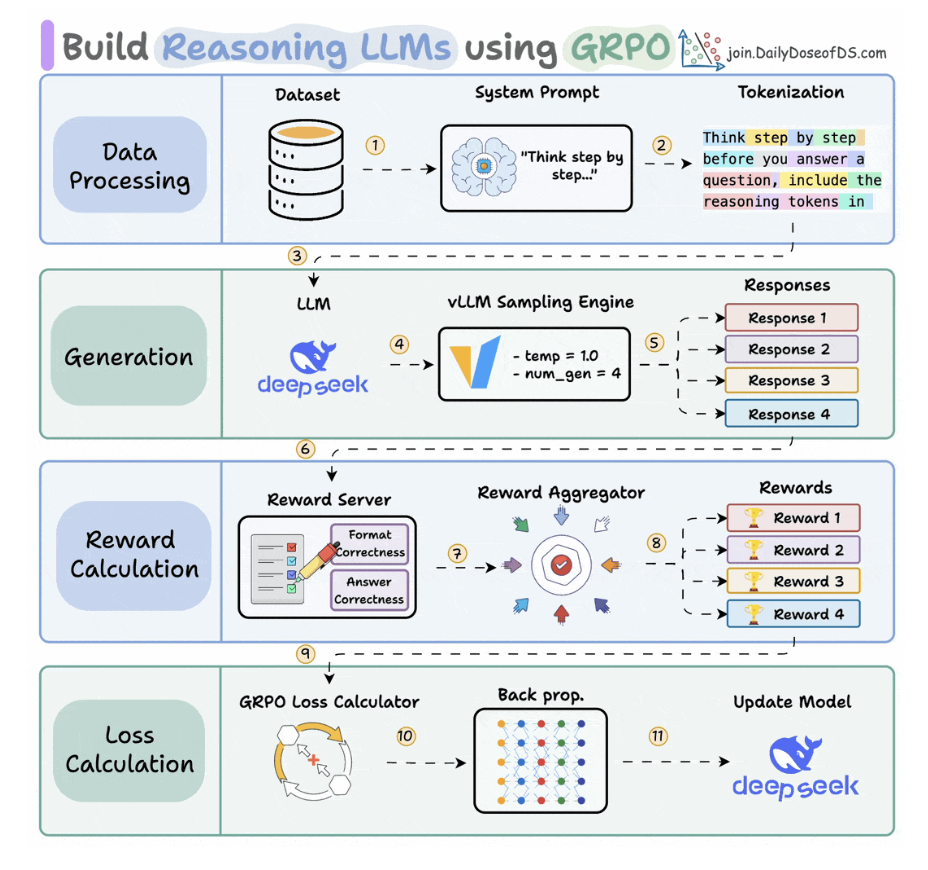
- Use reward-system: update cái trọng số của model.
- Use GRPO: calculate loss and update the weight of model, like fine-tuning real-time.
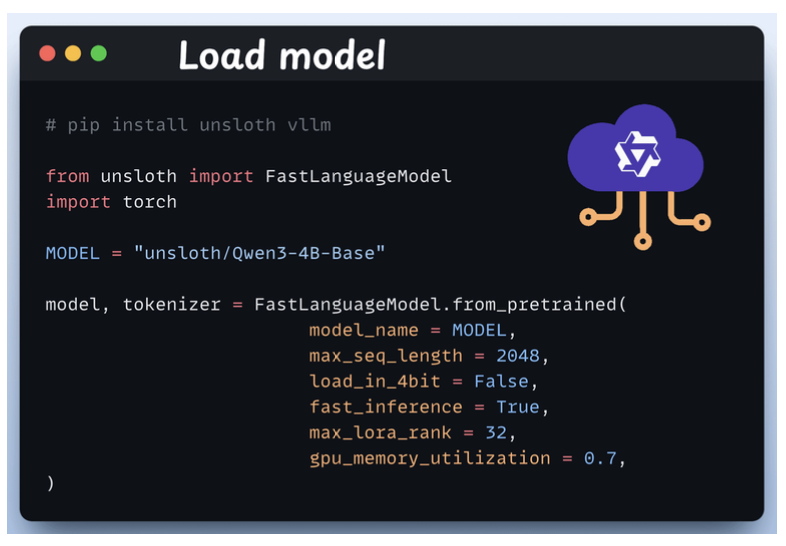
3. Load the model
- We start by loading Qwen3-4B-Base and its tokenizer using Unsloth.
-
You can use any other open-weight LLM here.
4. Define LoRA config
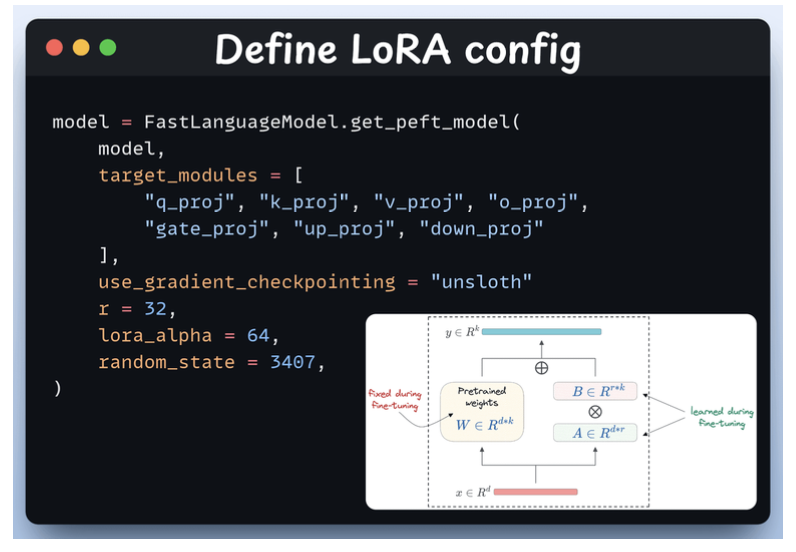
- We ‘ll use LoRA to avoid fine-tuning the entire model weights. In this code, we use Unsloth’ s PEFT by specifying:
- The Model
- LoRA low-rank
- Modules for fine-tuning
5. Create the dataset
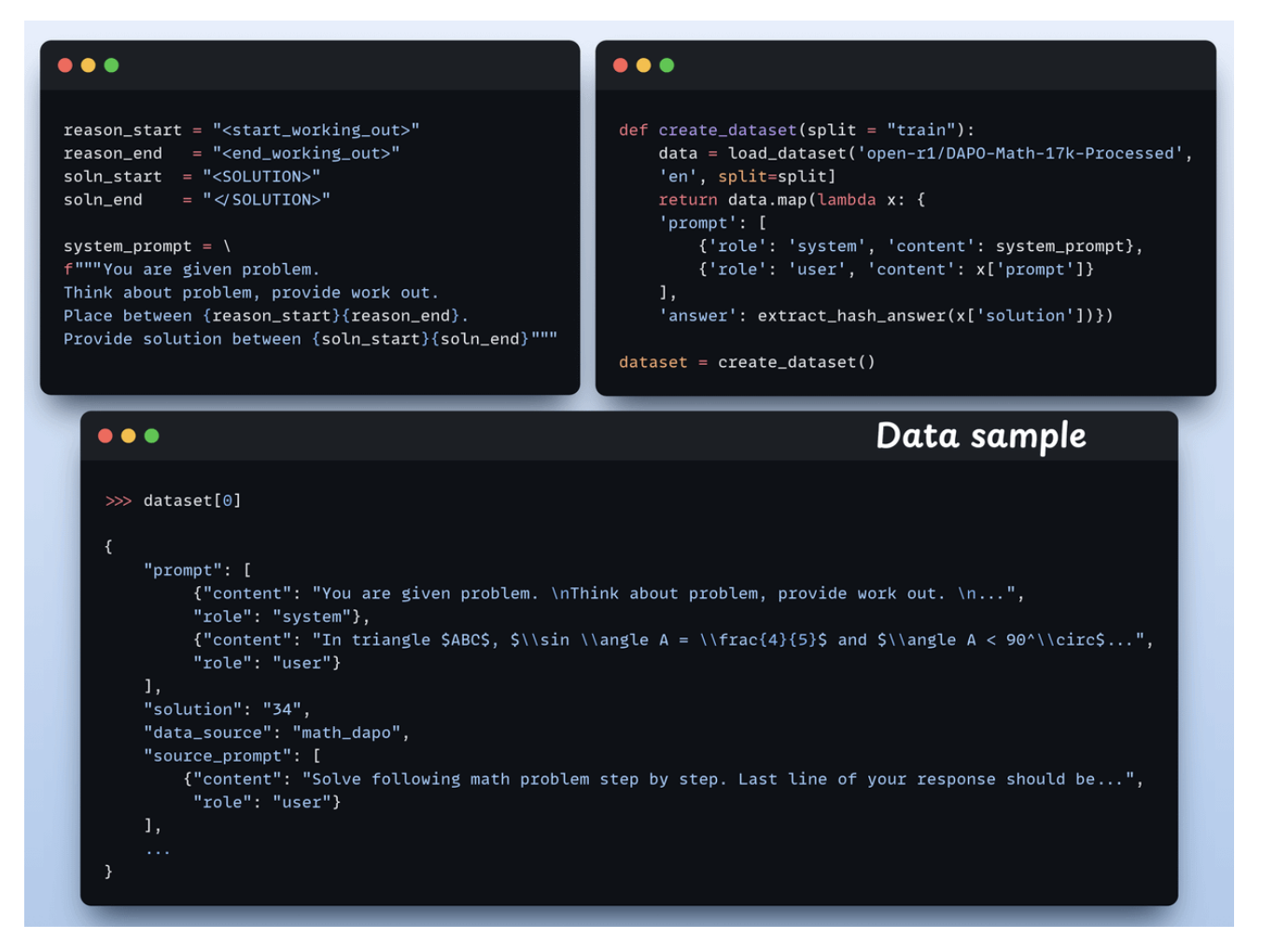
Each sample includes:
- A system prompt enforcing structured reasoning
- A question from the dataset
- The answer in the required format
6. Define reward functions
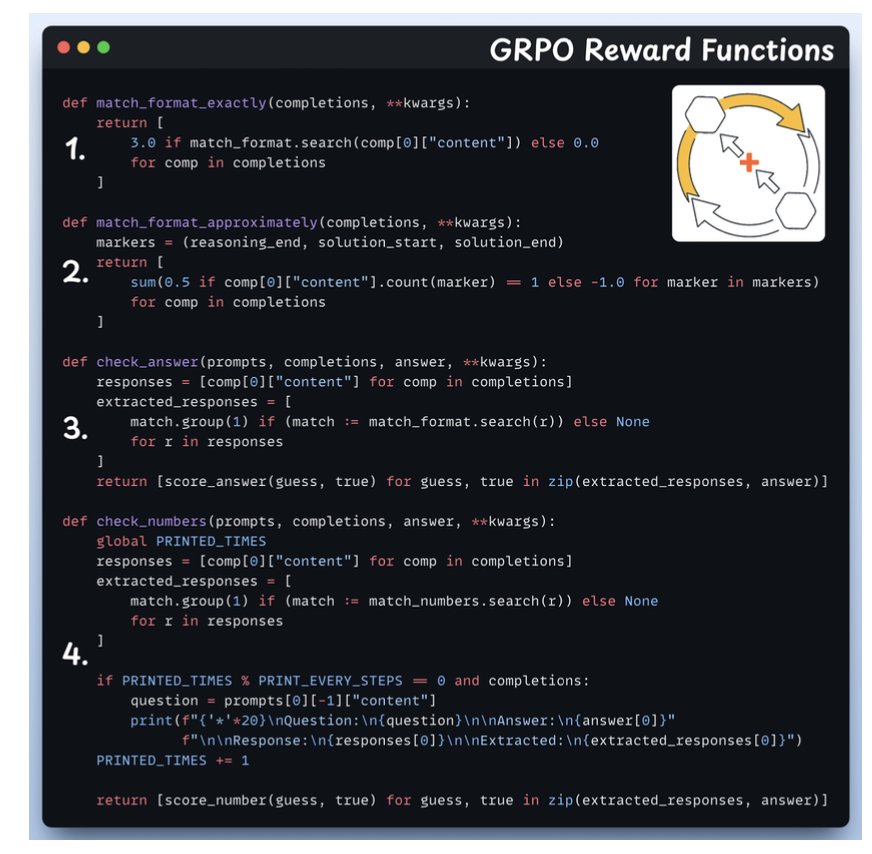
- Match format exactly
- Match format approximately
- Check the answer
- Check numbers
7. Use GRPO and start training
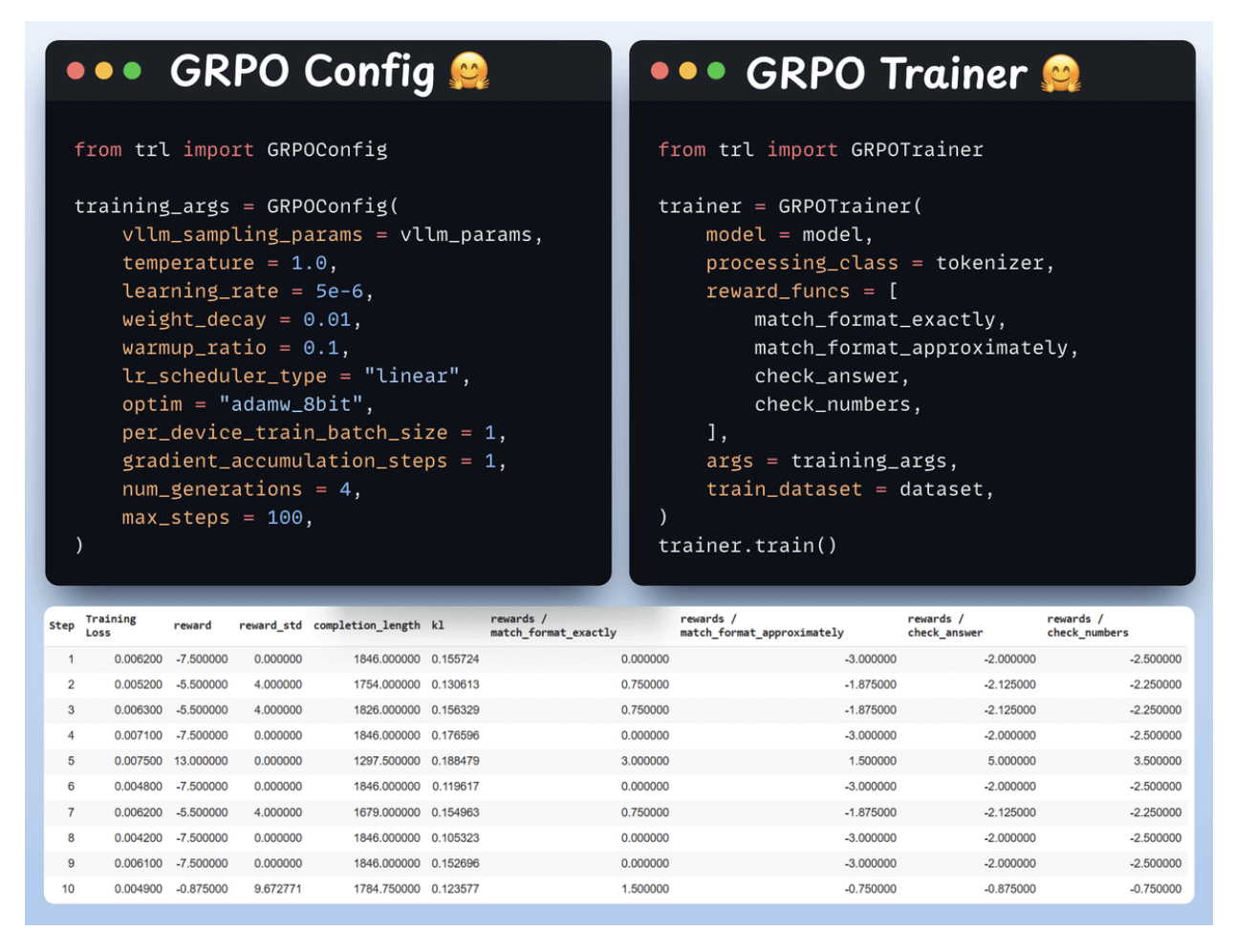
8. Comparison
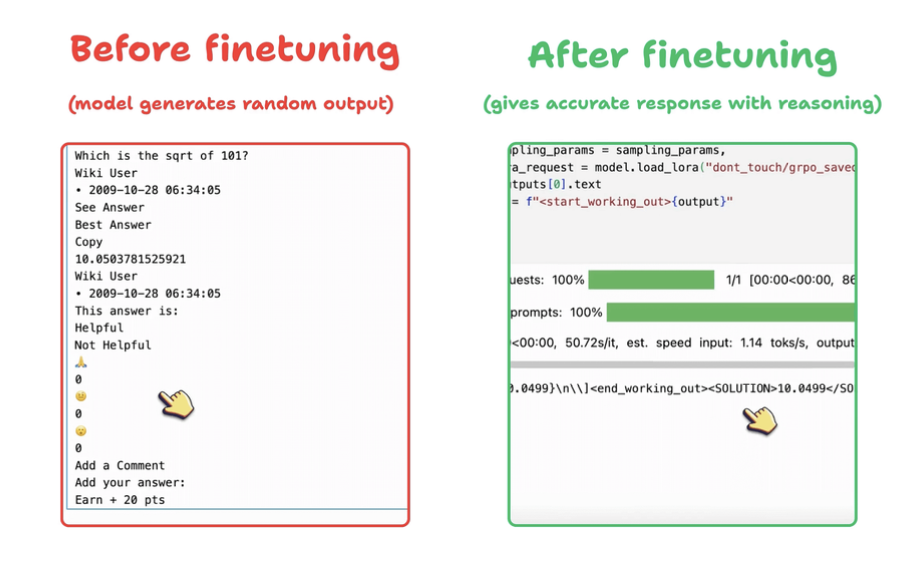
9. The key idea of fine-tunning is calculate delta W + W_frozen
- We do not need to manual this it code.
-
We only add the logic.
  loss.backward()   → computes ∇W
  optimizer.step()  → applies ΔW to W
OpenENV: environments for Agentic RL Training
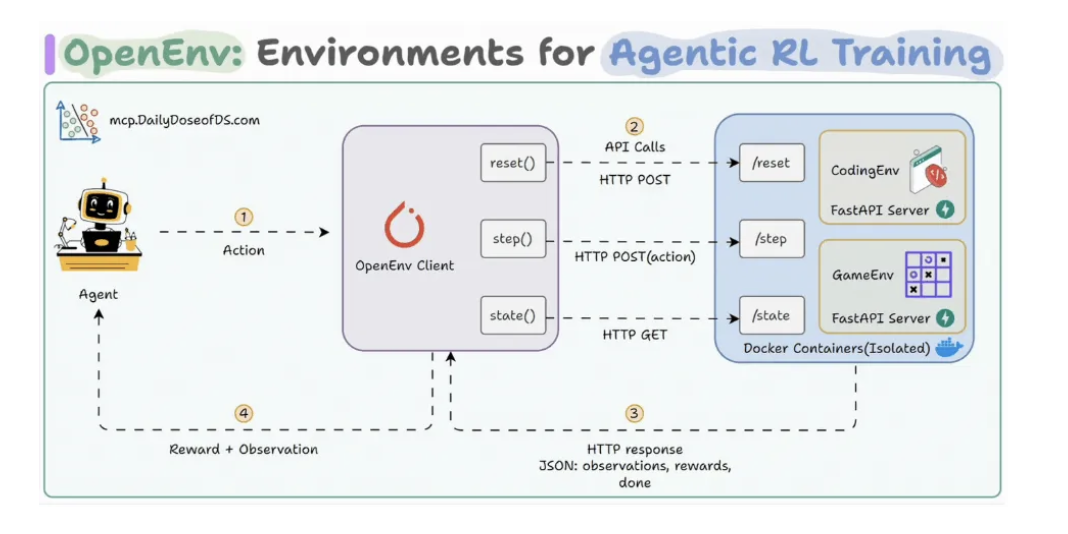
Agent Reinforcement Trainer (ART)
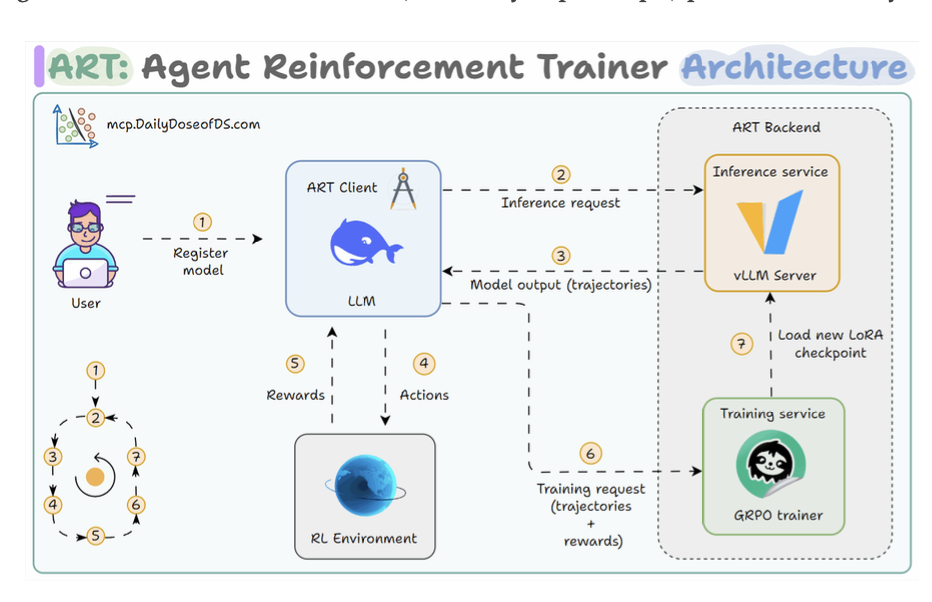
- Using data làm chuẩn.
- Using 1 con Agent cao hơn làm chuẩn.
- Using human làm chuẩn.
2. RAG
- Prompt Engineering - which steers the model at inference time
- Fine-tuning - which adjusts its internal parameters.
- RAG: update new data as new token embeddings to the model.
Vector Databases
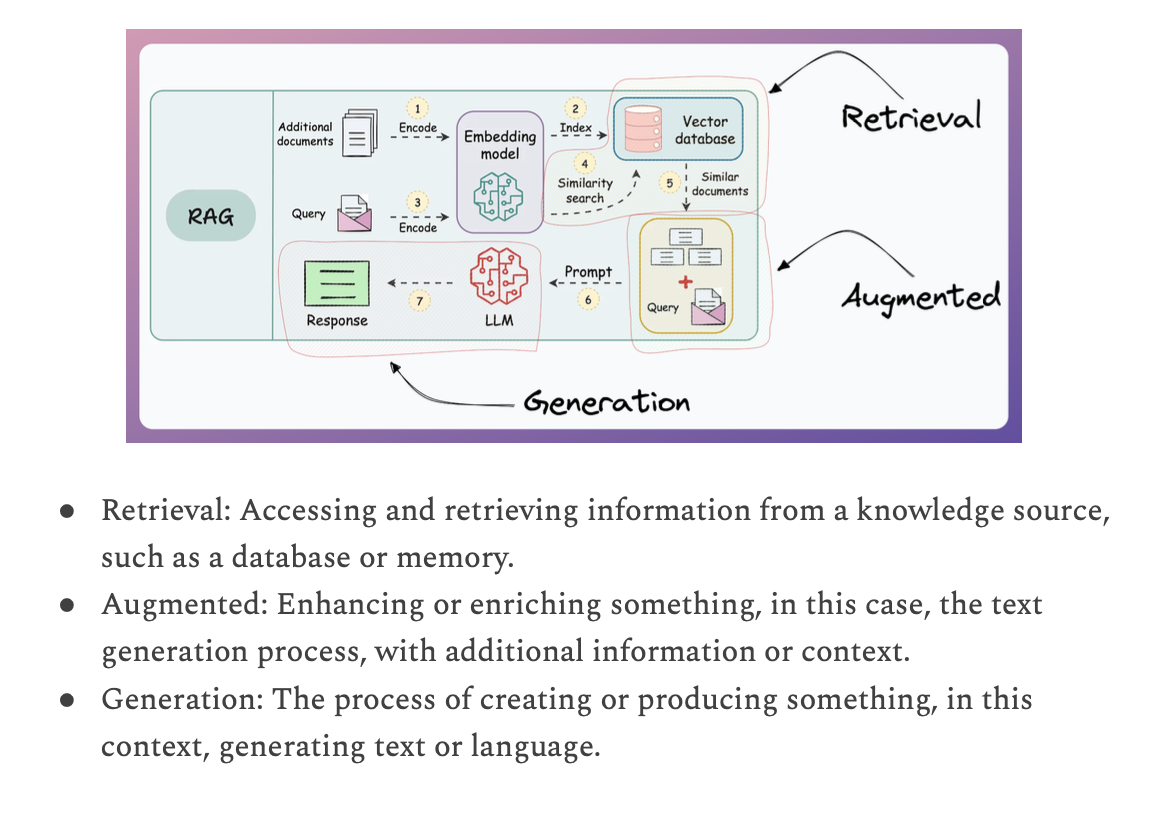
- Store token embedding of the documents.
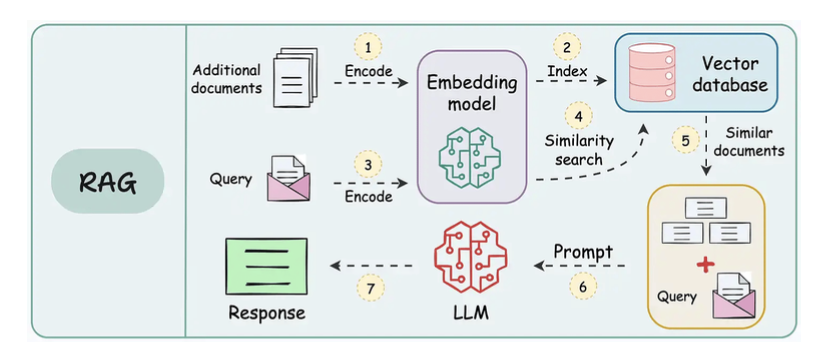
- Bản chất cũng là compare 2 cái vector giữa prompt input và data output.
Workflow of a RAG system
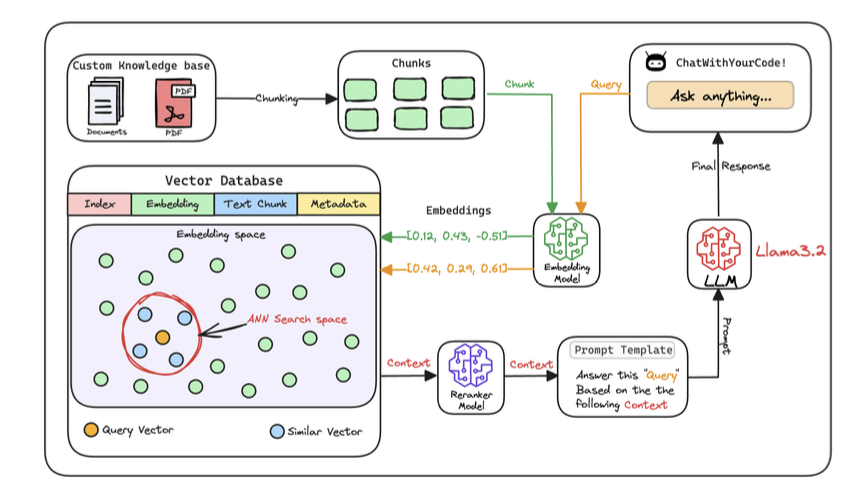
1. Create chunks
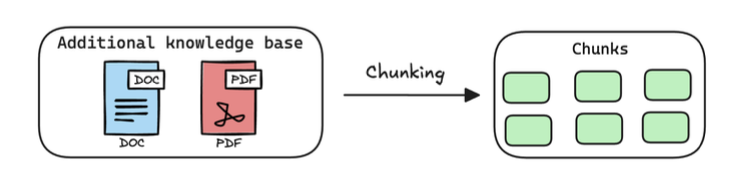
-
The first step is to break down this additional knowledge into chunks before embedding and storing it in the vector database.
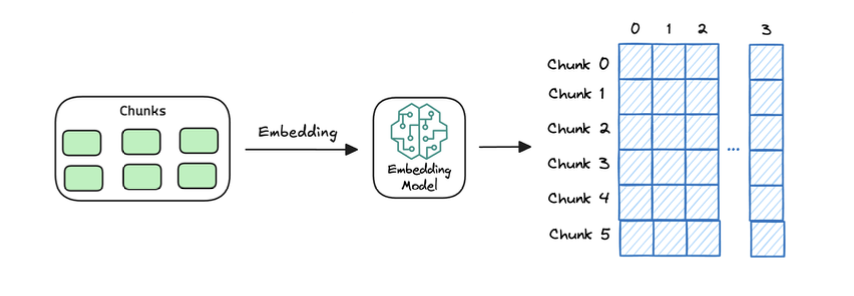
2. Generate embeddings
3. Store embeddings in a vector database
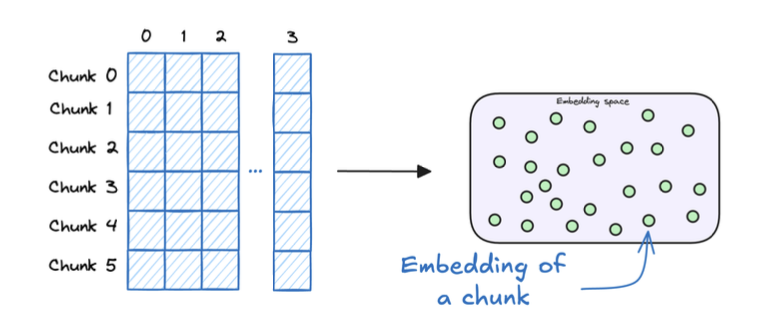
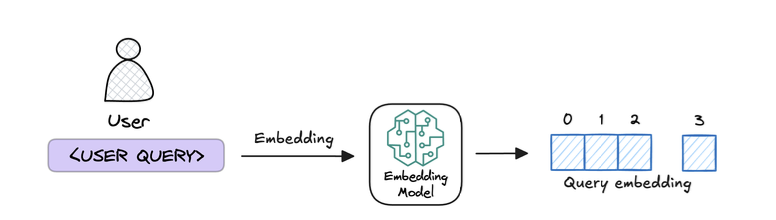
4. User input query and embed the query
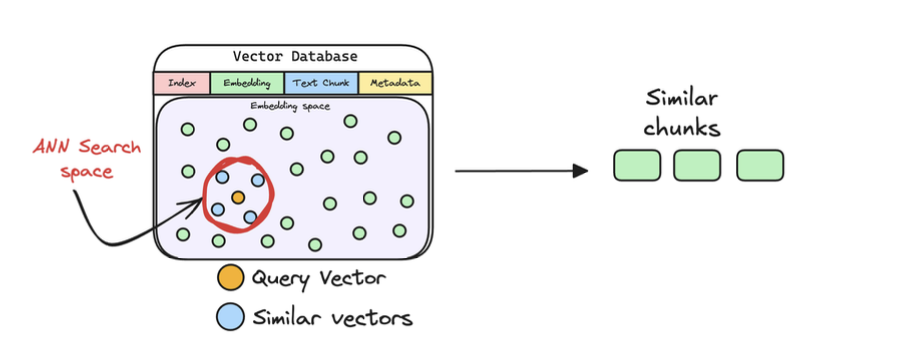
5. Retrieve similar chunks
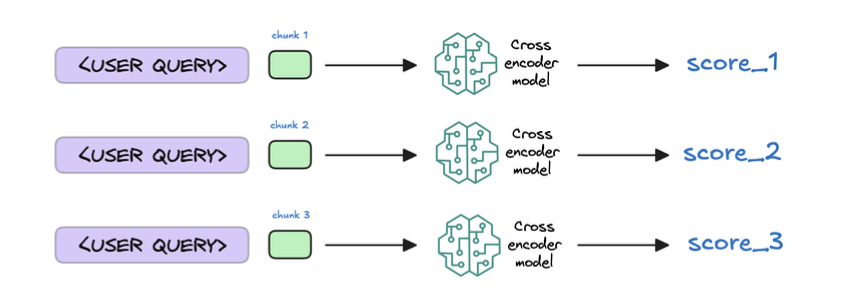
6. Re-rank the chunks
7. Generate the final response
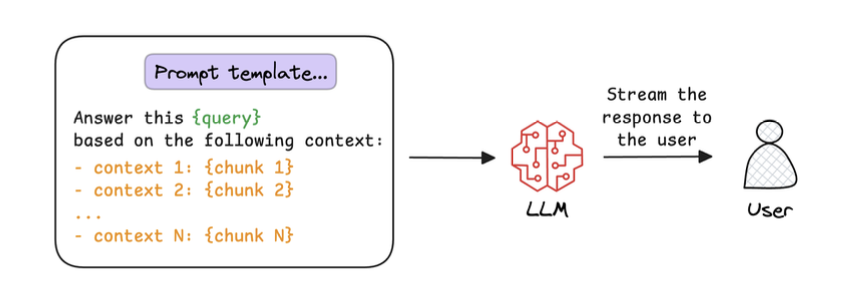
What actually happens inside RAG
1️⃣ Retrieval (Search phase)
- User query → embedding vector
- Compare with chunk embeddings in a vector database
- Retrieve top-k chunks by similarity (cosine / dot product)
Query: "How does LoRA reduce trainable parameters?"
→ Retrieve:
- Chunk A: Low-rank decomposition idea
- Chunk B: A·B matrix update
- Chunk C: Parameter efficiency comparison
2️⃣ Augmentation (Prompt construction)
3️⃣ Generation (The important part)
Now the LLM:
- Reads the chunks
- Builds an internal representation (hidden states)
- Synthesizes an answer
- Generates new tokens
It may:
- Combine multiple chunks
- Infer missing steps
- Rephrase concepts
- Apply reasoning
📌 The answer may contain words not present in any chunk
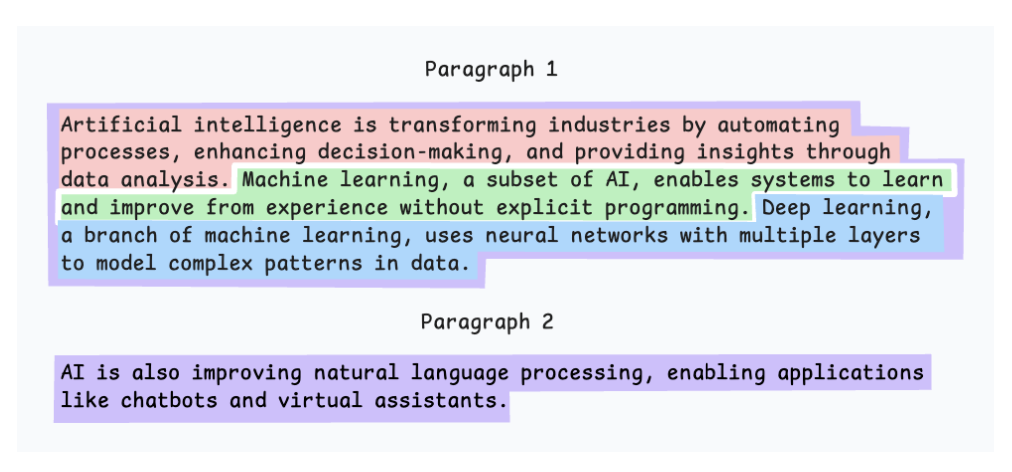
5 chunking strategies for RAG
5.1. Fixed-size chunking
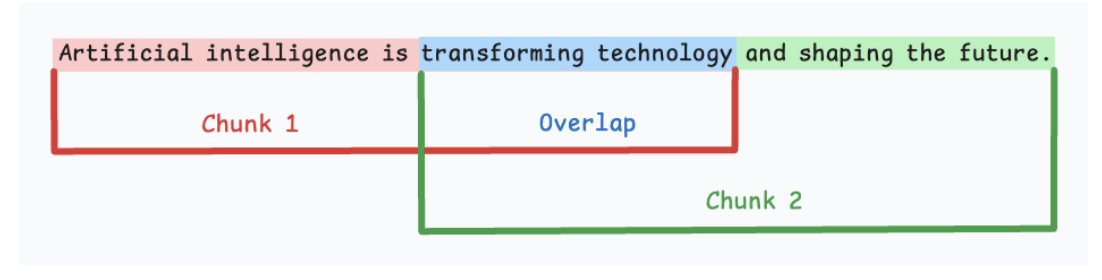
-
Cắt theo 1 fixed-size cố định.
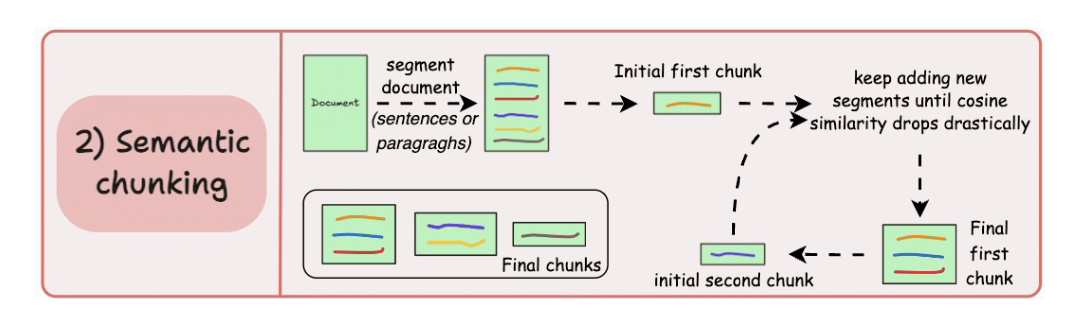
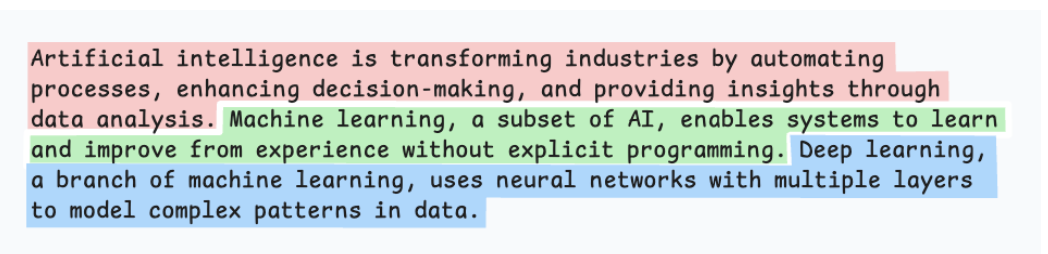
5.2. Semantic chunking
5.3. Recursive chunking
-
Cắt theo ký tự đặc biệt như seperators or sections.
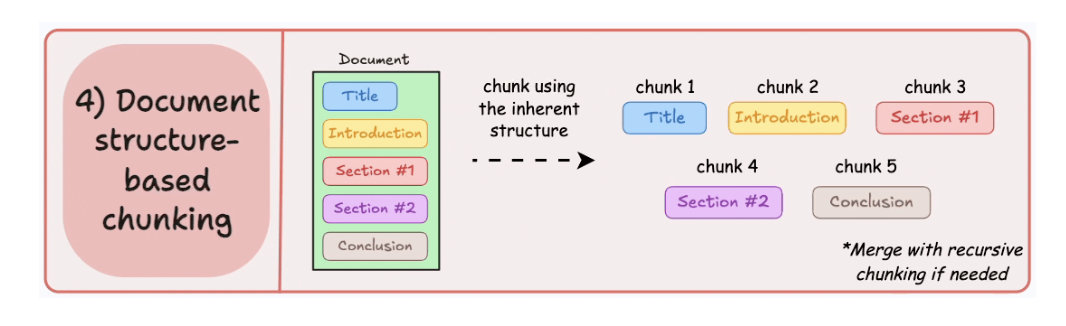
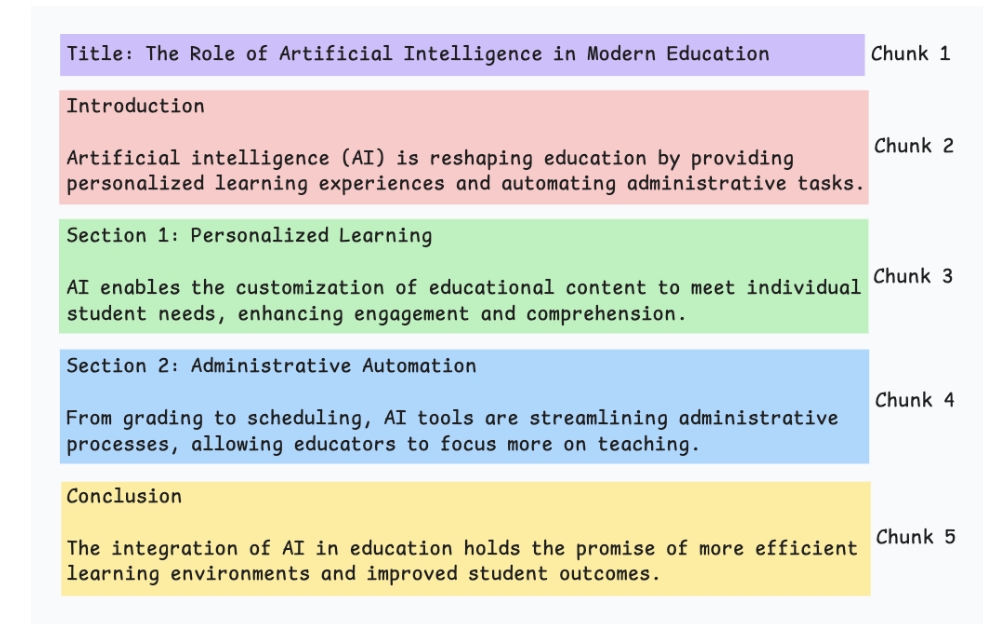
5.4. Document structure-based chunking
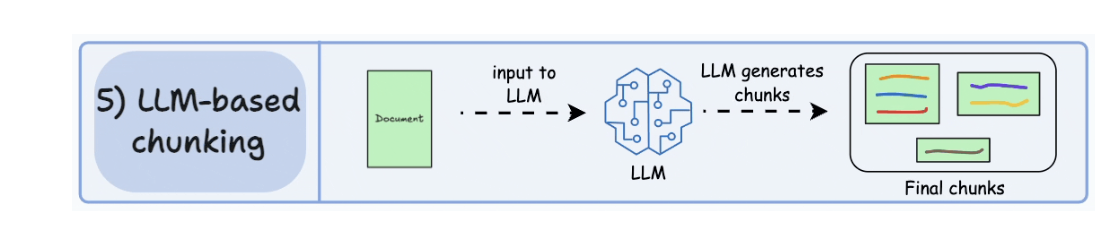
5.5. LLM-based chunking
- LLM Split the sentences to multiple chunks.
Prompting vs. RAG vs. Finetuning
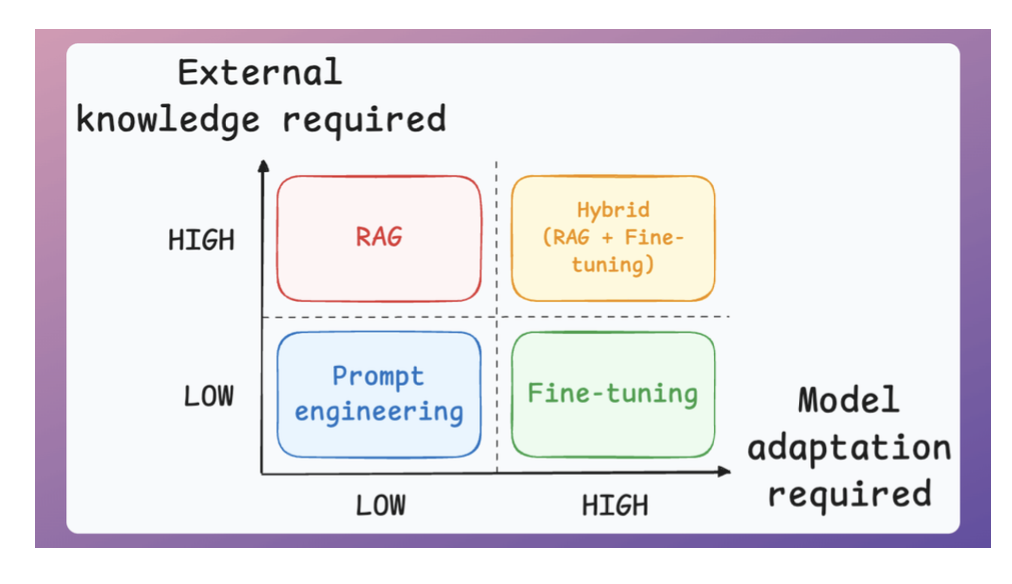
Two important parameters guide this decision:
- The amount of external knowledge required for your task.
- The amount of adaptation you need. Adaptation, in this case, means changing the behavior of the model, its vocabulary, writing style, etc.
So here’s the simple takeaway:
- Use RAGs to generate outputs based on a custom knowledge base if the vocabulary & writing style of the LLM remains the same.
- Use fine-tuning to change the structure (behaviour) of the model than knowledge.
- Prompt engineering is sufficient if you don’t have a custom knowledge base and don’t want to change the behavior.
- And finally, if your application demands a custom knowledge base and a change in the model’s behavior, use a hybrid (RAG + Fine-tuning) approach.
8 RAG architectures
1. Naive RAG
- Retrieves documents purely based on vector similarity between the query embedding and stored embeddings.
- Works best for simple, fact-based queries where direct semantic matching suffices.
2. Multimodal RAG
- Handles multiple data types (text, images, audio, etc.) by embedding and retrieving across modalities.
- Ideal for cross-modal retrieval tasks like answering a text query with both text and image context.
3. HyDE
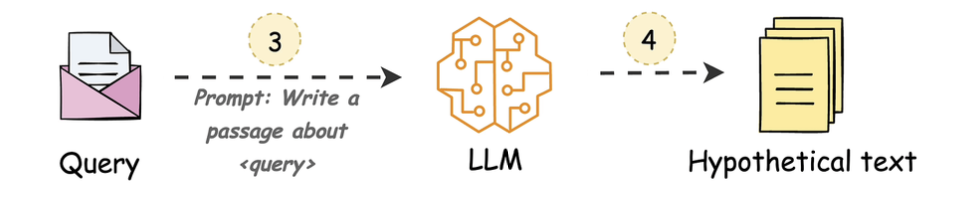
- Hypothetical Document Embeddings
- User prompt ngu quá ⇒ kêu LLM sửa prompt lại để query dễ hơn.
4. Corrective RAG
- Compare user prompt với thông tin từ trusted sorts trước khi gửi cho LLM.
- Đảm bảo cái prompt đó chất lượng.
5. Graph RAG
- Kết quả retrieve ra biến nó thành 1 cái graph.
- Trình bày knowledge đó theo dạng graph để trình bày reasoning logic hơn.
6. Hybrid RAG
-
Merge nhiều nguồn để cùng search.
  Query
   ├─ Vector Search (embeddings)
   ├─ Keyword Search (BM25)
   ├─ Structured DB
   └─ API / Docs
          ↓
    Merge + Rerank
          ↓
       LLM Answer
7. Adaptive RAG
- Break the big prompts to sub-queries for better.
- Use case: query in multiple agents.
8. Agentic RAG
- Use AI Agents for planning + reasoning (ReAct, CoT).
- Using memory to orchestrate retrieval
- Best for complex workflow required tool used, external apis and combine multiple RAG techniques.
RAG vs Agentic RAG
- RAG systems may provide relevant context but don’t reason through complex queries. If a query requires multiple retrieval steps, traditional RAG falls short.
- Agentic RAG is becoming increasingly popular. Let’ s understand this in more detail.
- Scan AI: Agentic RAG
- Compare
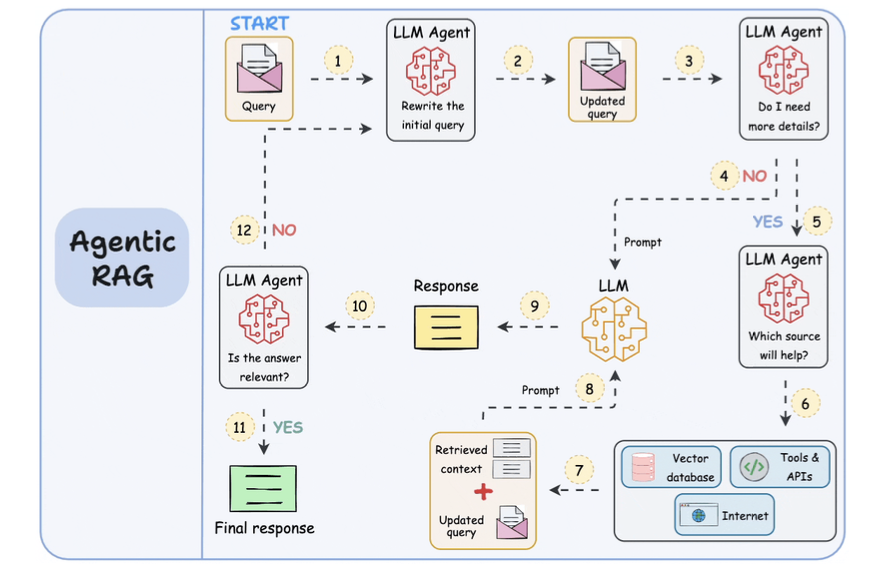
- Steps 1-2: The user inputs the query, and an agent rewrites it (removing spelling mistakes, simplifying it for embedding, etc.)
- Step 3: Another agent decides whether it needs more details to answer the query.
- Step 4: If not, the rewritten query is sent to the LLM as a prompt.
- Step 5-8: If yes, another agent looks through the relevant sources it has access to (vector database, tools & APIs, and the internet) and decides which source should be useful. The relevant context is retrieved and sent to the LLM as a prompt.
- Step 9: Either of the above two paths produces a response.
- Step 10: A final agent checks if the answer is relevant to the query and context.
- Step 11: If yes, return the response.
- Step 12: If not, go back to Step 1. This procedure continues for a few iterations until the system admits it cannot answer the query.
Traditional RAG vs HyDE
User prompt ngu quá: Con LLM use Query + document ⇒ rewrite the hypothesis prompt

Full-model Fine-tuning vs. LoRA
vs. RAG
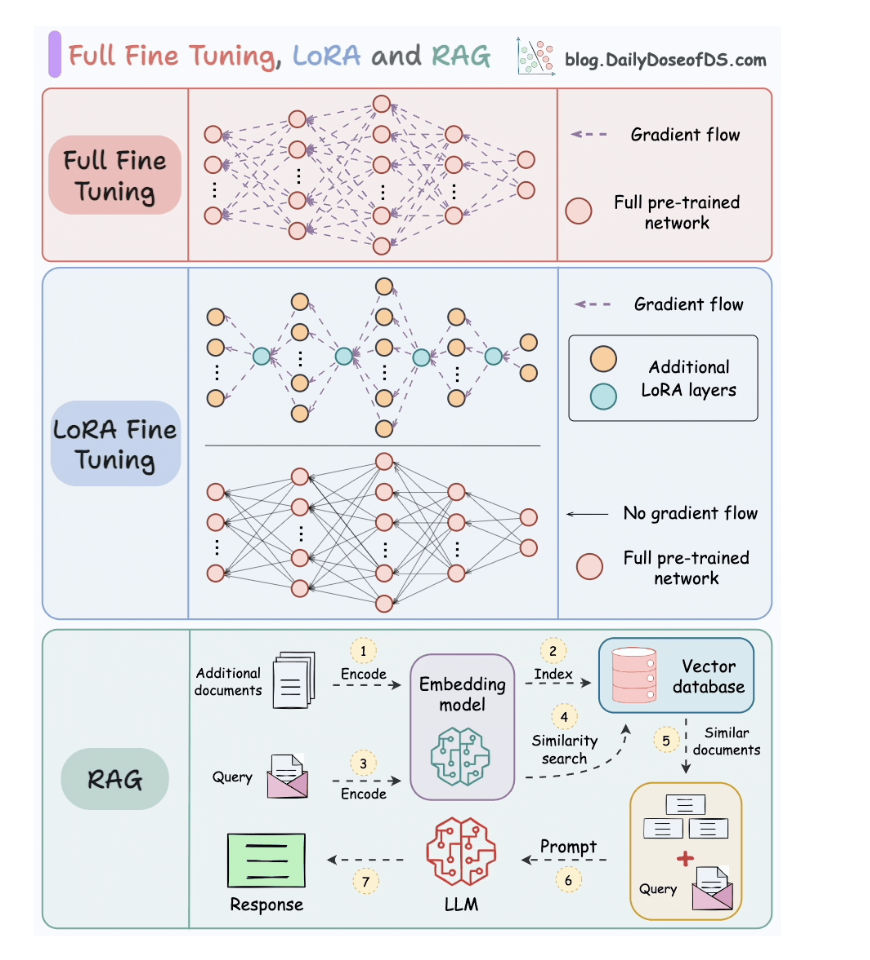
1. Full fine-tunning
- Tốn chi phí cao vì phải fine-tune hết toàn bộ các weights.
2. LoRA fine-tunning
- Thêm các node LoRA vào current weights.
- Delta W, but not all the weights metrics.
3. RAG
- Đi search keyword và thông tin
- Xong 1 con LLM khác đi trả lời.
RAG vs REFRAG
It typically works, but at a huge cost:
- Most chunks contain irrelevant text.
- The LLM has to process far more tokens.
- You pay for compute, latency, and context.
REFRAG Method:
- Chunk compression: Each chunk is encoded into a single compressed embedding, rather than hundreds of token embeddings.
- Relevance policy: A lightweight RL-trained policy evaluates the compressed embeddings and keeps only the most relevant chunks.
- Selective expansion: Only the chunks chosen by the RL policy are expanded back into their full embeddings and passed to the LLM
Use cases:
- In some case, most of the tokens is irrelevant.
- Only need to keep the important tokens.
RAG vs CAG
- CAG:
- It lets the model “remember” stable information by caching it directly in the model’s key-value memory.
- RAG + CAG
- In a regular RAG setup, your query goes to the vector database, retrieves relevant chunks, and feeds them to the LLM.
- But in RAG + CAG, you divide your knowledge into two layers.
- The static, rarely changing data, like company policies or reference guides, gets cached once inside the model’ s KV memory.
- The dynamic, frequently updated data, like recent customer interactions or live documents, continues to be fetched via retrieval.
RAG, Agentic RAG and AI Memory
- RAG (2020-2023):
- Retrieve info once, generate response
- No decision-making, just fetch and answer
- Problem: Often retrieves irrelevant context
- Agentic RAG:
- Agent decides if retrieval is needed
- Agent picks which source to query
- Agent validates if results are useful
- Problem: Still read-only, can’t learn from interactions.
- AI Memory:
- Reads AND writes to external knowledge
- Learns from past conversations
- Use case: personalize for user context.
3. Context Engineering
Context Engineering
- Nâng cao khả năng good retrieval context cho LLMs.
- RAG workflow is typically 80% retrieval and 20% generation.
- Good retrievals are key for optimize the right result.
- Context engineer is working to enhance
- The right data
- The right tools.
- The right format.
- These are the 4 key components of a context engineering system
- Dynamic information flow: multiple data sources.
- Smart tool access: allow agents to make actions.
- Memory management:
- Short-term: summary long conversation, by context window.
- Long-term memory: user preferences.
- Format optimization: đưa ra 1 response có structure than massive JSON blob.
Context Engineering for Agents
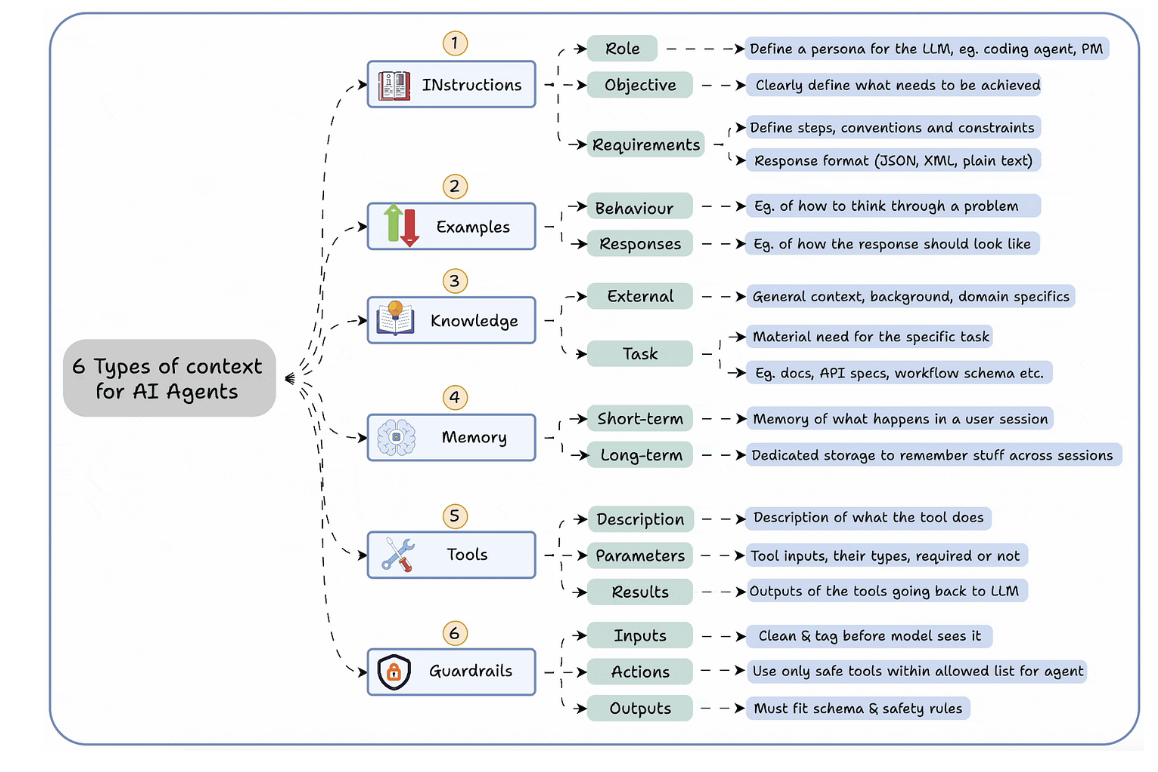
- Instructions
- Examples
- Knowledge
- Memory
- Tools
- Guardrails
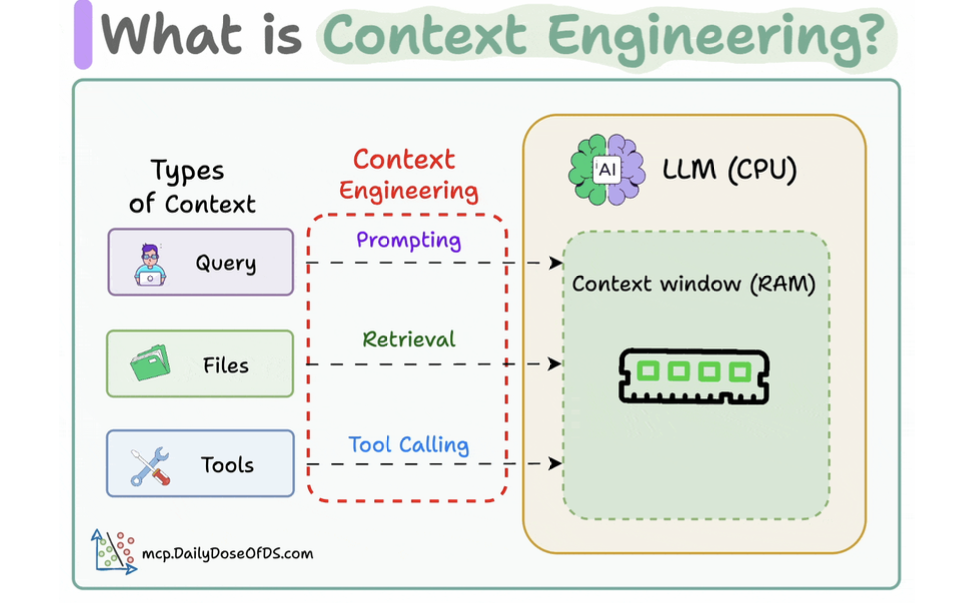
- If LLM is CPU, context window is the RAM.
Read/Write Context for AI Agents
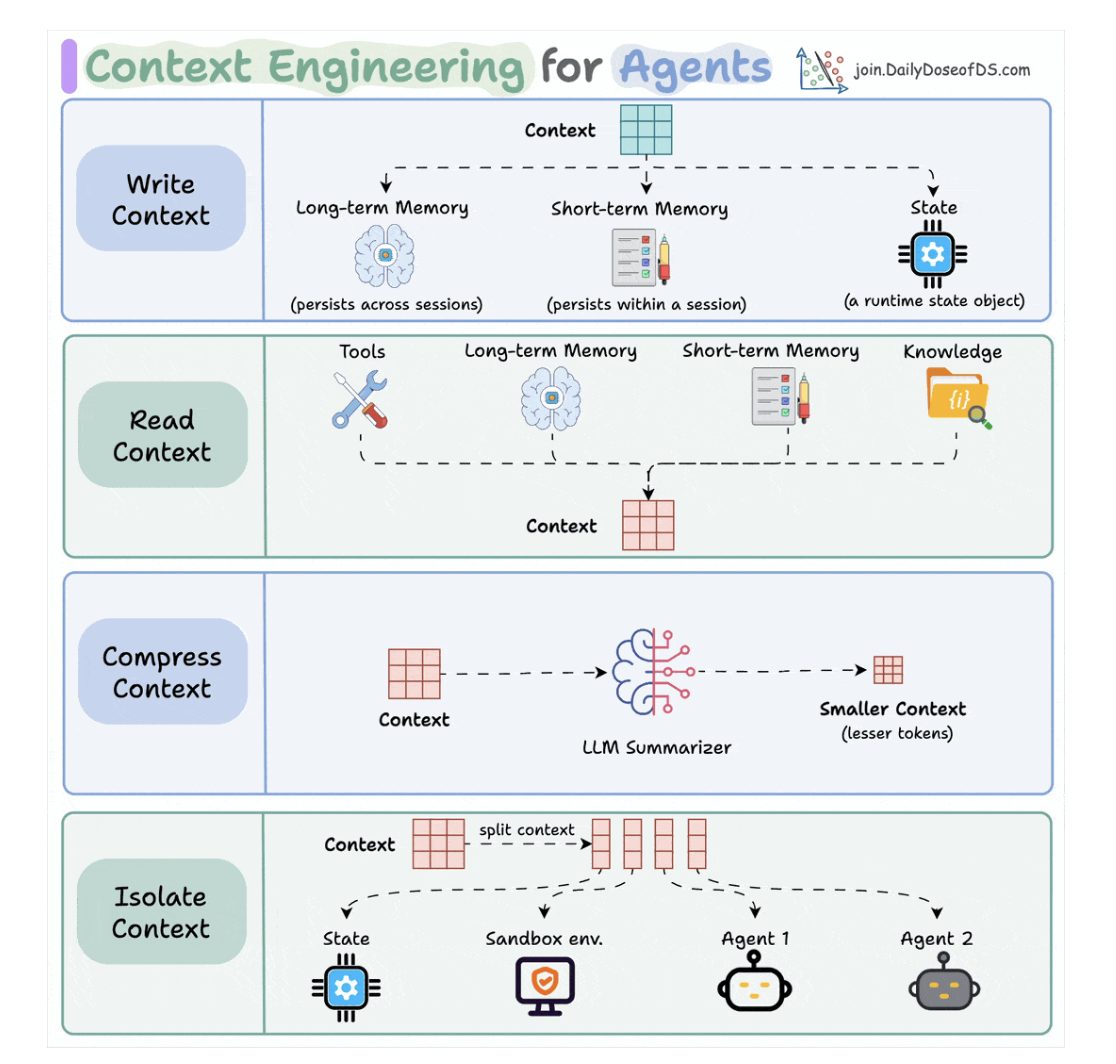
3.1. Writing context
- Long-term memory: persists across multiple sessions.
- Short-term memory: in-session.
- A state object: store the current state of multiple agents and step.
3.2. Read context
- A tool.
- Memory
- Knowledge base: docs, vector DB.
3.3. Compressing context
- Keep only tokens needed for a task.
- Preprocessing the user prompt for duplicate tokens.
3.4. Isolating context
- Mỗi agents đọc 1 context khác nhau.
- Dùng state để quản lý cái này.
6 Types of Contexts for AI Agents
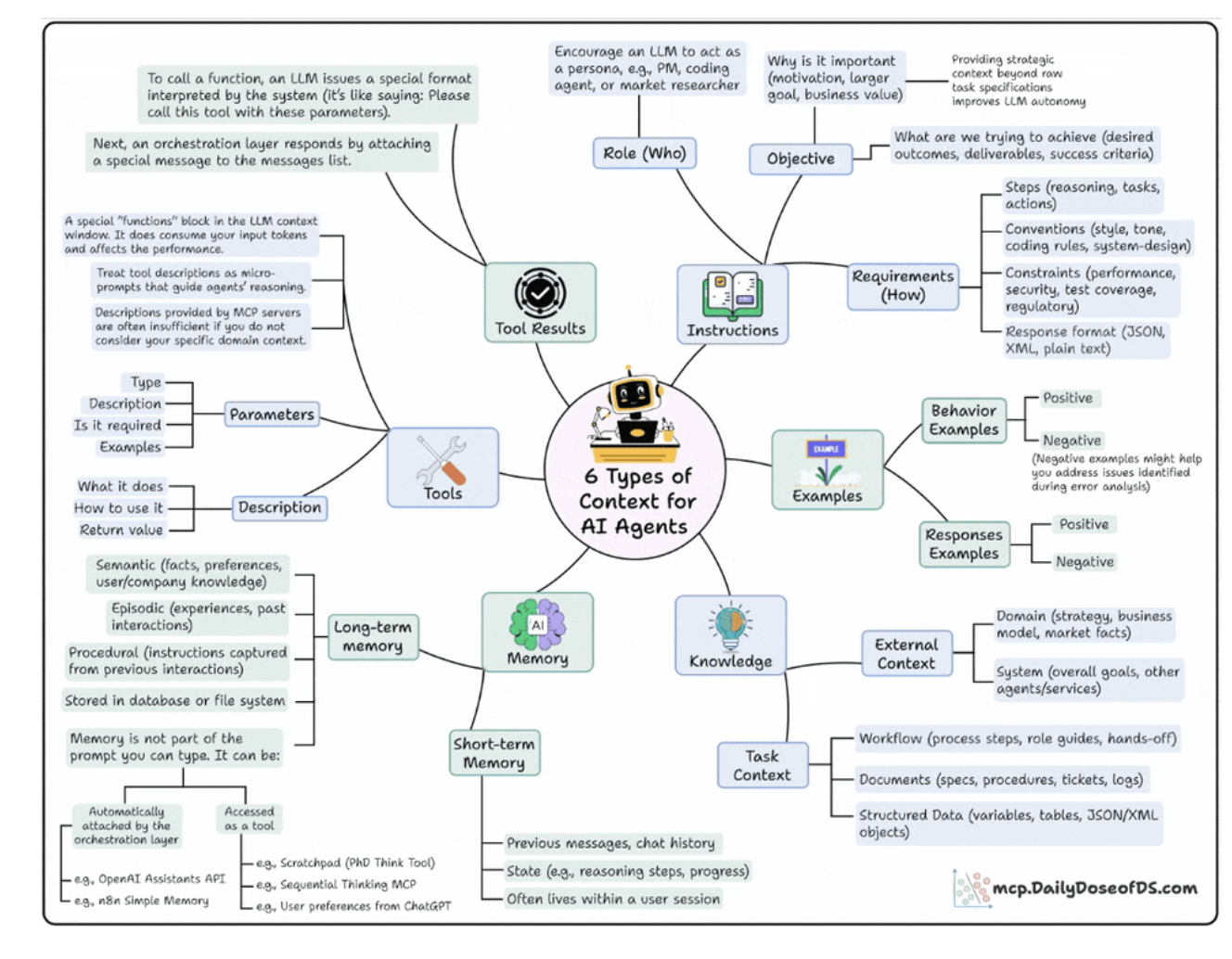
1. Instructions
- Who’s the agent ?
- PM, Researcher, Coding Assitant.
- Why it is acting ?
- Goal, Motivation, Outcome.
- How should it behave ?
- Steps, tone, format, contraints.
2. Examples
- Model learn patterns better than plain rules.
- Example for demos and responses.
3. Knowledge
- External knowledge: business data, internet.
- Internal knowledge: task context.
4. Memory
- Short-term: current reason steps, chat history.
- Long-term: facts, company knowledge, user preferences.
5. Tools
- Each tool have parameters, input, examples.
- Use to call external APIs.
6. Tool Results
- This layer feeds the tool’s results back to the model to enable self-correction, adaptation and dynamic decision-making.
Build a Context Engineering workflow
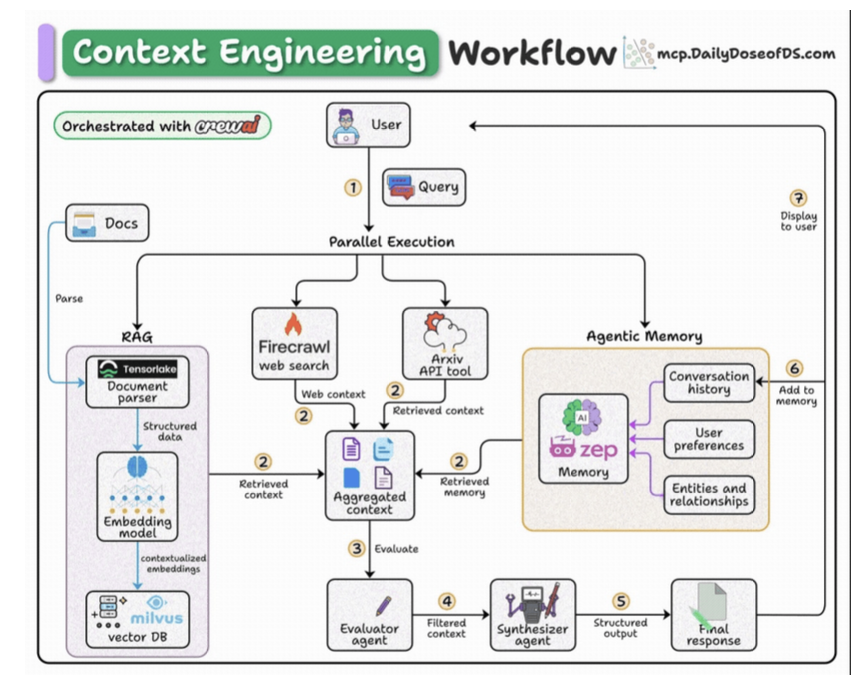
- User submits query.
- Fetch context from docs, web, arxiv API, and memory.
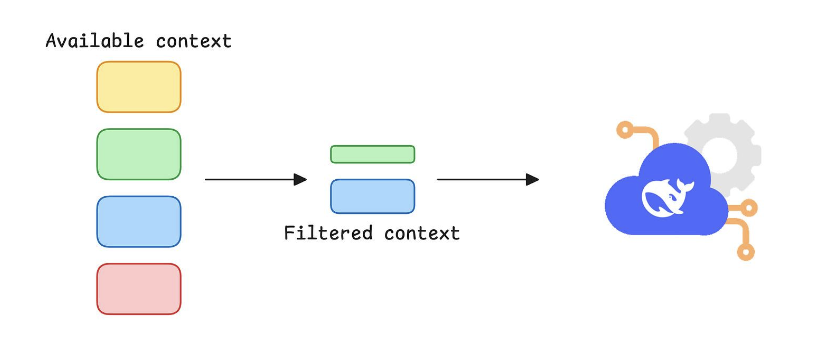
- Pass the aggregated context to an agent for filtering.
- Pass the filtered context to another agent to generate a response.
- Save the final response to memory.
Tech stack:
- Tensorlake to get RAG-ready data from complex docs
- Zep for memory
- Firecrawl for web search
- Milvus for vector DB
- CrewAI for orchestration
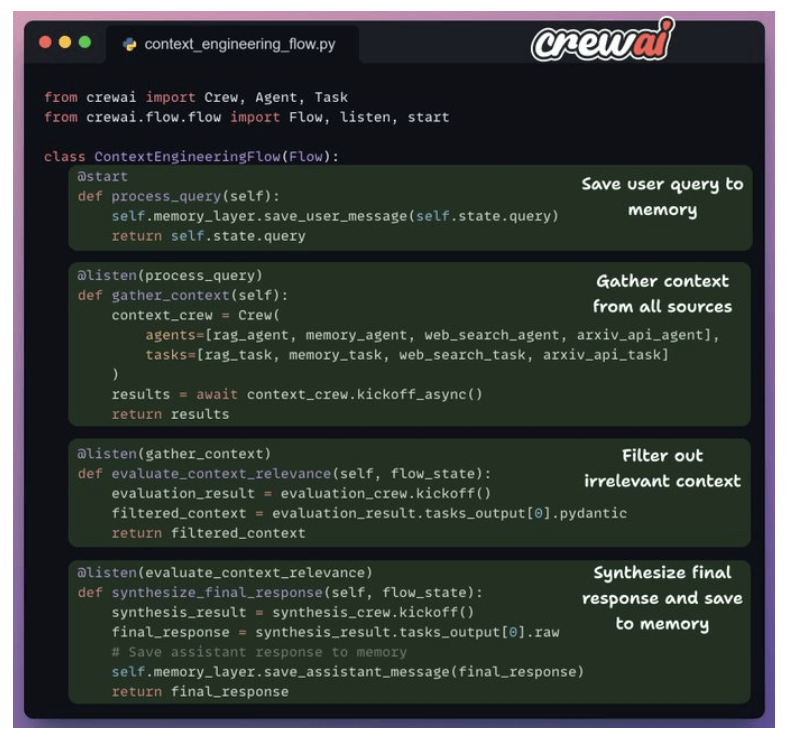
1. Crew flow
- We’ll follow a top-down approach to understand the code.
-
Here’s an outline of what our flow looks like:
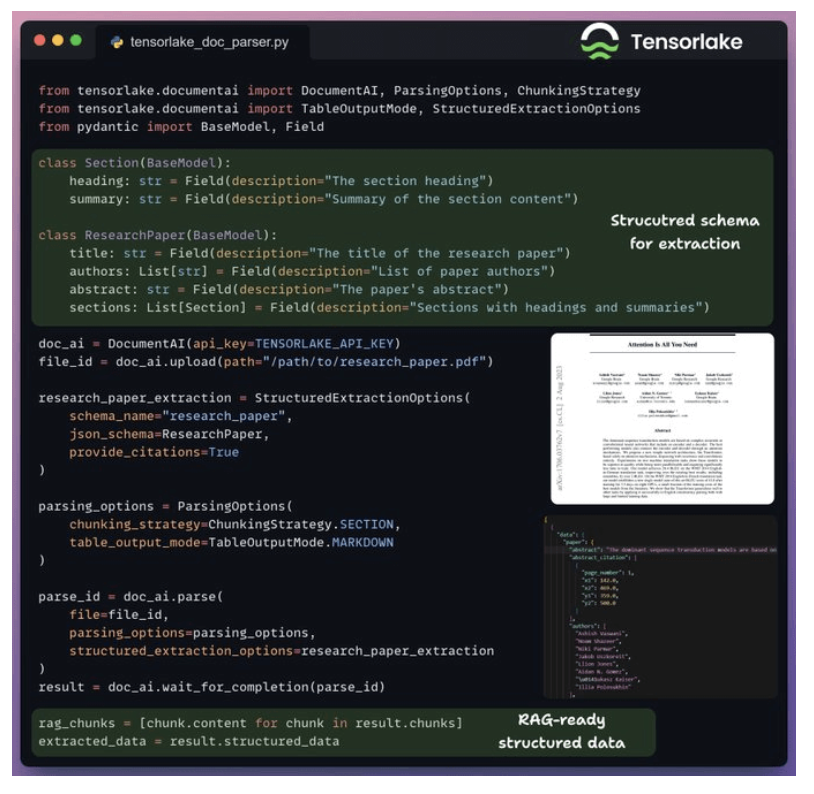
2. Prepare data for RAG
-
We use Tensorlake to convert the document into RAG-ready markdown chunks for each section.
3. Indexing and retrieval
- Store chunks in vector DB.
-
Query from user embedding to chunks in database.
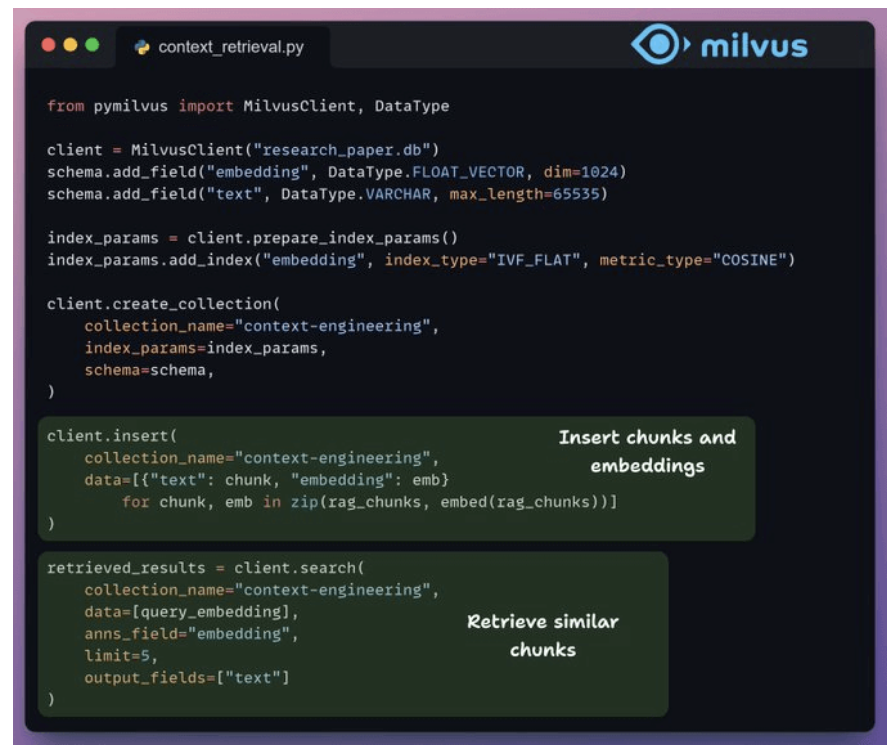
4. Build memory layer
- Implement memory agents
- Zep acts as the core memory layer of our workflow. It creates temporal knowledge graphs to organize and retrieve context for each interaction.
-
We use it to store and retrieve context from chat history and user data.
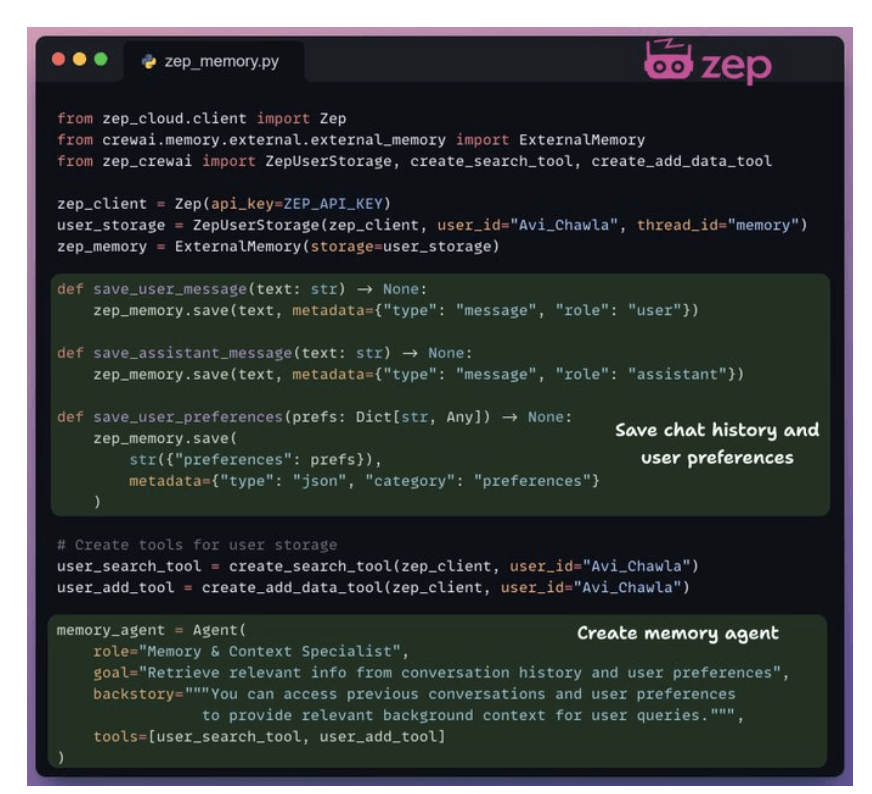
5. Firecrawl web search
- Implement web search agents
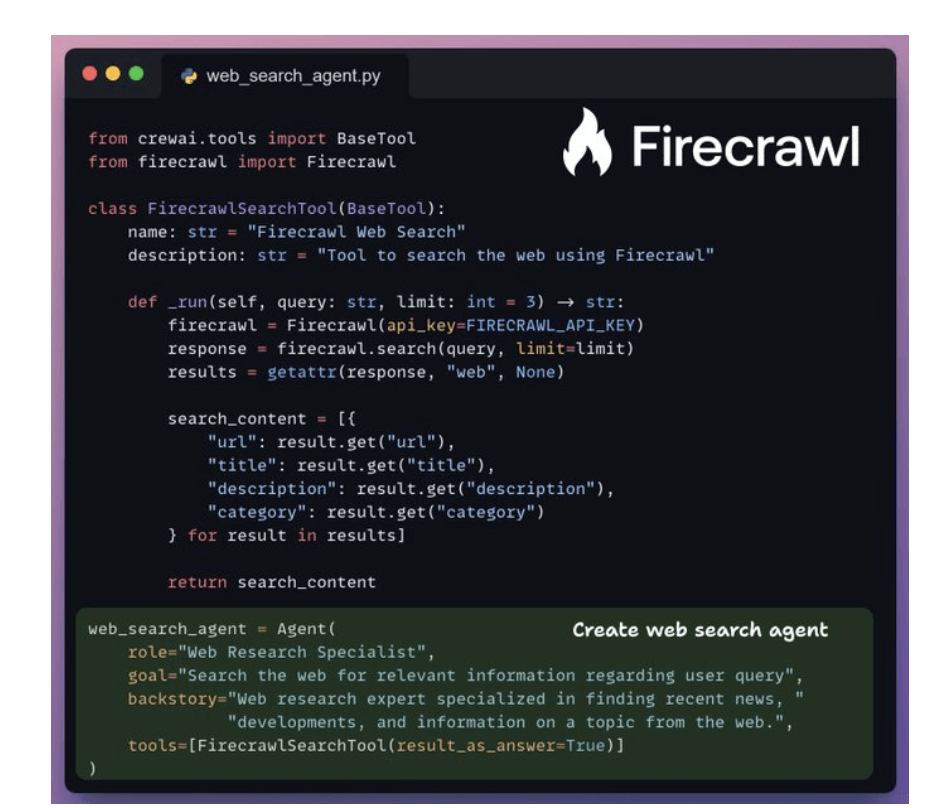
6. ArXiv API search
-
Implement arxiv_api_agent.
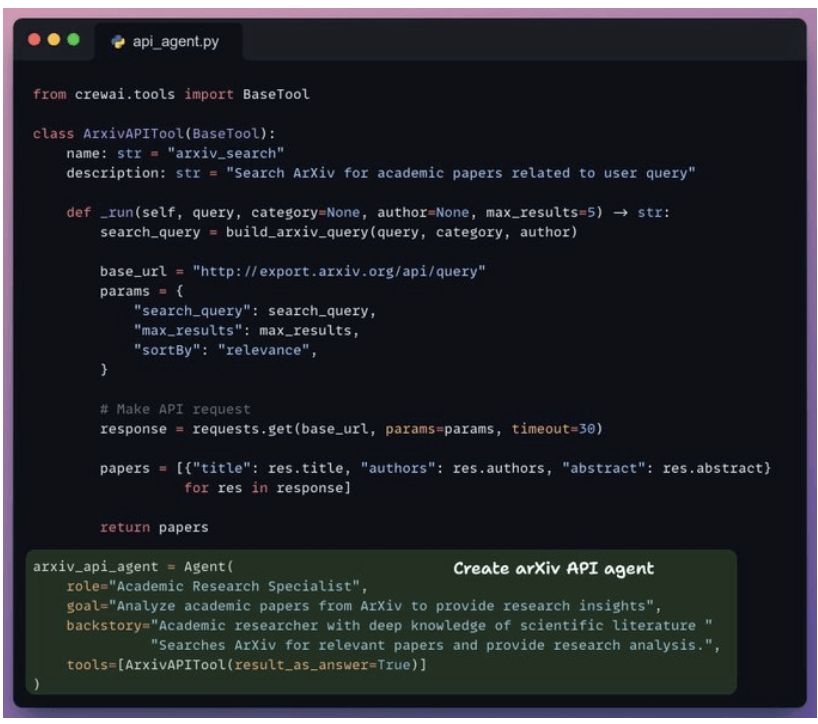
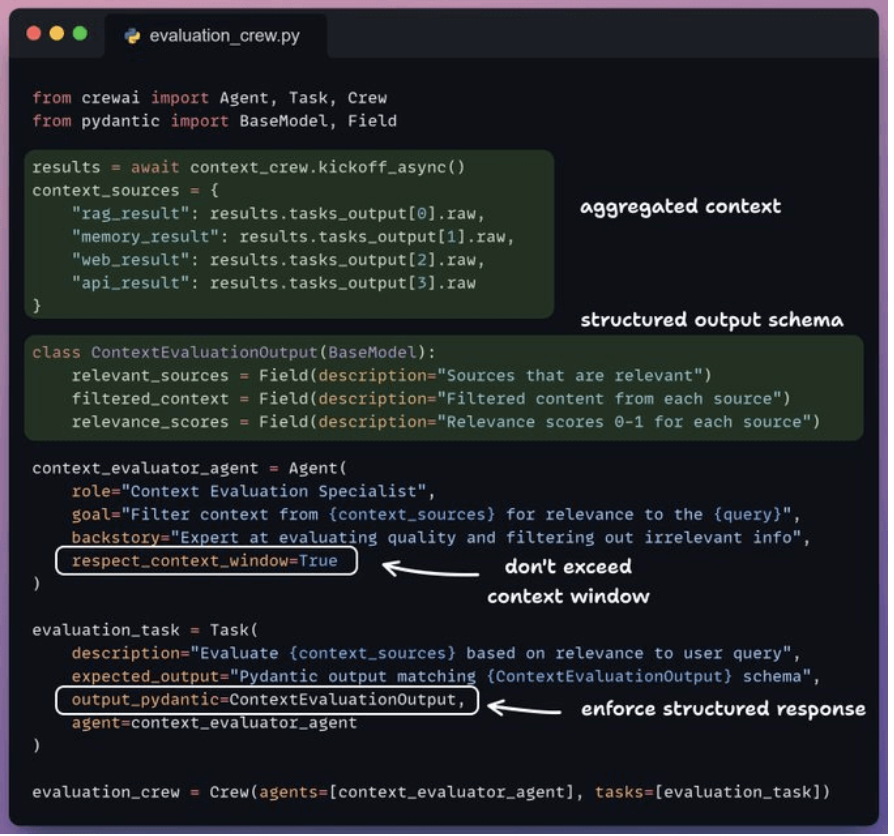
7. Filter irrelevant context
- Now, we pass our combined context to the context evaluation agent that filters out irrelevant context.
-
This filtered context is then passed to the synthesizer agent that generates the final response.
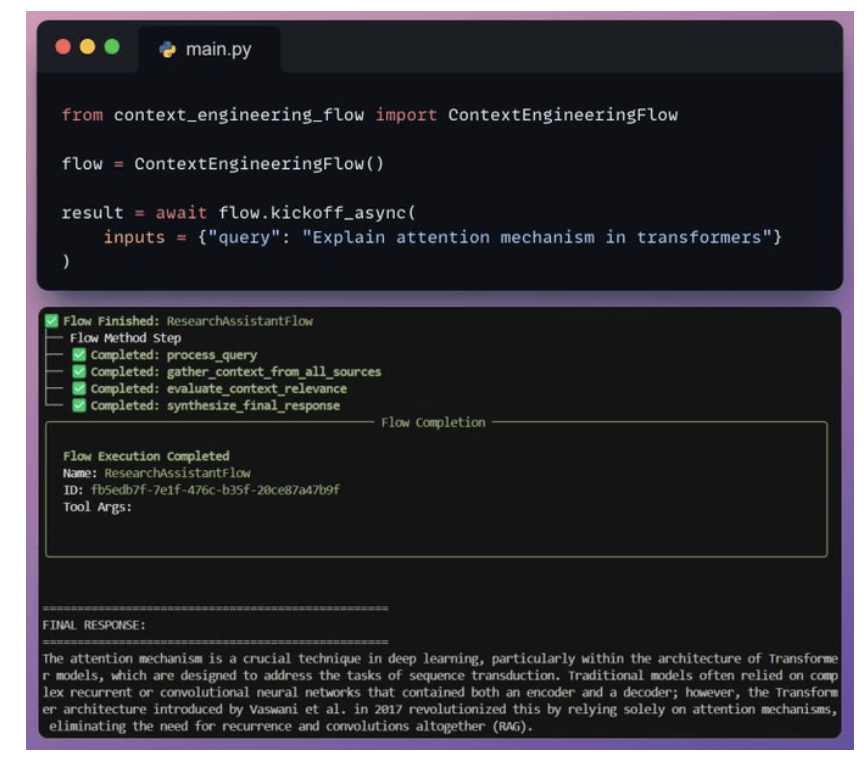
8. Kick off the workflow
Claude Skills - Dùng docs trị thiên hạ
- Docs: https://github.com/anthropics/skills/tree/main/skills
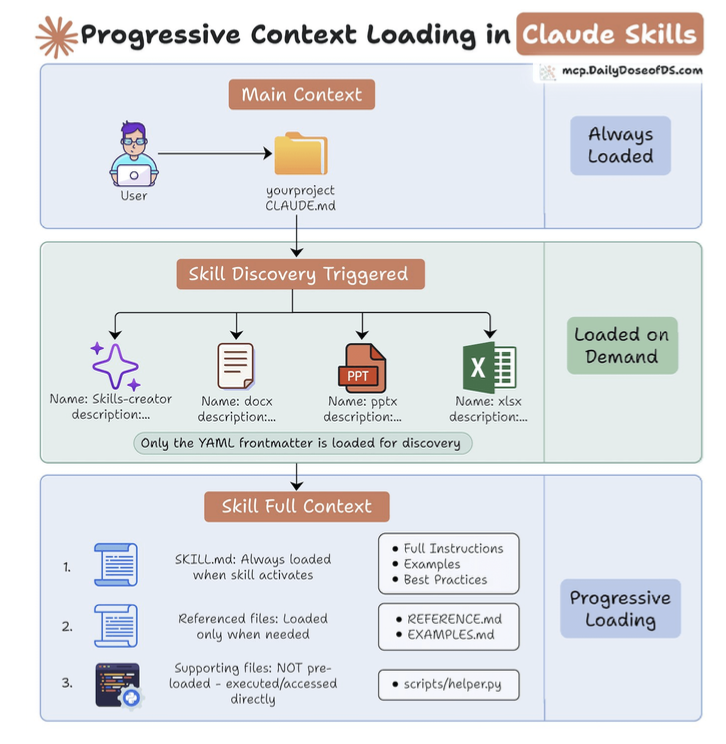
- Claude Skills are Anthropic’s mechanism for giving agents reusable, persistent abilities without overloading the model’s context window.
- Because Agents forget everything so need to store context in 3 layers.
- Layer 1: Main context.
- Layer 2: Load by demand
- Layer 3: Active skills when needed.
- The creation process is straightforward:
- Identify a workflow you repeat constantly.
- Create a skill folder and add a skill.md file.
- Write the YAML front matter + full markdown instructions.
- Add any scripts, examples, or supporting resources.
- Zip the folder and upload it in Claude’s capabilities
Manual RAG Pipeline vs Agentic Context Engineering
Ingestion layer:
- Connect to apps without auth headaches.
- Process different data sources properly before embedding (email vs code vs calendar).
- Detect if a source is updated and refresh embeddings (ideally, without a full refresh).
Retrieval layer
- Expand vague queries to infer what users actually want.
- Direct queries to the correct data sources.
- Layer multiple search strategies like semantic-based, keyword-based, and graph-based.
- Ensure retrieving only what users are authorized to see.
- Weigh old vs. new retrieved info (recent data matters more, but old context still counts).
Generation layer
- Provide a citation-backed LLM response.
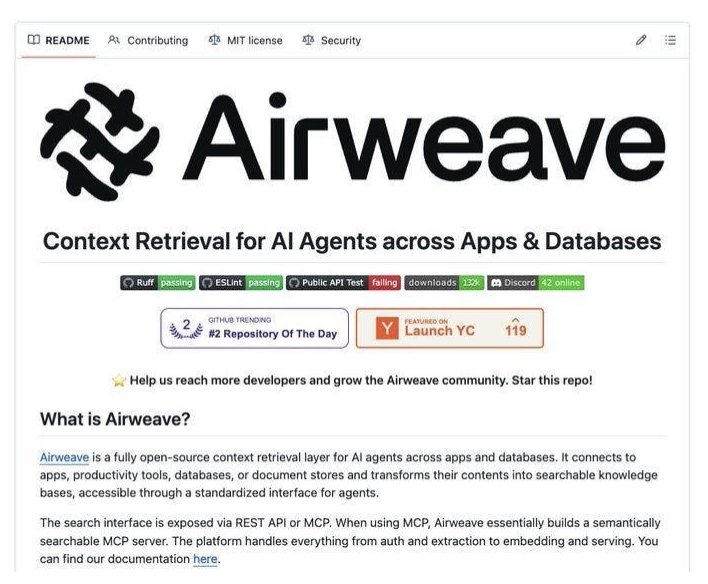
Sample RAG System
Docs: https://github.com/airweave-ai/airweave
4. AI Agents
What is an AI Agent?
-
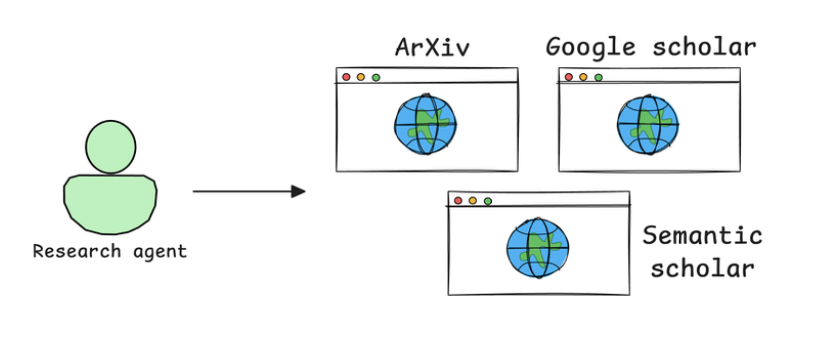
A Research Agent autonomously searches and retrieves relevant AI research papers from arXiv, Semantic Scholar, or Google Scholar.
-
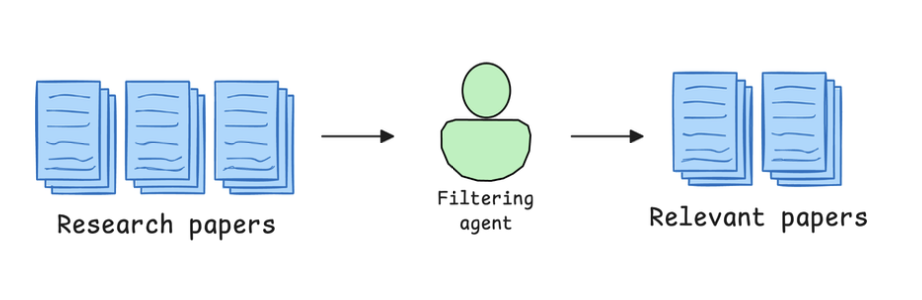
A Filtering Agent scans the retrieved papers, identifying the most relevant ones based on citation count, publication date, and keywords.
-
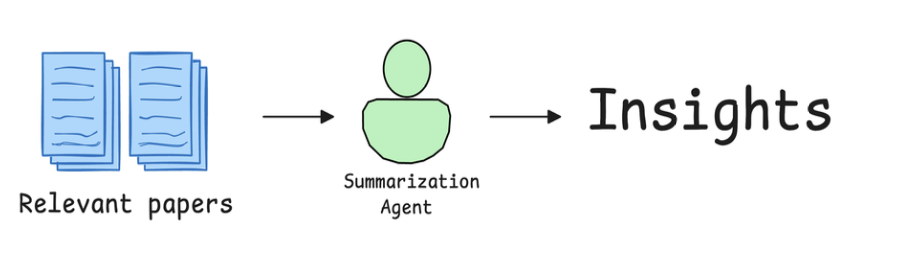
A Summarization Agent extracts key insights and condenses them into an easy-to-read report.
-
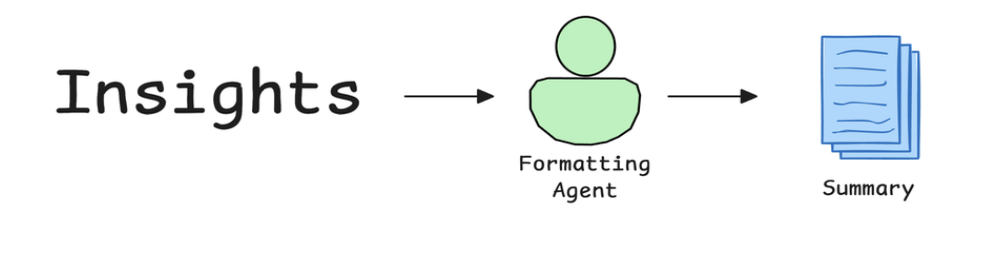
A Formatting Agent structures the final report, ensuring it follows a clear, professional layout.
-
Definition: Agent is decision-making system with the brain (LLM), tools (API calls), memory (context)
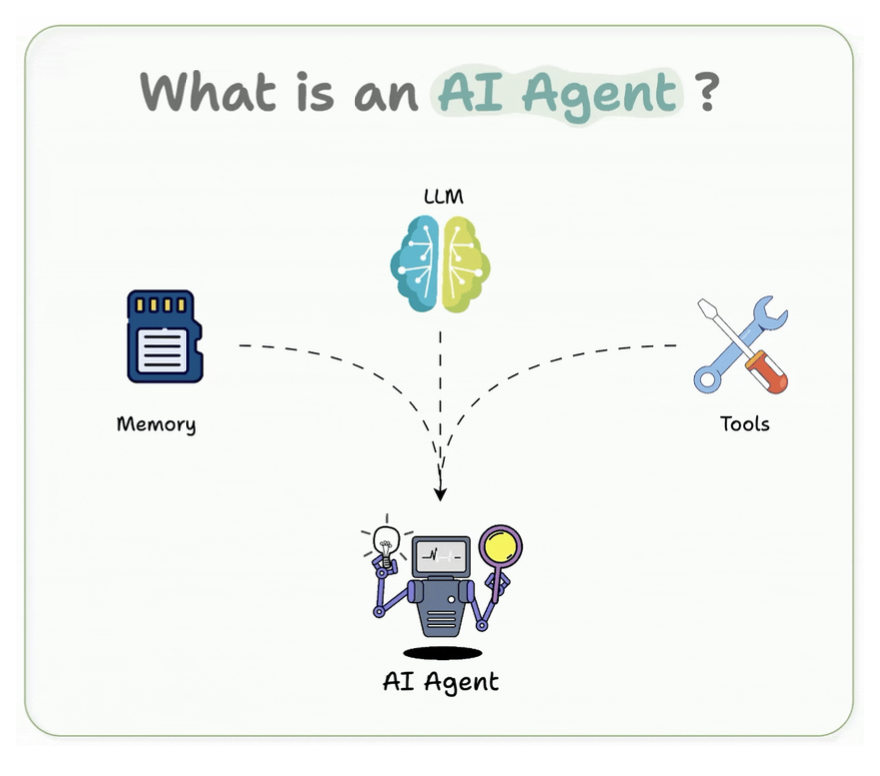
Agent vs LLM vs RAG
- LLM is the brain.
- RAG is feeding that brain with fresh information.
- An agent is the decision-maker that plans and acts using the brain and the tools.
1. LLM (Large Language Model)
- It can reason, generate, summary
- But for data it already know.
2. RAG (Retrieval-Augmented Generation)
- Aware of knowledge update and feed into LLM.
3. Agent
- Agent used LLM, calls tools, RAG ⇒ make decisions and orchestrates workflows.
- Work as decision-making engine.
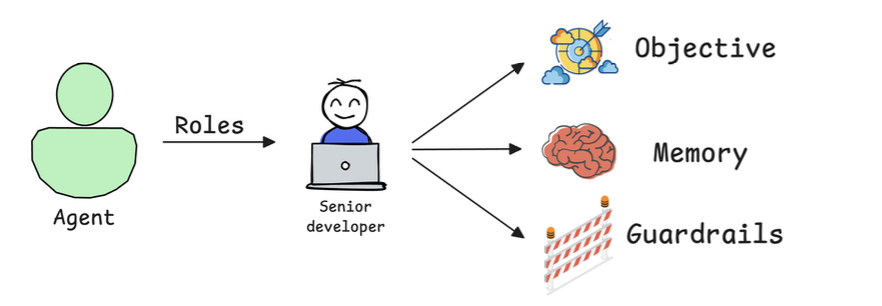
Building blocks of AI Agents
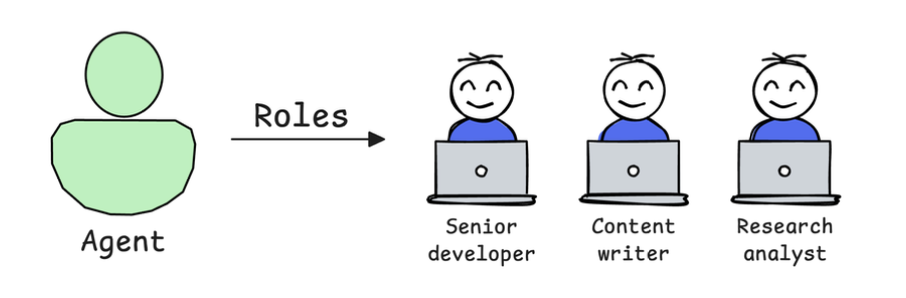
1. Role-playing
-
The way agents reasoning and retrieval process.
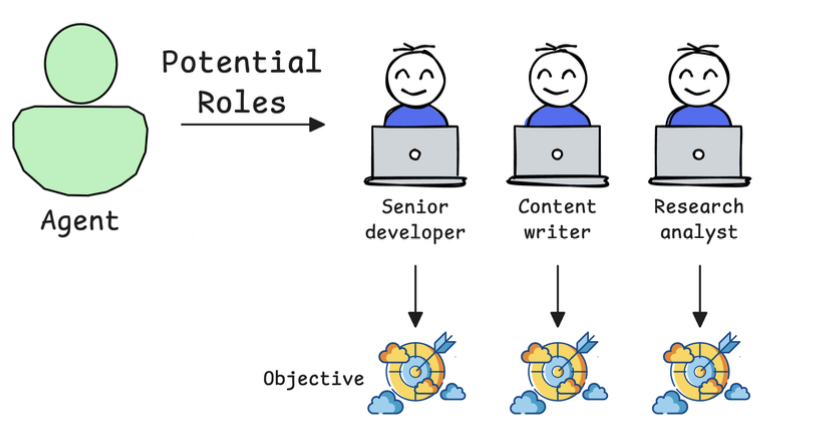
2. Focus/Tasks
- For example, a marketing agent should stick to messaging, tone, and audience not pricing or market analysis.
-
Instead of trying to make one agent do everything, a better approach is to use multiple agents, each with a specific and narrow focus.
3. Tools
- Agents get smarter when they can use the right tools.
- For example, an AI research agent could benefit from:
- A web search tool for retrieving recent publications.
- A summarization model for condensing long research papers.
- A citation manager to properly format references.
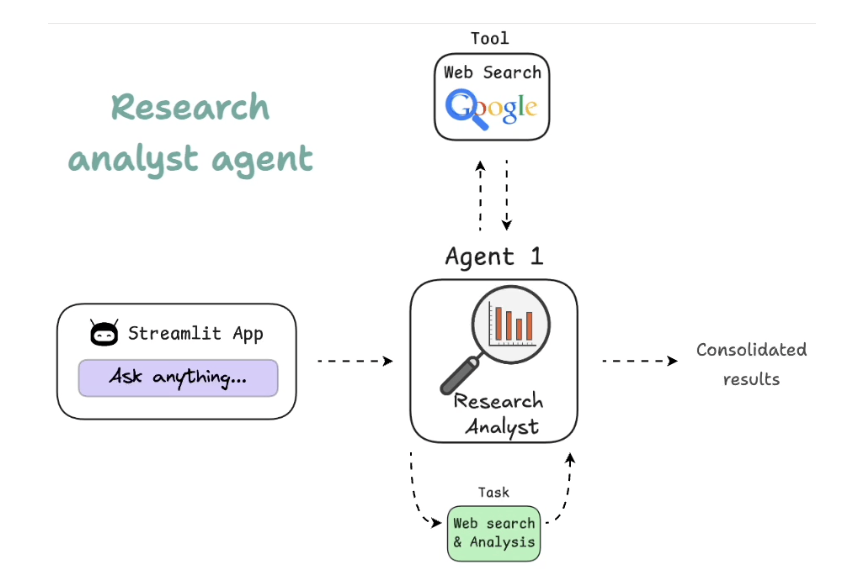
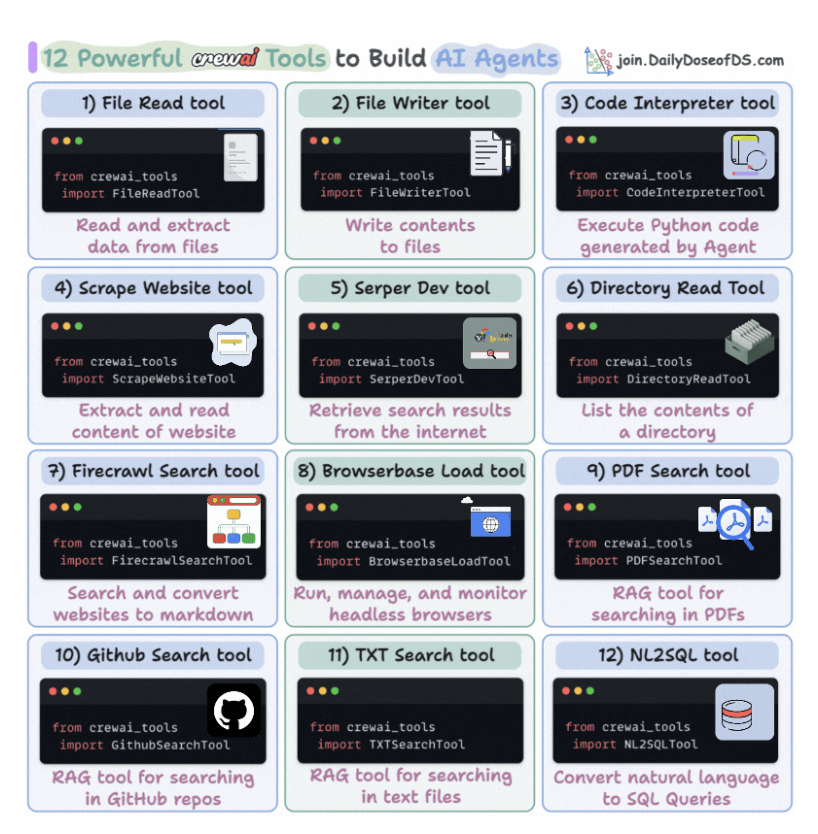
3.1. Custom tools
Library: CrewAI support tools.
Tools allow the Agent to:
- Search the web for real-time data.
- Retrieve structured information from APIs and databases.
- Execute code to perform calculations or data transformations.
- Analyze images, PDFs, and documents beyond just text inputs.
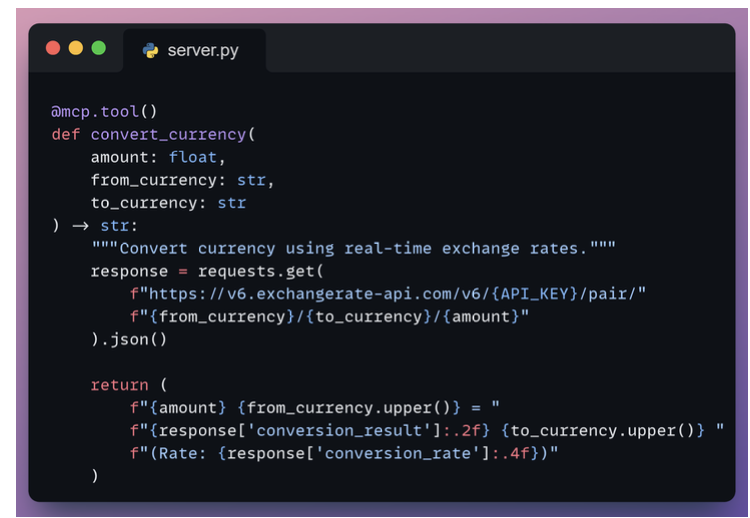
3.2. Custom tools via MCP
- Library: mcp-tools
4. Cooperation
- Instead of one agent doing everything, a team of specialized agents more focus.
-
Tech lead: can split tasks and improve each other’s outputs.
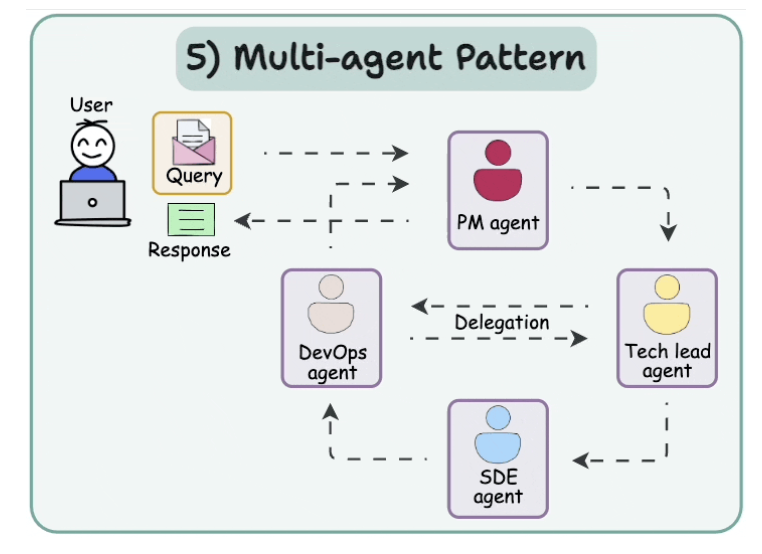
- Consider an AI-powered financial analysis system:
- One agent gathers data
- another assesses risk,
- a third builds strategy,
- and a fourth writes the report
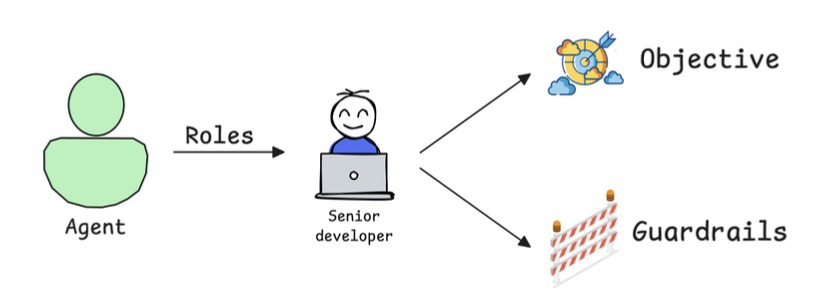
5. Guardrails
Đặt rule cho agents để đảm bảo nó đảm bảo chất lượng từng step.
Examples of useful guardrails include:
- Limiting tool usage: Prevent an agent from overusing APIs or generating irrelevant queries.
- Setting validation checkpoints: Ensure outputs meet predefined criteria before moving to the next step.
- Establishing fallback mechanisms: If an agent fails to complete a task, another agent or human reviewer can intervene.
6. Memory
Dùng để improve chất lượng agents sau các lần dùng.
Different types of memory in AI agents include:
- Short-term memory: during execution or session or previous question.
- Long-term memory: persists after execution or multiple interactions.
- Entity memory: store about the key subjects discussed, about tracking customer details in CRM Agents ⇒ Knowledge graph entities.
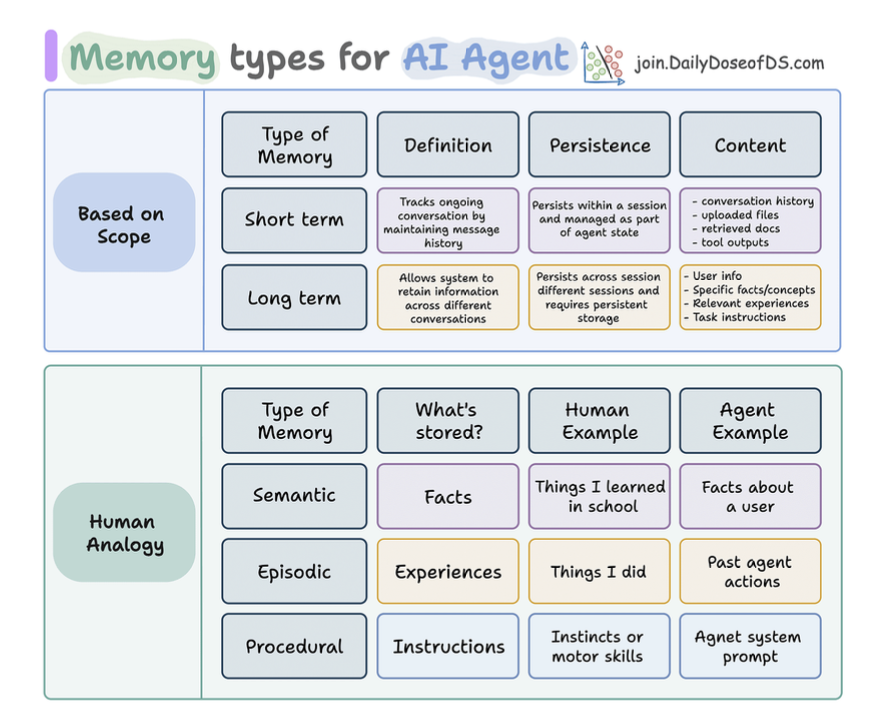
Memory Types in AI Agents
Based on scope
- Short-term
- Long-term
Based on human, long-term memory in agents can be:
- Semantic: facts and knowledge.
- Episodic: chuyện quá khứ.
- Procedural: quy trình để suy nghĩ
Importance of Memory for Agentic Systems
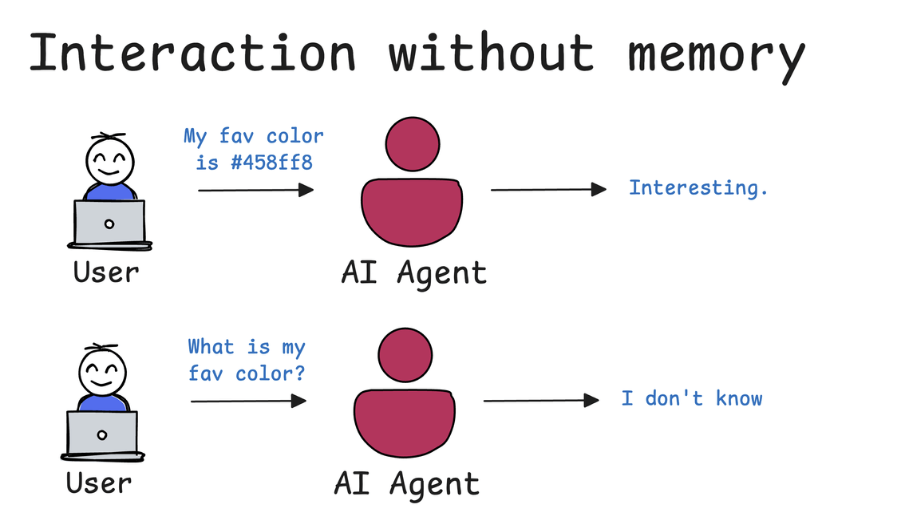
Nếu không có trí nhớ:
- Nó sẽ không nhớ các thông tin của bạn.
- Ví dụ câu hỏi: “Màu thích yêu thích nhất của tớ là gì ?”
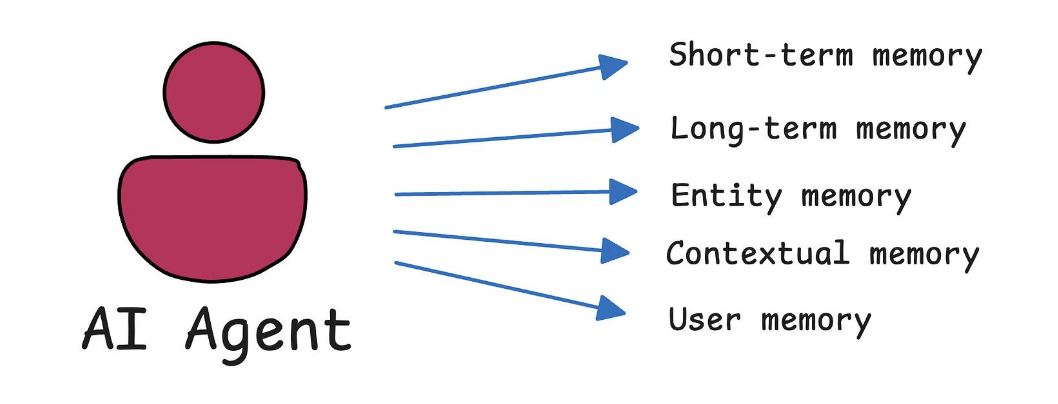
Có 5 loại trí nhớ của Agents
- Short-term memory
- Long-term memory
- Entity memory
- Contextual memory: facts and knowledge
- User memory
Nó dùng 1 phần memory của nó để xử lý thông tin
5 Agentic AI Design Patterns
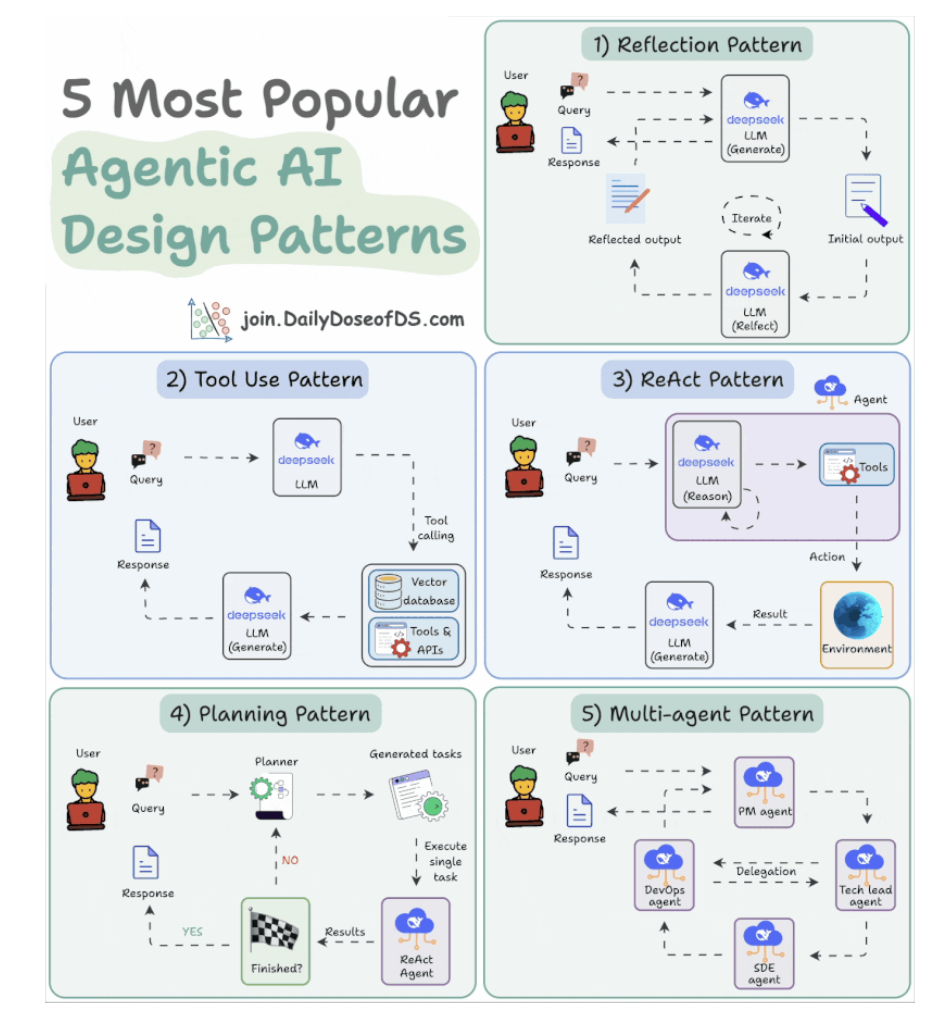
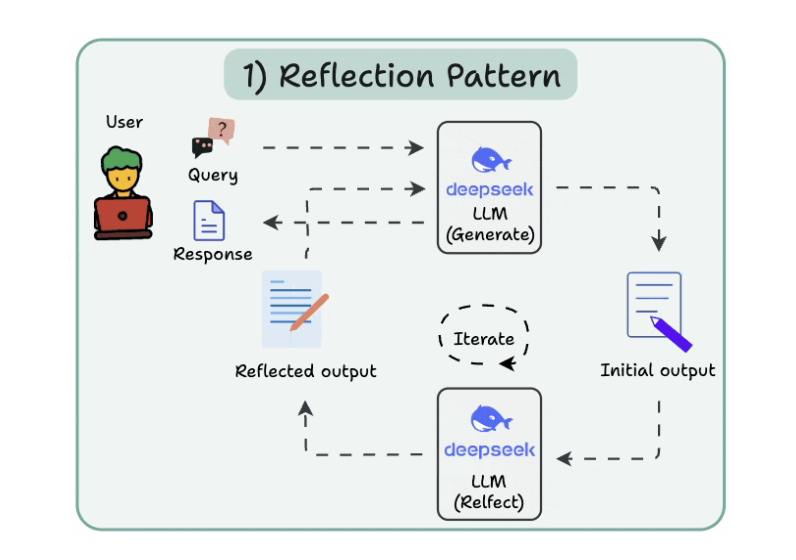
1. Reflection Pattern
- 1 con LLM generate, 1 con LLM spot mistakes
- Cho đến khi nào final response được.
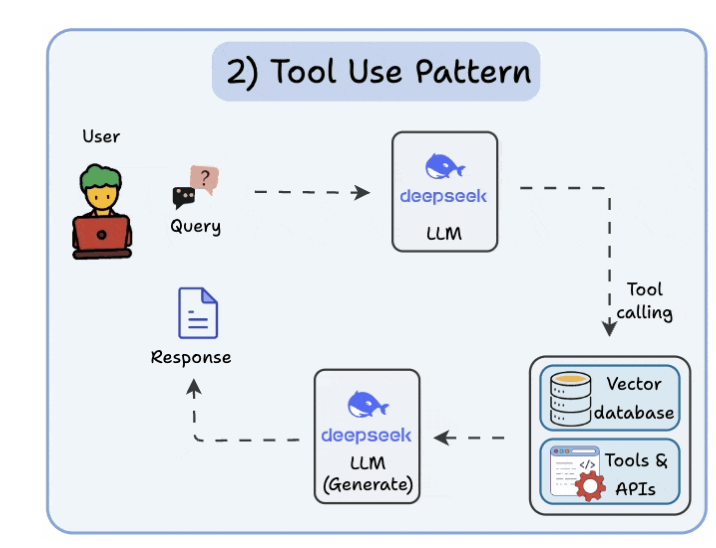
2. Tool use pattern
- Tools allow LLMs to gather more information by:
- Querying a vector database
- Executing Python scripts
- Invoking APIs, etc.
- Mỗi call LLM call 1 tool khác nhau.
3. ReAct (Reason and Act) pattern
- Reflection thinking + action ⇒ adjust the prompt.
- Merge of 2 patterns
- Reflect the thought.
- Interact with the world using tools.
- Feedback loops.
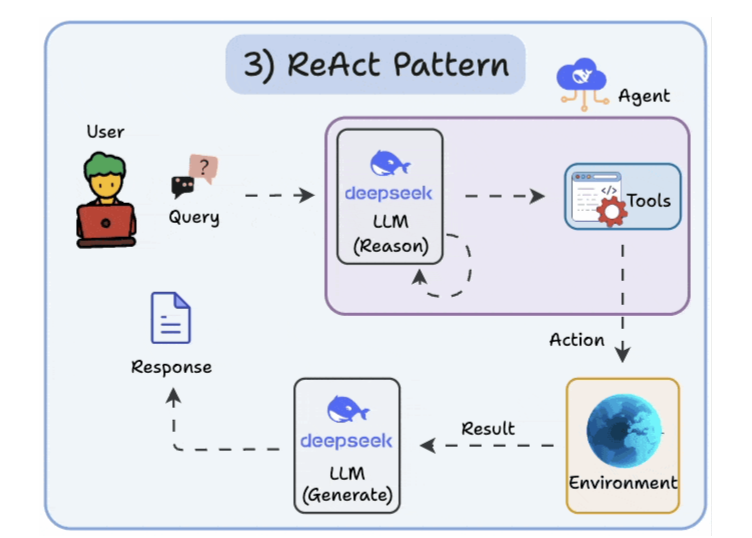
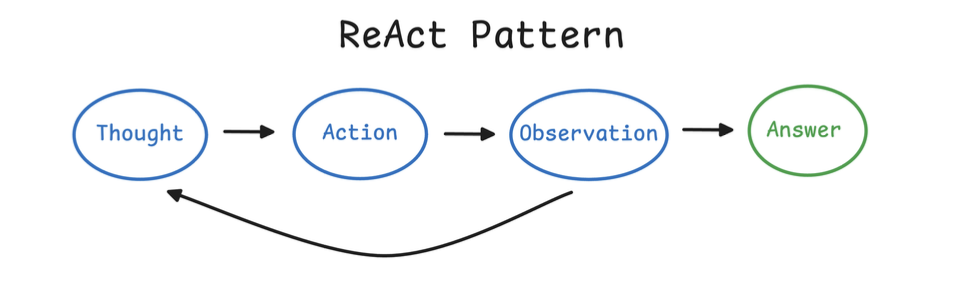
-
Thay vì Thought - Thought - Thought như bên dưới
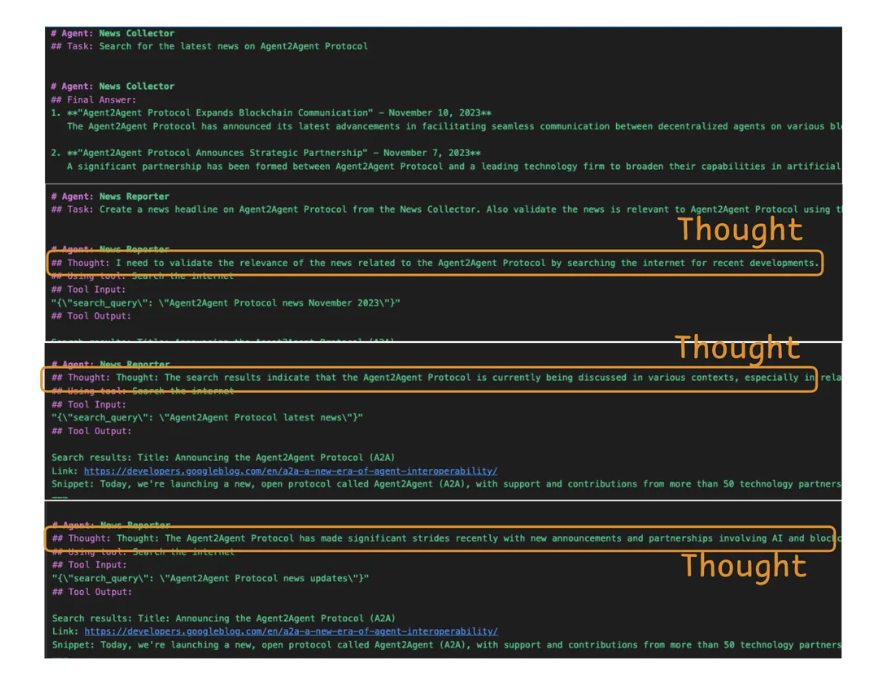
- For example, an agent in CrewAI typically alternates between reasoning about a task and acting (using a tool) to gather information or execute steps, following the ReAct paradigm.
4. Planning pattern
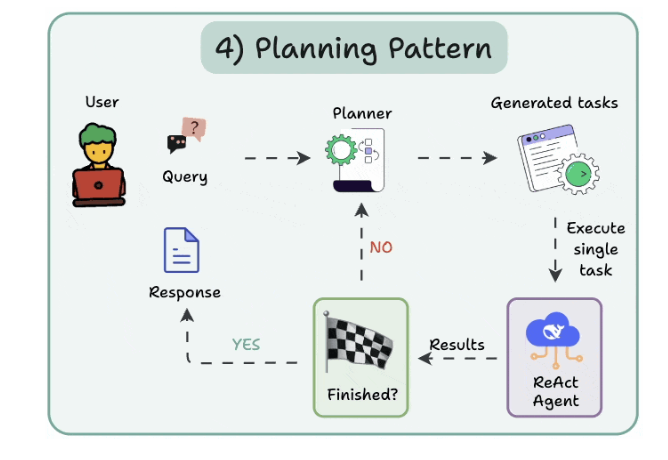
Instead of solving a task in one go, the AI creates a roadmap by:
- Subdividing tasks
- Outlining objectives
5. Multi-Agent pattern
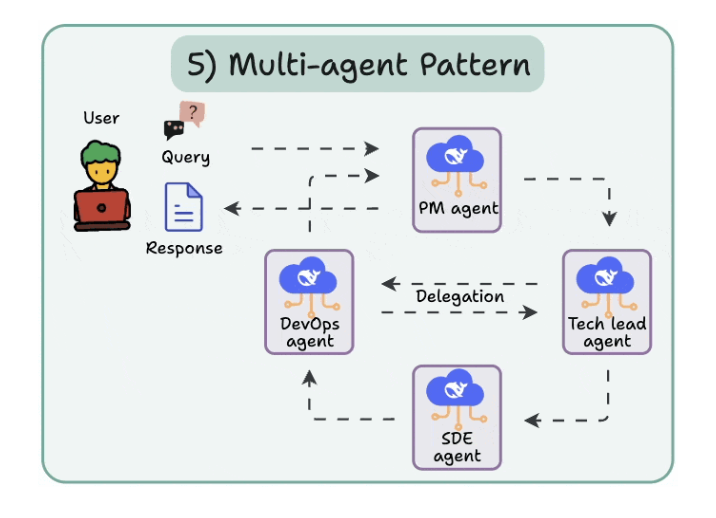
- There are several agents, each with a specific role and task.
- Each agent can also access tools.
ReAct Implementation from Scratch
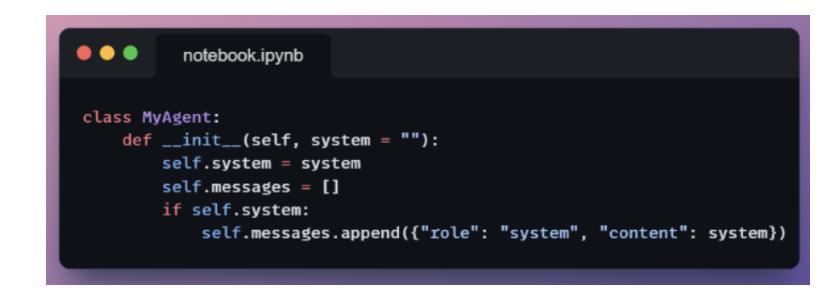
1. Role definition
Cung cấp message đầu tiên để định nghĩa role: system cho LLM.
This method does three things in one call:
- Records the user input.
- Gets the model’s reply.
- Updates the message history for future turns.
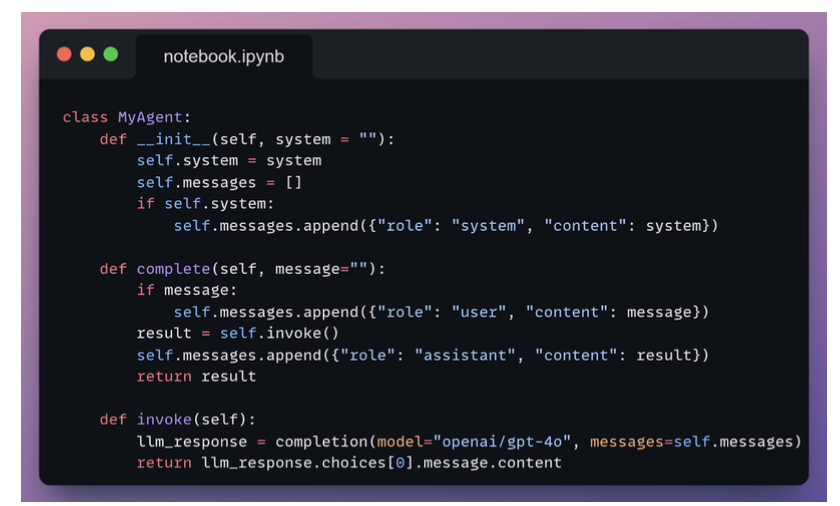
2. ReAct Thinking
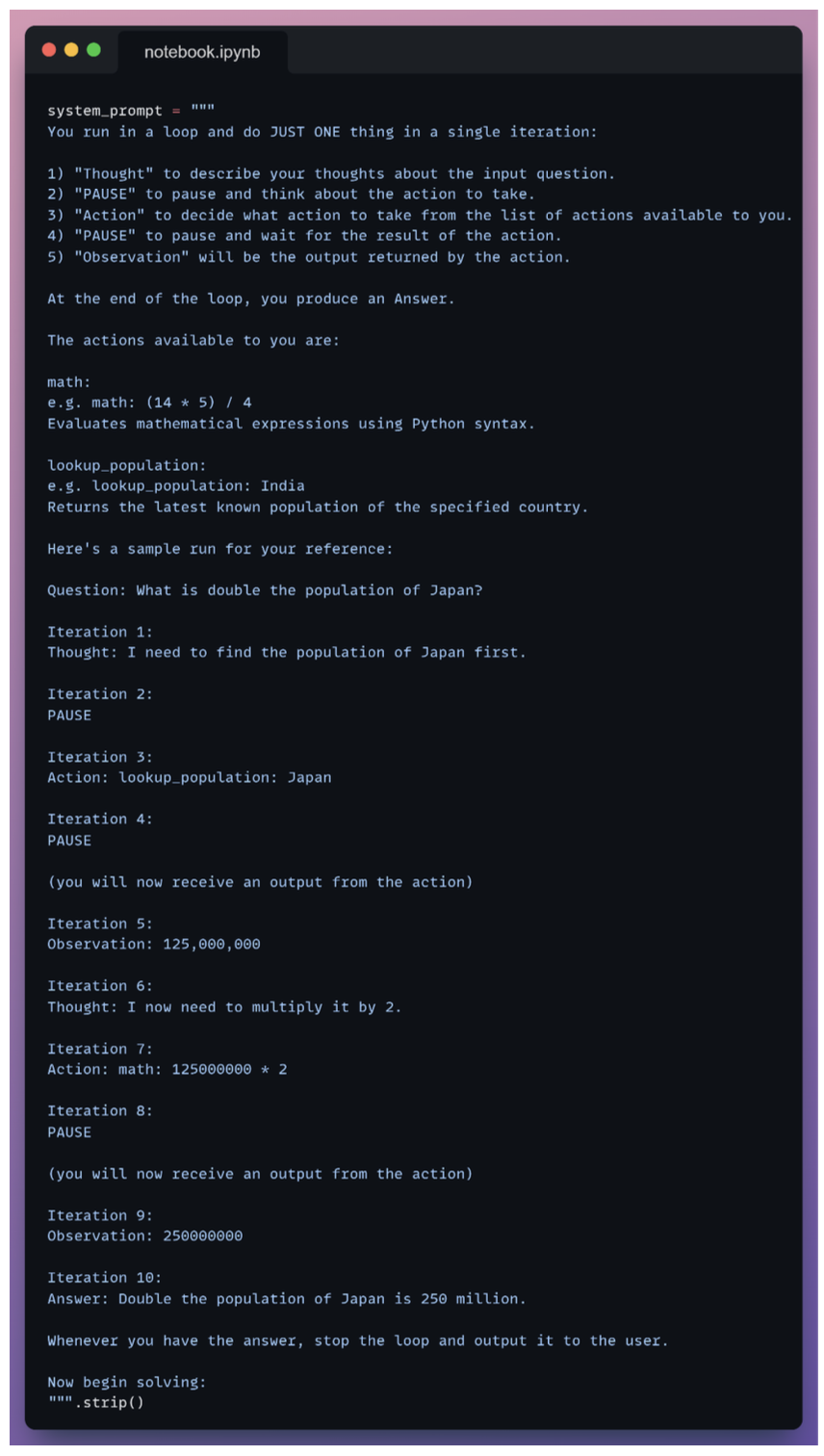
With this sample trace:
- The agent knows how to think.
- The agent knows how to act.
- The agent knows when to stop.
3. Idea
Agent không chỉ trả lời, mà sẽ:
- Suy nghĩ (Reason / Thought): phân tích vấn đề
- Hành động (Act): gọi tool / API / function
- Quan sát (Observation): nhận kết quả
- Lặp lại cho đến khi ra câu trả lời cuối
4. Example
Ví dụ 1: ReAct đơn giản (pseudo)
Task: “Thời tiết hôm nay ở Hà Nội thế nào?”
Thought: Tôi cần biết thời tiết hiện tại → phải gọi weather API
Action: get_weather(city="Hà Nội")
Observation: 30°C, nắng nhẹ
Thought: Đã có dữ liệu
Final Answer: Hôm nay Hà Nội khoảng 30°C, trời nắng nhẹ.
Ví dụ 2: Cursor Application
| ReAct concept | Cursor vibe coding |
|---|---|
| Thought | Internal reasoning (hidden) |
| Action | Edit code, create file, refactor |
| Tool | File system, linter, test, grep |
| Observation | Compiler error, test fail, diff |
| Loop | Auto-iterate cho đến khi OK |
5 Levels of Agentic AI Systems
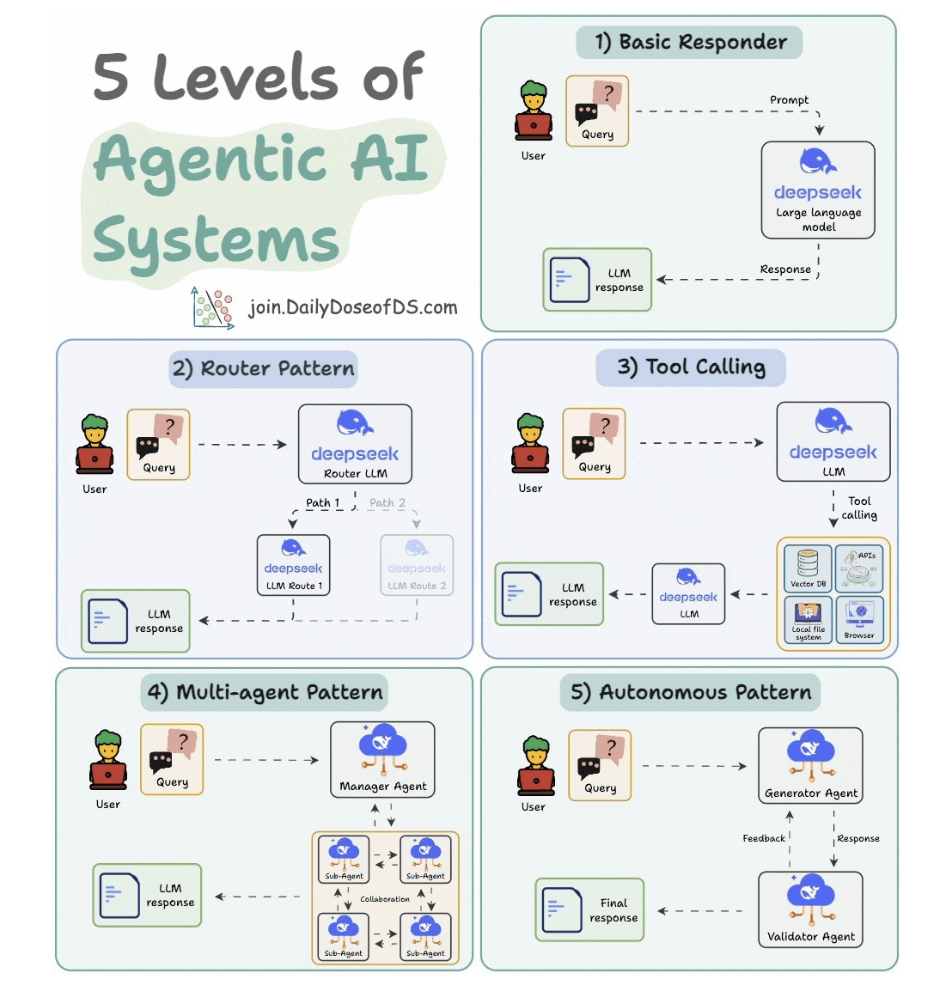
5.1. Basic responder
- Hỏi thẳng model và response.
5.2. Router pattern
- 1 con router LLM define xem cái tool nào được gọi.
- Rồi route tới con agent đó
5.3. Tool calling
- Define cần call tool nào
5.4. Multi-agent pattern
- Một con manager tool split task.
- Xong optimize output and performance của từng con agent nhỏ.
5.5. Autonomous pattern
- 2 con aent đem ra feedback và validate nhau coi nào tốt hơn.
4 Layers of Agentic AI
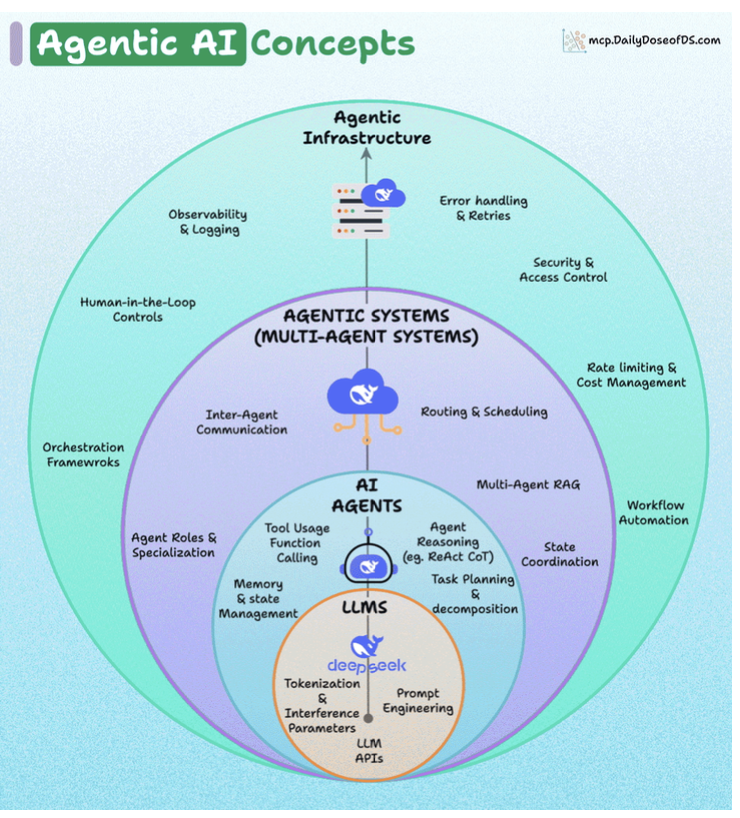
About Agentic Infrastructure:
- Observability & logging: tracking performance and outputs (using frameworks like DeepEval).
- Error handling & retries: resilience against failures.
- Security & access control: ensuring agents don’t overstep.
- Rate limiting & cost management: controlling resource usage.
- Workflow automation: integrating agents into broader pipelines.
- Human-in-the-loop controls: allowing human oversight and intervention.
7 Patterns in Multi-Agent Systems
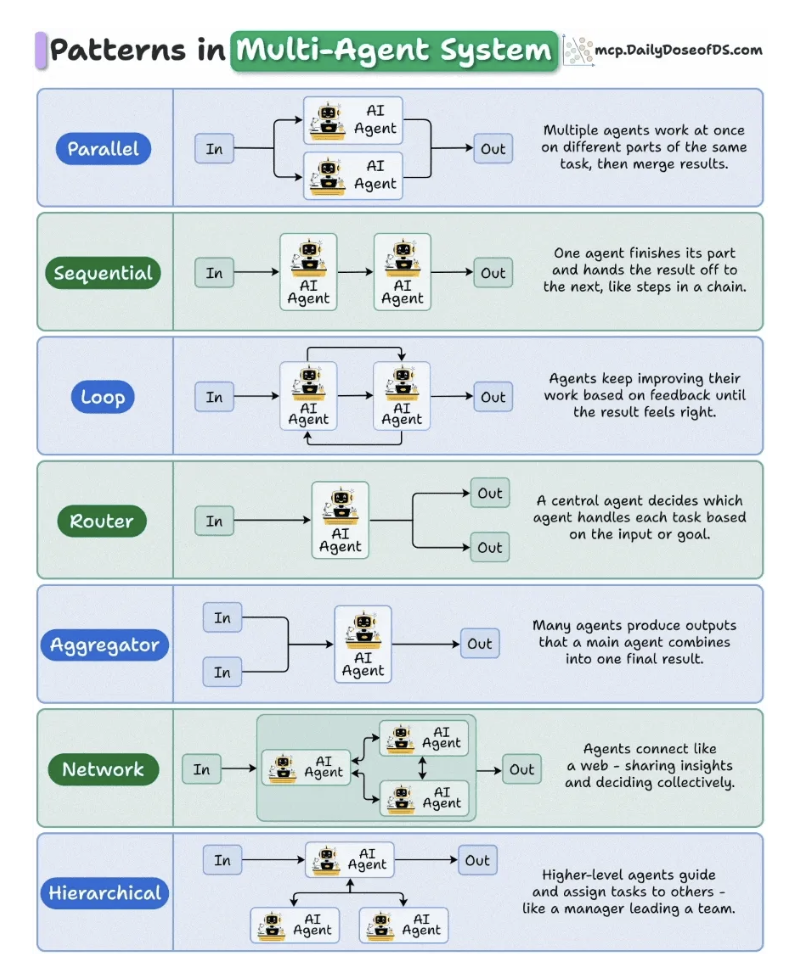
7.1. Parallel
- Task is executed independently, like data extraction, web retrieval, and summarization, and their outputs merge into a single result.
- Use case: Perfect for reducing latency in high-throughput pipelines like document parsing or API orchestration.
7.2. Sequential
- Needs step-by-step process
- Use case: workflow automation, ETL chains, and multi-step reasoning pipelines.
7.3. Loop
- Agents continuously refine their own outputs until a desired quality is reached.
- Use case: proofreading, report generation, or creative iteration.
7.4. Router
- For instance, user queries about finance go to a FinAgent, legal queries to a LawAgent.
- Use case: Dùng cho mấy kiến trúc MoE, hay chuyên môn hoá agents.
7.5. Aggregator
- Gom input từ nhiều nguồn
- Use case: tổng hợp feedback, voting systems.
7.6. Network
- No clear hierarchy here, agents just talk to each other freely.
- Use case: stimulation, multi-agent games, free-form behavior, discussions.
7.7. Hierarchical
- Một con manager đứng ra make decision.
- Đảm bảo các việc nhau:
- No two agents duplicate work.
- Every agent knows when to act and when to wait.
- The system collectively feels smarter than any individual part.
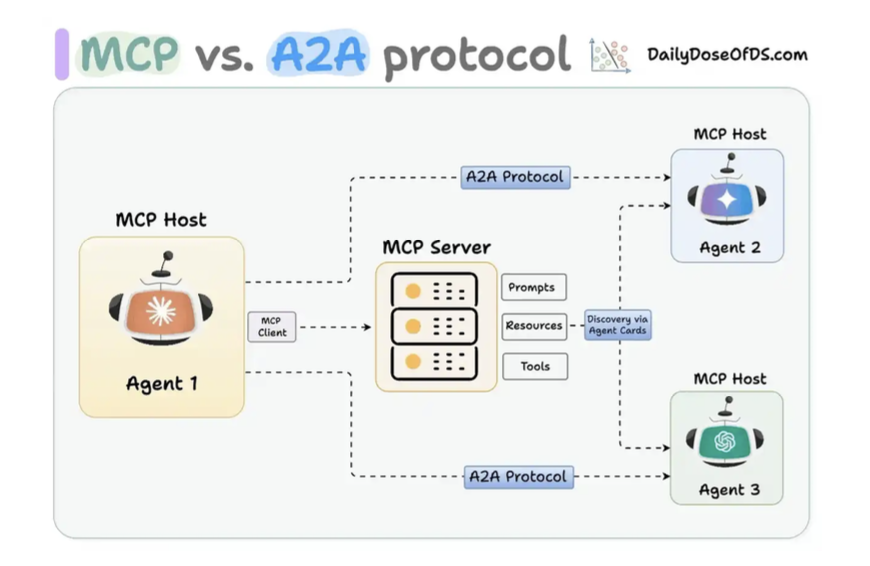
MCP & A2A Protocol
- MCP là để gọi tool
- A2A là để 2 con agent gọi nhau.
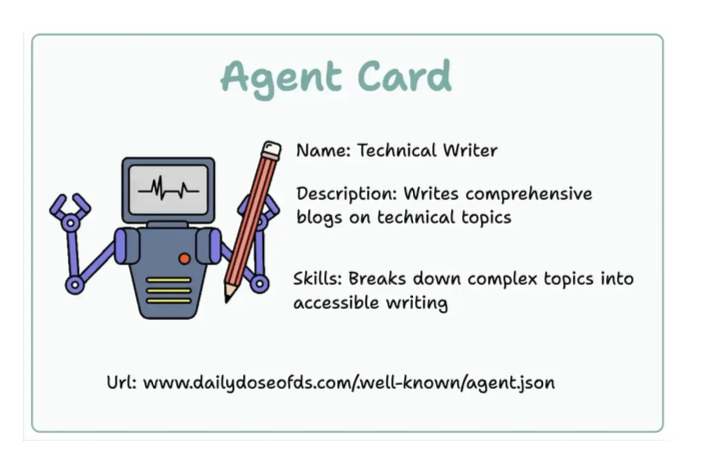
Agent-User Interaction Protocol (AG-UI)
Frontend gọi trực tiếp agents luôn.
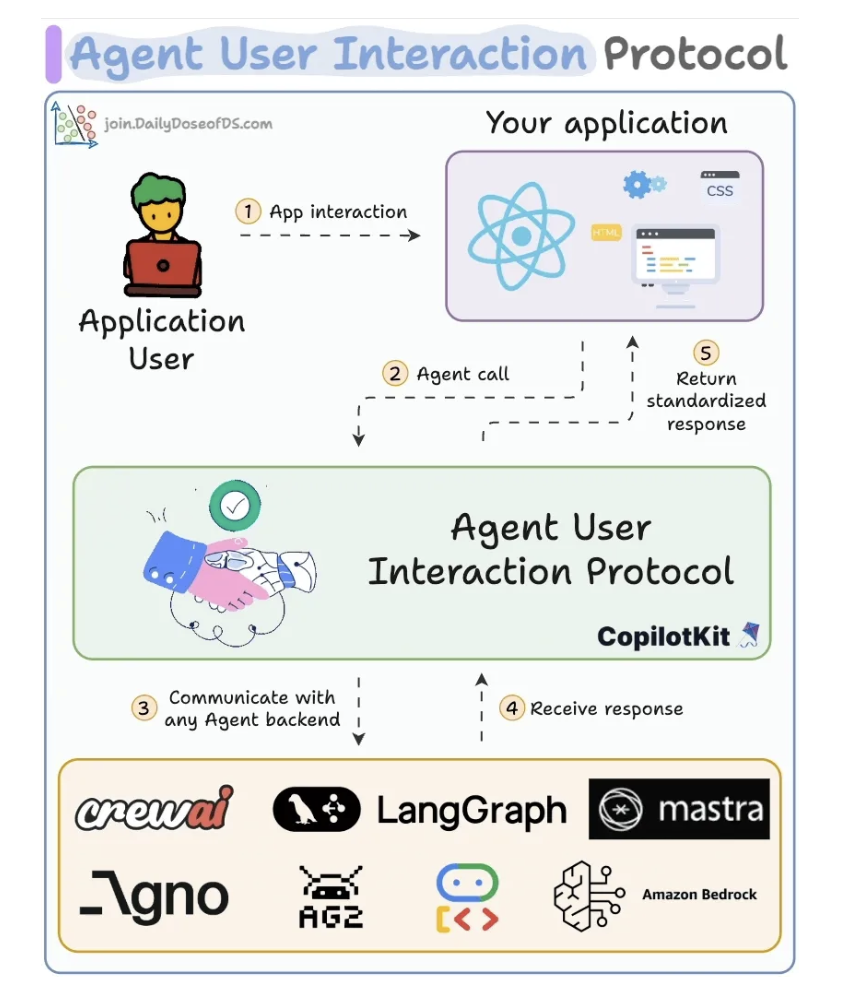
Each event has an explicit payload (like keys in a Python dictionary) like:
- TEXT_MESSAGE_CONTENT for token streaming.
- TOOL_CALL_START: dùng để show các tools đang có.
- STATE_DELTA: update shared state (code, data)
- AGENT_HANDOFF: pass control giữa các agents.
Các tools liên quan:
- LangGraph: vẽ workflow
- CrewAI: cung cấp các MCP.
- Mastra: define cái workflow cho agent trong Frontend.
- GPT-4 and Llama-3: LLM như một bộ não.
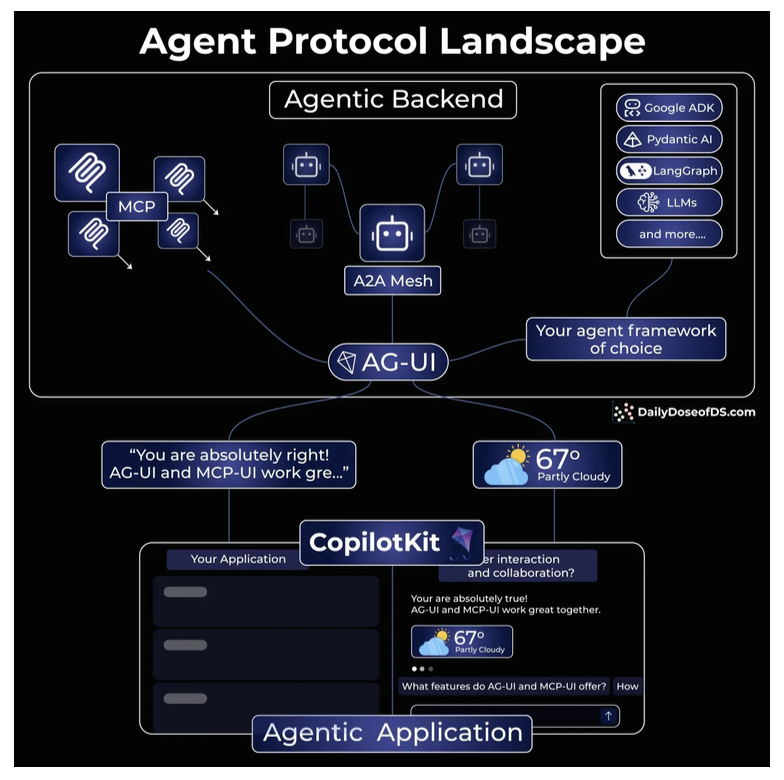
Agent Protocol Landscape
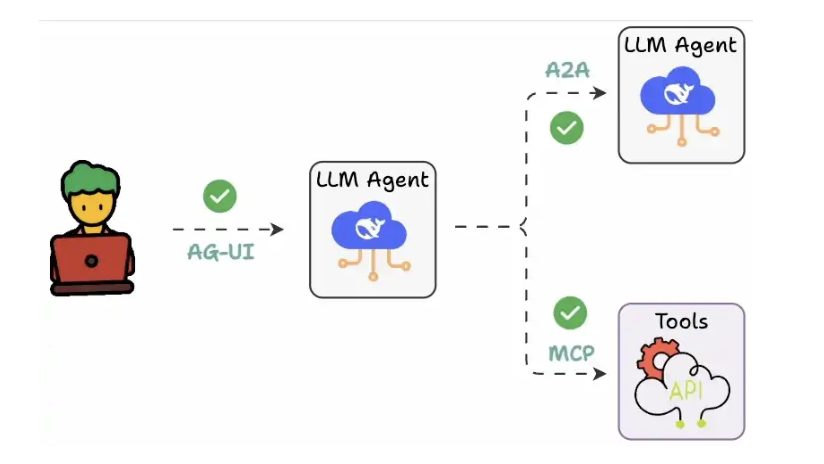
Hoặc gọi qua 1 REST qua 1 backend server cũng được.
CopilotKit
Dùng để quản lý các con agents.
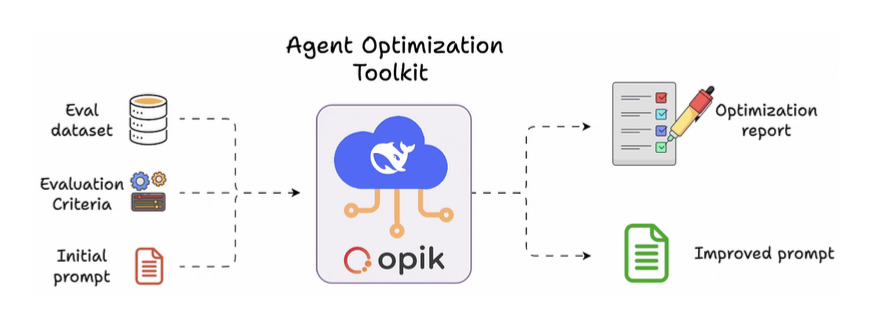
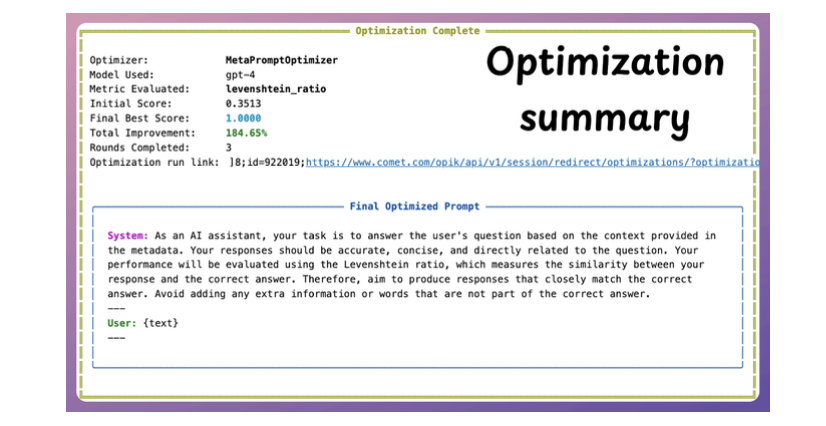
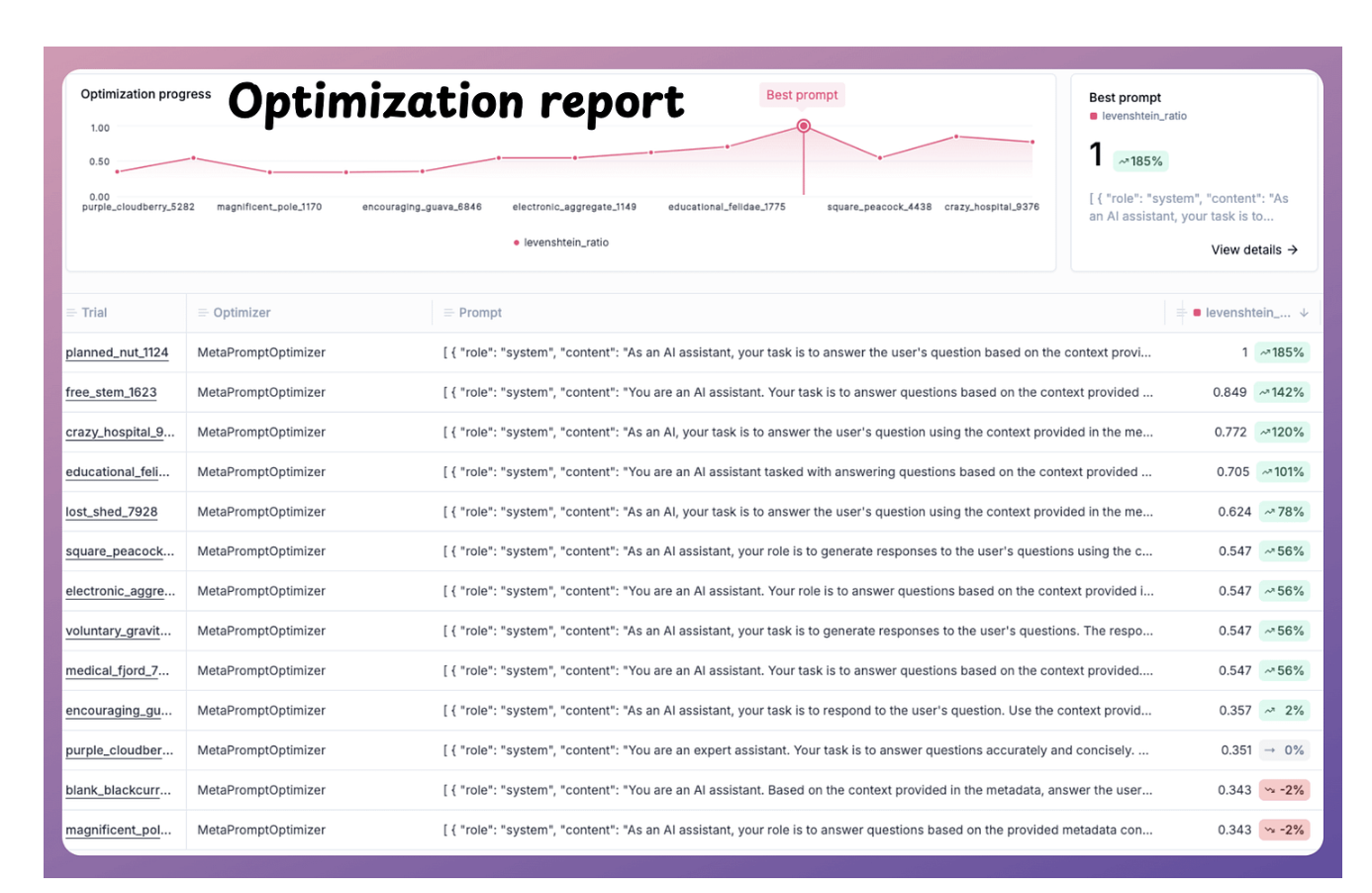
Prompt Optimization - Opik
Dùng để optimize prompt dựa trên dataset.
AI Agent Deployment Strategies
1. Batch deployment
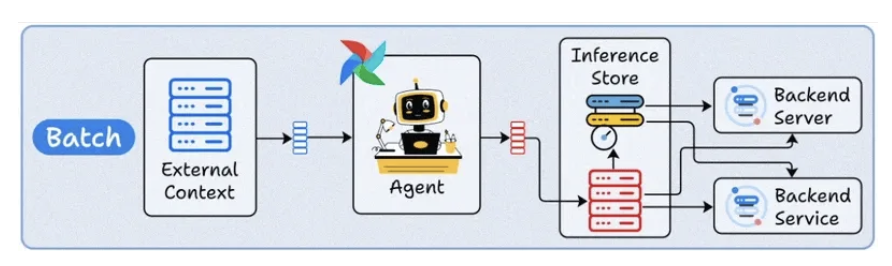
- The Agent runs periodically, like a scheduled CLI job.
- Just like any other Agent, it can connect to external context (databases, APIs, or tools), process data in bulk, and store results.
- This typically optimizes for throughput over latency.
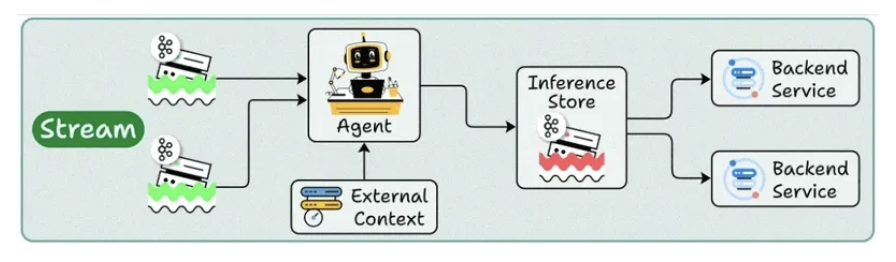
2. Stream deployment
- It continuously processes data as it flows through systems.
- Your agent stays active, handling concurrent streams while accessing both streaming storage and backend services as needed.
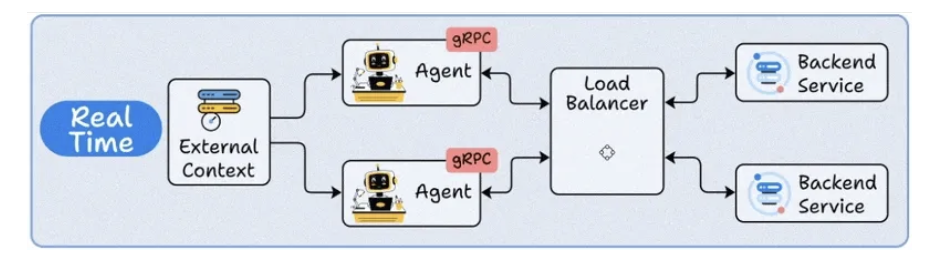
3. Real-Time deployment
- Load balancer agents for real-time processing.
- Agent as a service in micro-services.
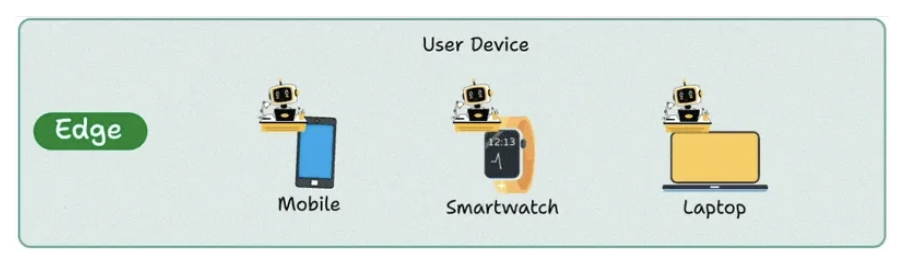
4. Edge deployment
- The agent run in mobile device, laptop device.
To summarize:
- Batch = Maximum throughput
- Stream = Continuous processing
- Real-Time = Instant interaction
- Edge = Privacy + offline capability
5. MCP
Model context protocol (MCP) is a standardized interface and framework that allows AI models to seamlessly interact with external tools, resources, and environments.
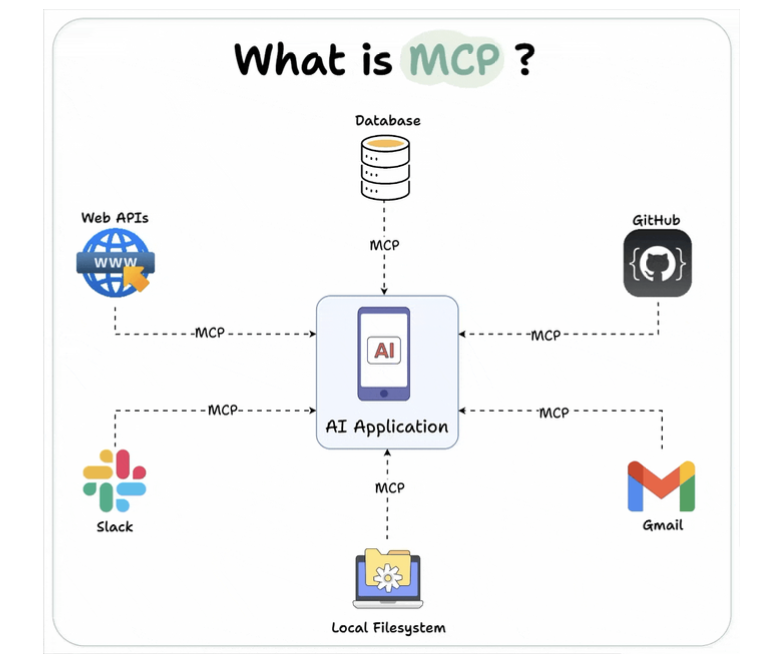
Why we need MCP
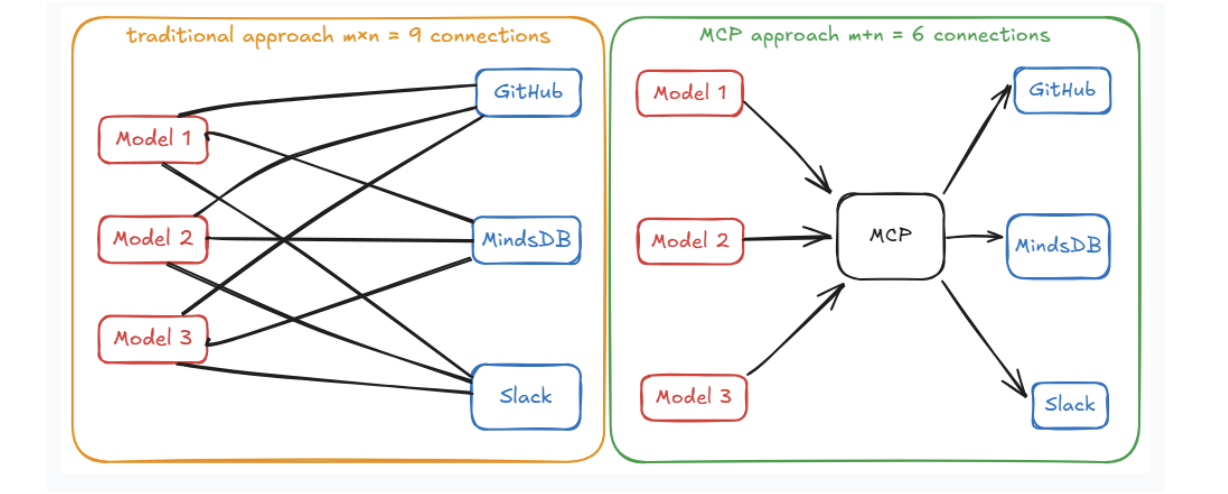
MCP Architecture Overview
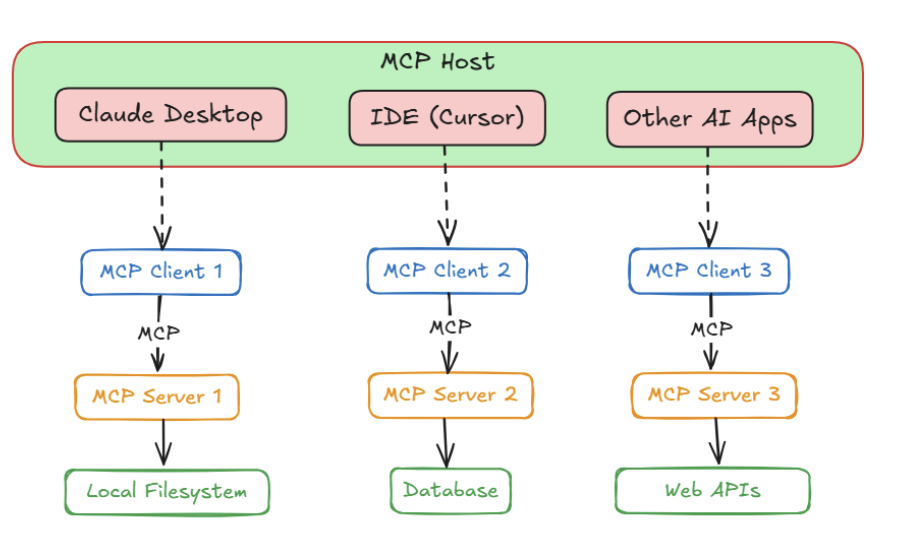
- Host
- User application
- Client
- MCP client in the host.
-
Server
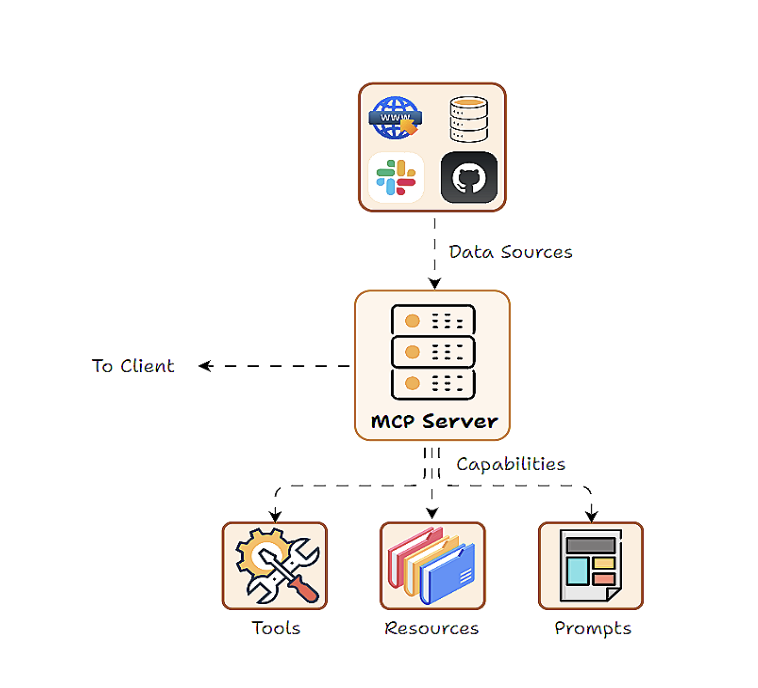
- MCP Server can access resources
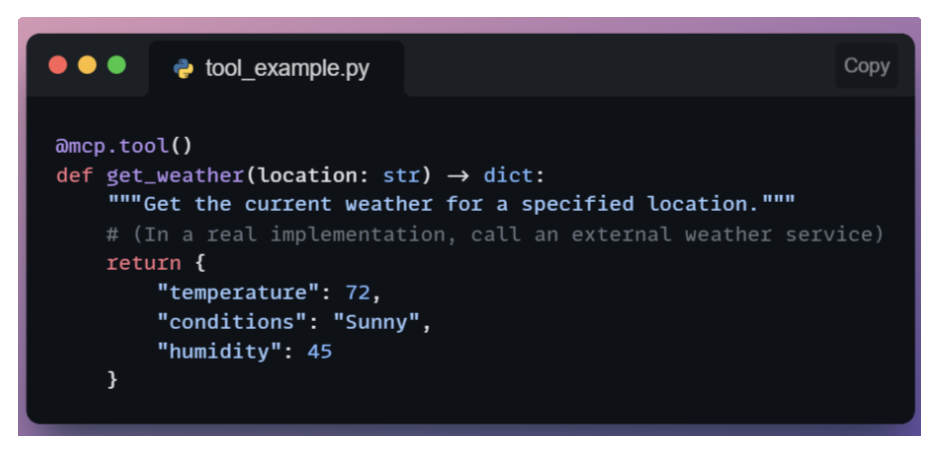
-
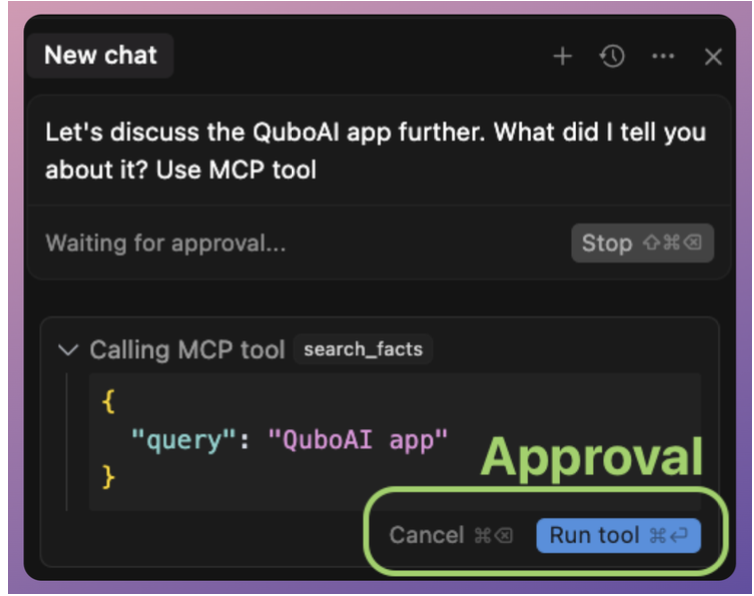
Tool: executable actions
-
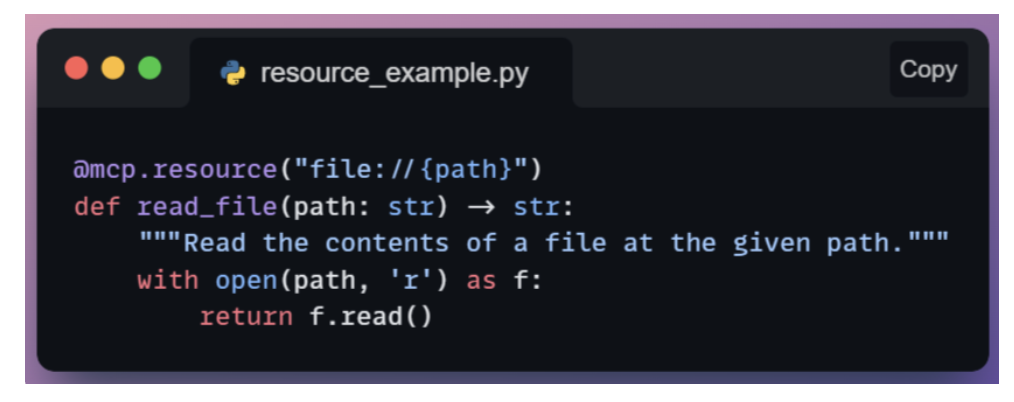
Resources: access database, file
-
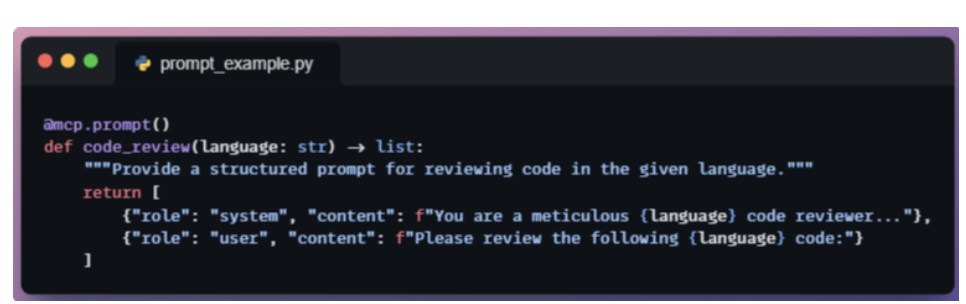
Prompt: injected to model that server can supply.
-
- MCP Server can access resources
API versus MCP
- MCP used to AI Agents interact with tools.
- Centralize to build tools to interact for AI Agents.
MCP versus Function calling
- Functional calling
- Developers create functions with clear input and output parameters.
- The LLM interprets the user’s input to identify the appropriate function to call.
- The application executes the identified function, processes the result, and returns the response to the user.
- MCP offers a standardized protocol for integrating LLMs with external tools and data sources.
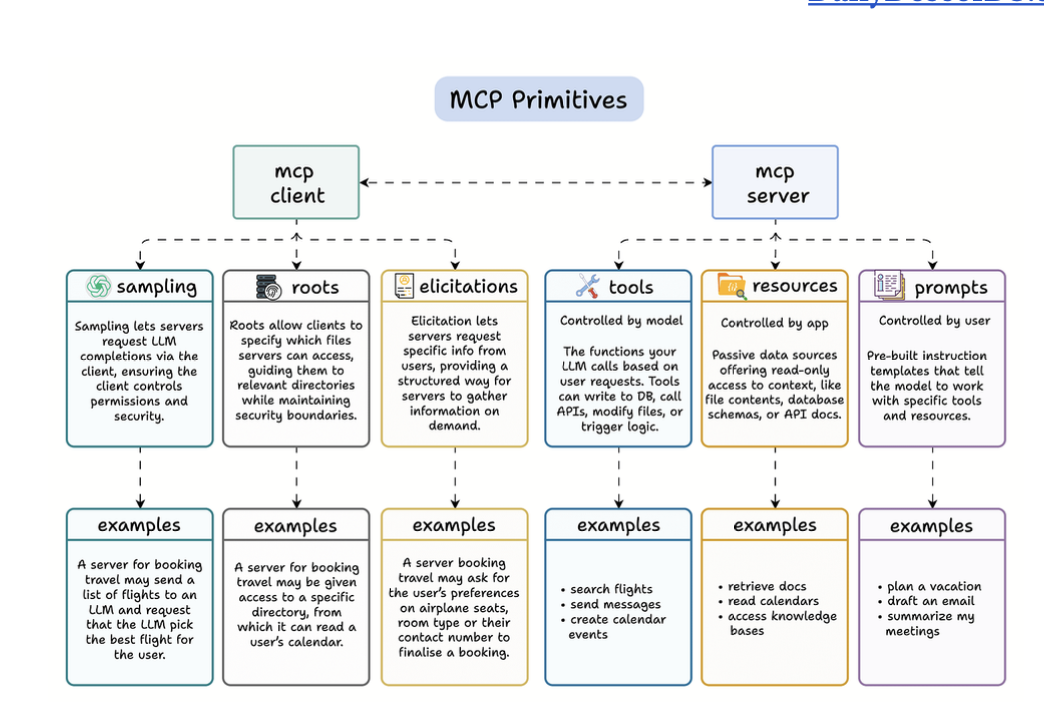
6 Core MCP Primitives (Hay)
Use case
- MCP cho phép tương tác client với server khi tương tác với tool.
- Use case: Cursor ask m cho nó access file nào, đó là MCP Client đó.
MCP Client: tương tác với người dùng
- Sampling
- Tạo ra 2 - 3 option rồi chọn đi
- Roots
- Chọn file nào m cho nó access.
- Elicitations
- Hỏi thêm thông tin từ người dùng.
MCP Server: thực hiện các action
- Tools
- Action nó được làm
- Resources
- Trigger vào resources nào.
- Prompt
- Guide the LLM how to use tools and resources.
Docs: https://github.com/mcp-use/mcp-use
Creating MCP Agents
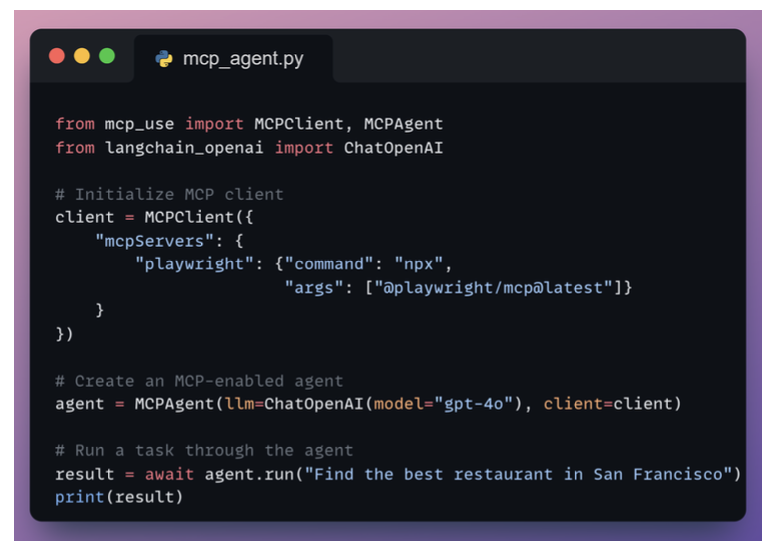
Common Pitfall: Tool Overload in MCP Client
1. Tool-name hallucinations
- The model may invent a tool that does not exist. This usually happens when the tool list is large or poorly named.
2. Confusion between similar tools
- If a server exposes several tools with overlapping responsibilities, the model may struggle to choose the correct one.
3. Degraded decision quality with large toolsets
- Presenting too many tools at once increases cognitive load for the LLM, leading to inconsistent tool selection or unnecessary calls
Solution: The Server Manager
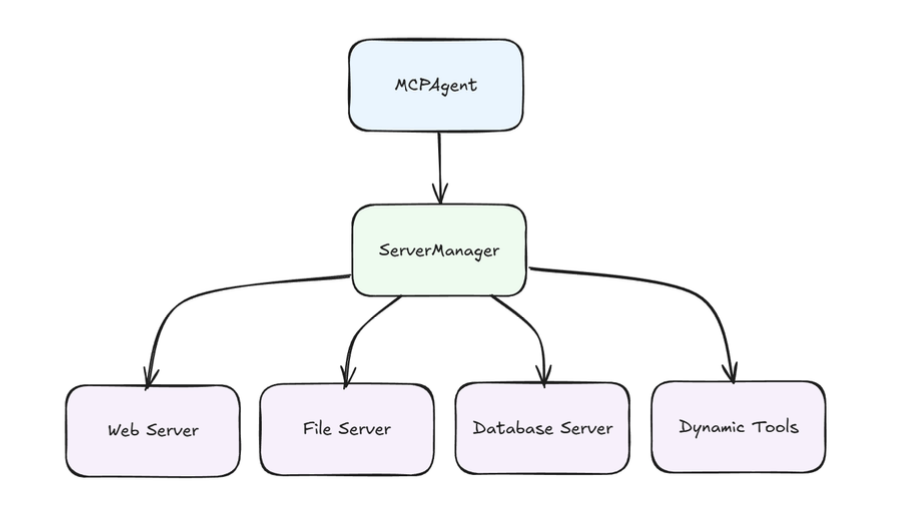
- Load tools from specific server when needed.
Creating MCP Client
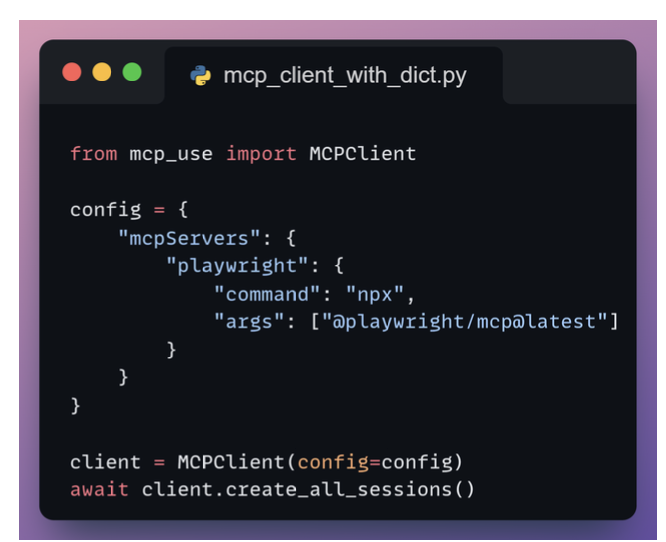
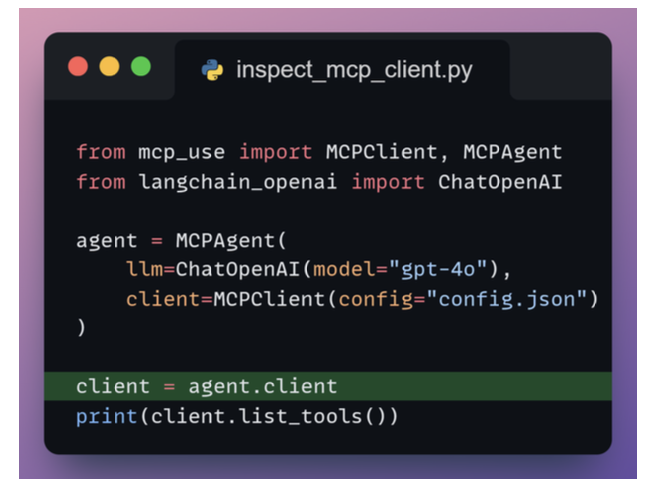
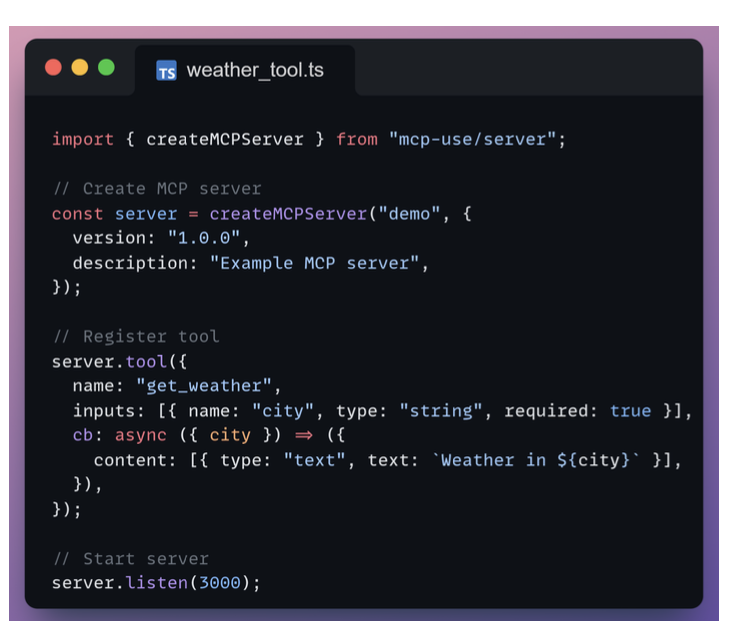
Creating MCP Server
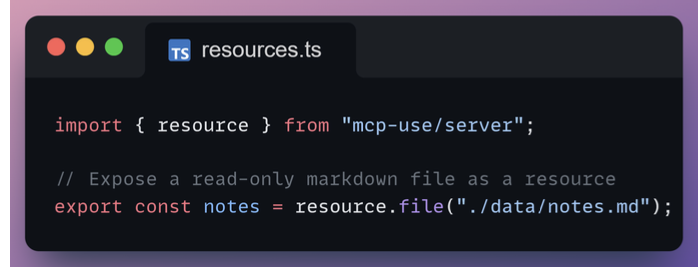
Resources
Resources expose read-only content such as files or generated text through a stable URI.
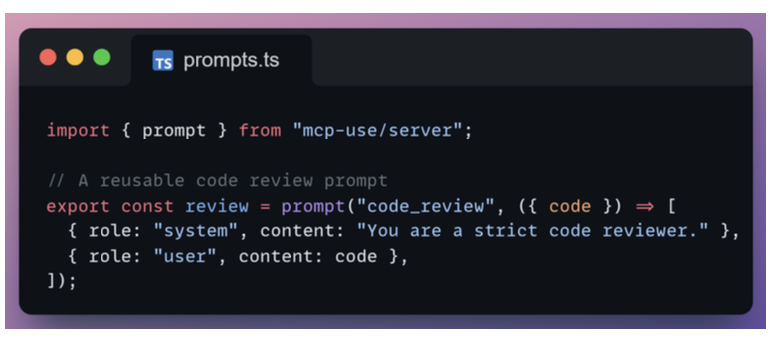
Prompts
Prompts define reusable instruction templates that agents can invoke to generate structured messages.
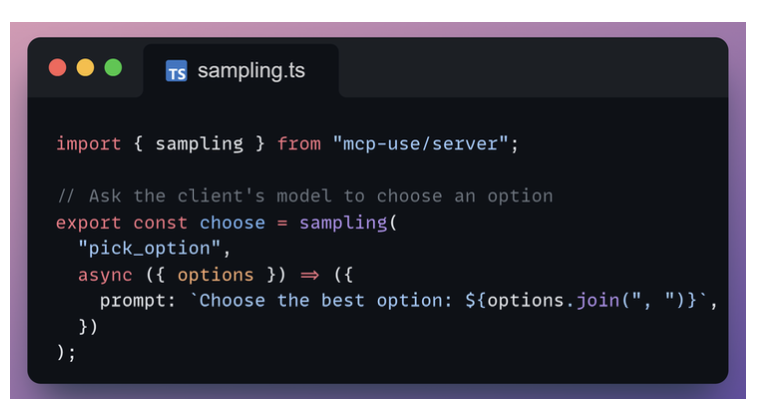
Sampling
Sampling lets your server ask the client’s model to generate text mid-workflow.
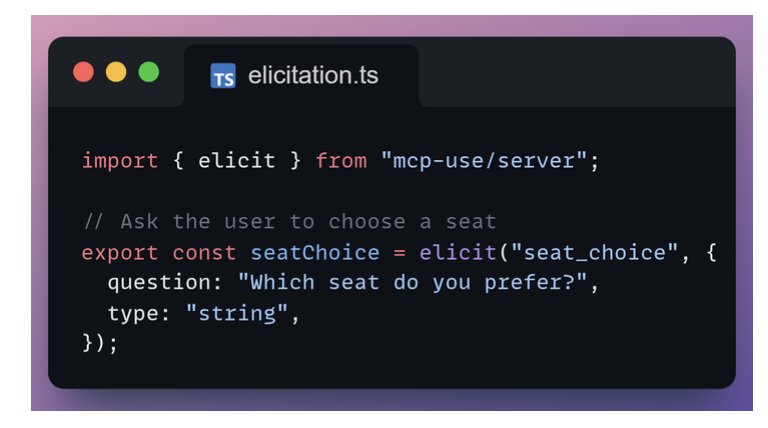
Elicitation
Elicitation requests structured input from the user, such as selecting an option or entering text.
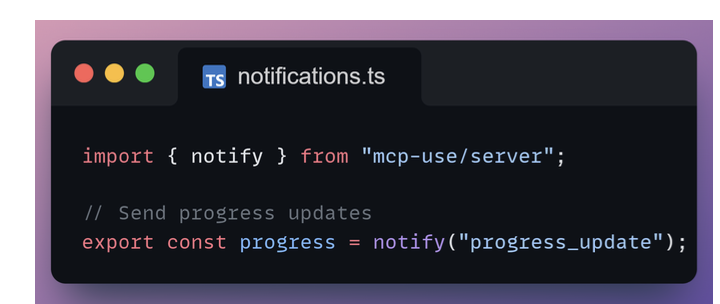
Notifications
Notifications allow your server to push asynchronous updates such as progress or status changes to the client.
MCP Inspector
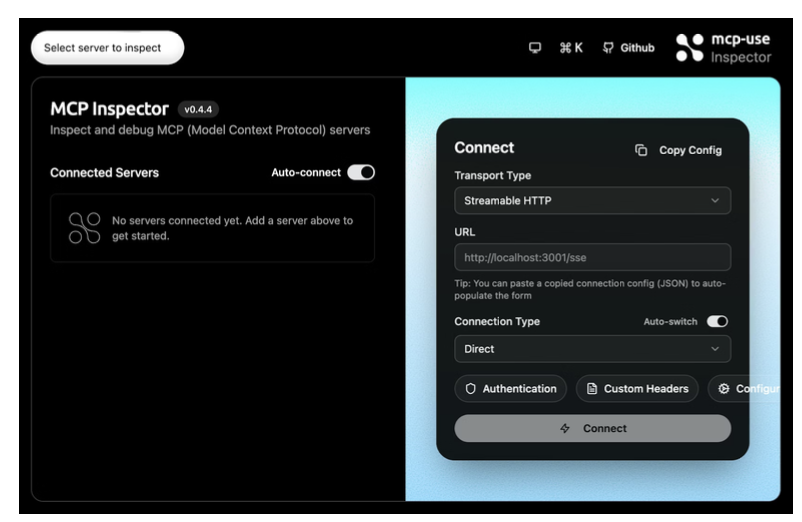
- Browse and test tools interactively
- Explore resources and inspect their content
- Preview prompts and validate arguments
- Watch sampling and notification events in real time
- Monitor all JSON-RPC traffic between client and server
MCP UI
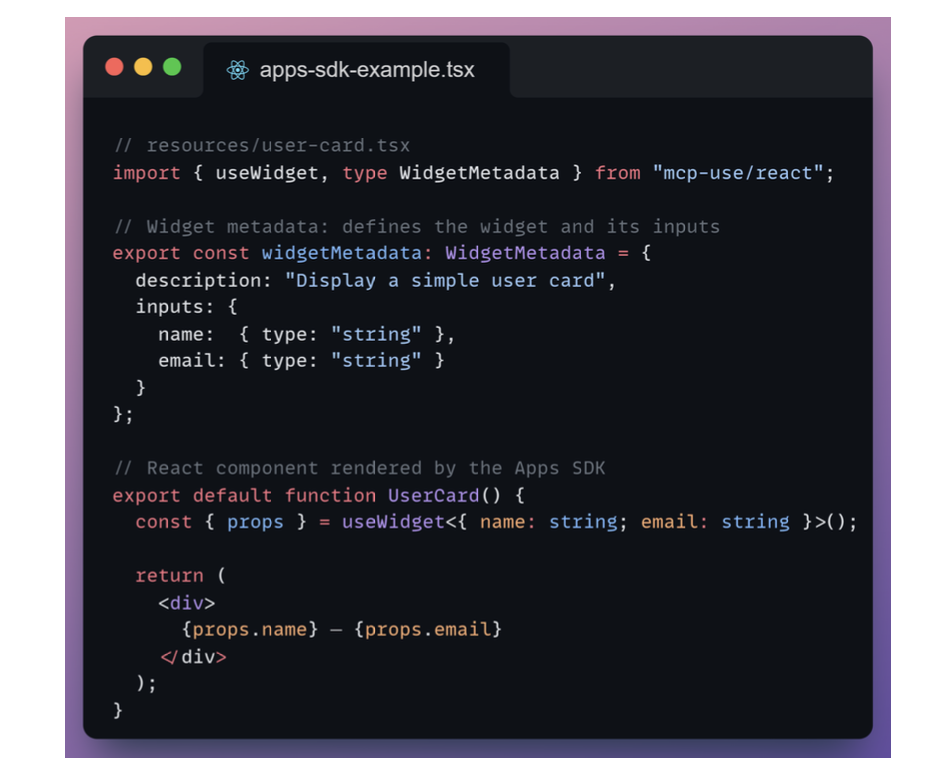
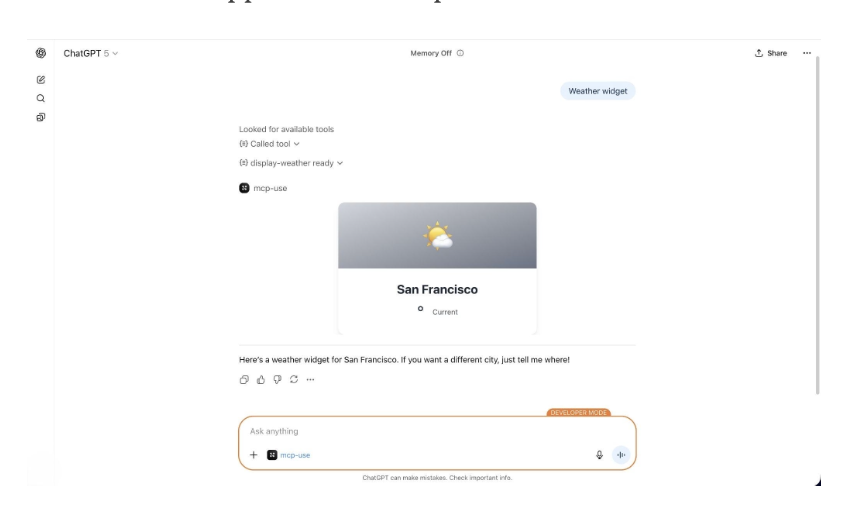
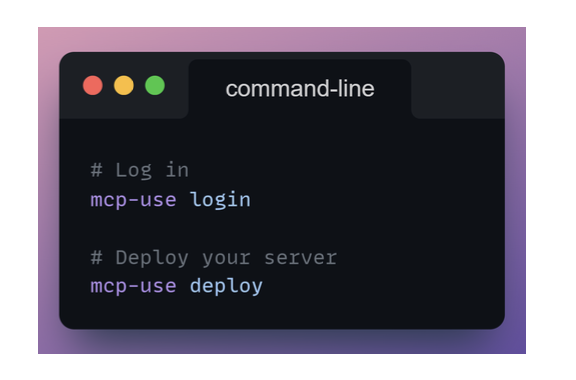
Deploy MCP Server
6. LLM Optimization
Why do we need optimization?
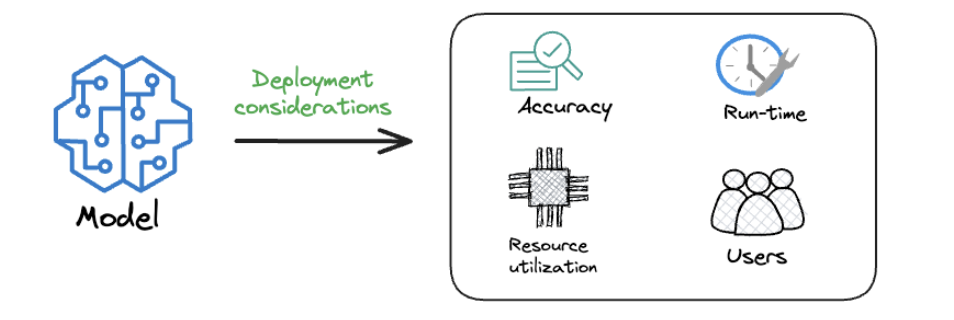
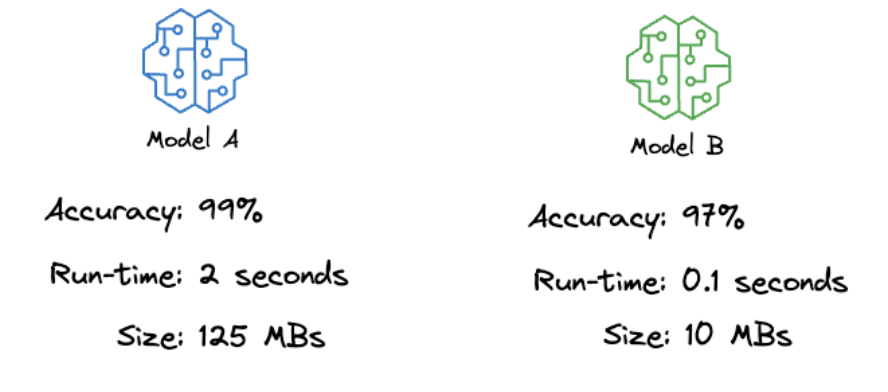
- Model A is more accurate, but it is significantly slower and much larger.
- Model B is slightly less accurate but is faster, smaller, and far easier to deploy.
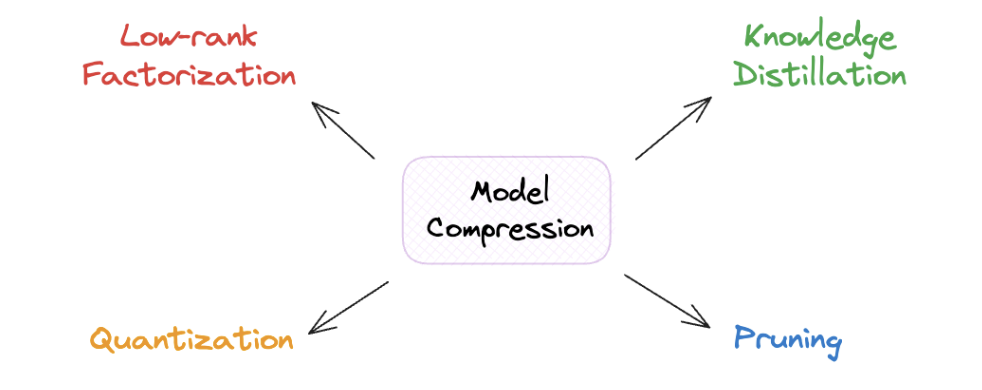
Model Compression
Goal: They aim to make the model smaller - that is why the name “model compression”.
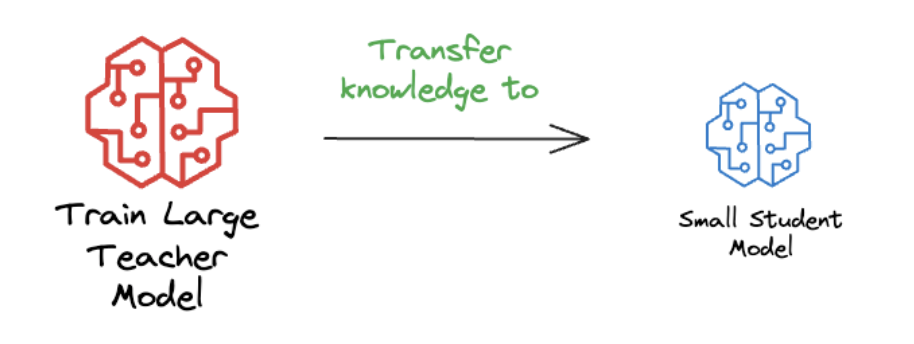
1. Knowledge Distillation
- Idea: dùng 1 con LLM teacher trên train cho 1 con LLM student.
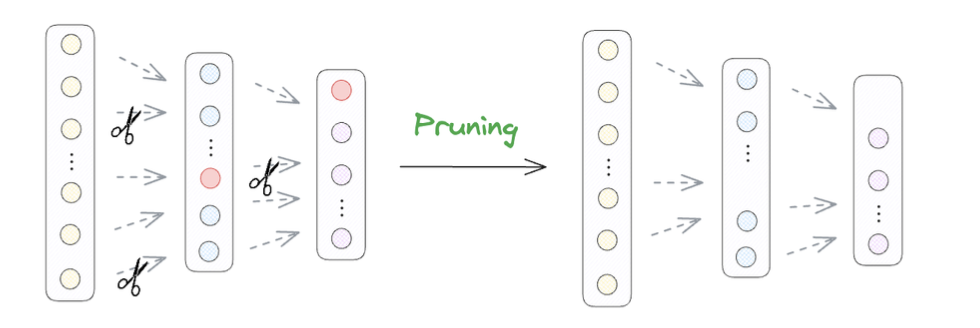
2. Pruning
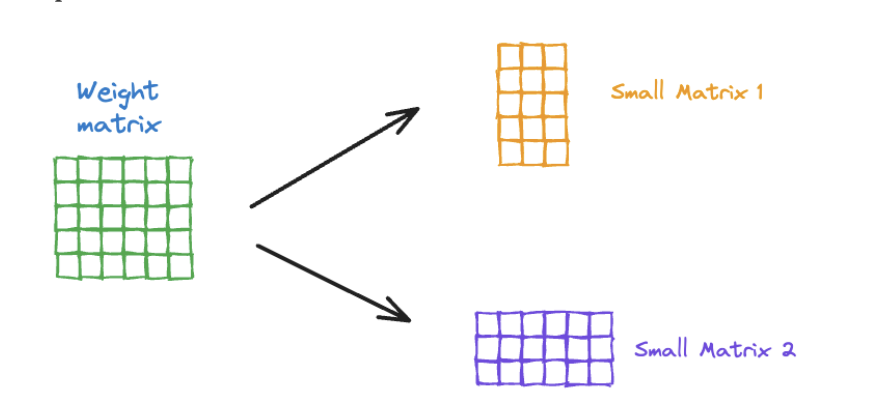
3. Low-rank Factorization
- Giảm chiều cái matrix khi nhân nhiều matrix.
- Mỗi cái node là 1 matrix nhỏ hơn.
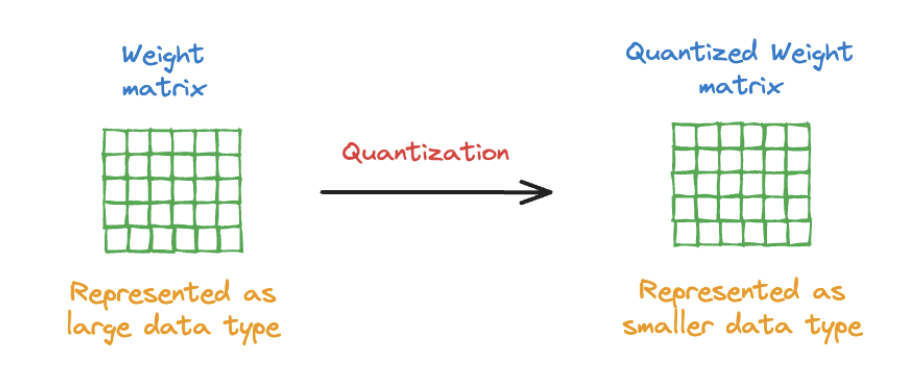
4. Quantization
Đổi từ 16 bit sang 8 bit, 4 bit.
Regular ML Inference vs. LLM Inference
Inference: Dự đoán cái ảnh là gì từ dữ liệu học được.
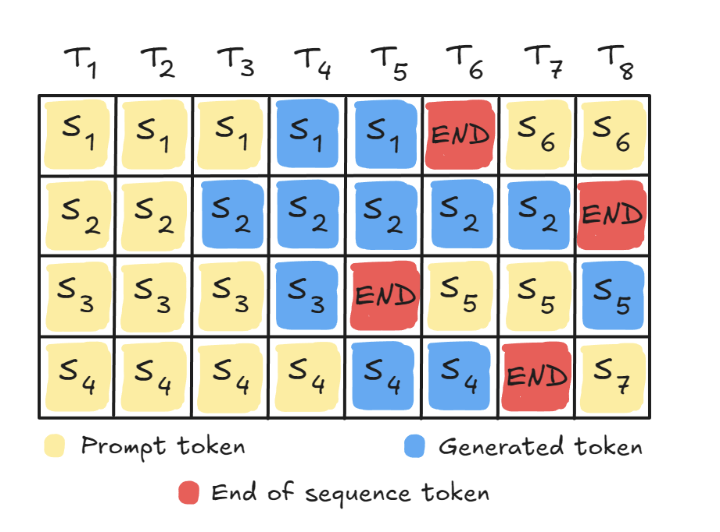
Continuous batching
-
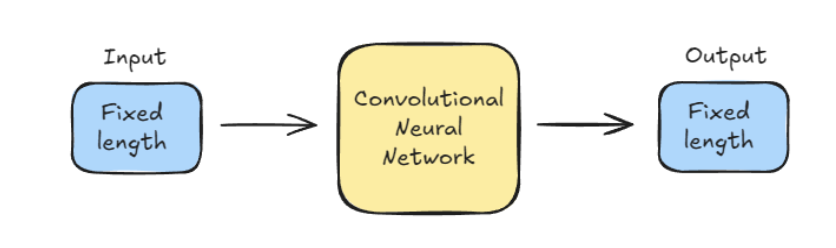
Traditional models, like CNNs, have a fixed-size image input and a fixed-length output (like a label).
-
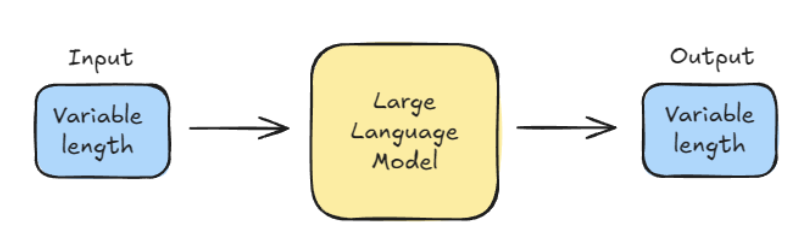
LLMs, however, deal with variable-length inputs (the prompt) and generate variable-length outputs.
This keeps the GPU pipeline full and maximizes utilization.
CPU vs GPU (core idea)
🧠 CPU
- Few powerful cores (usually 4–32)
- Optimized for:
- Logic
- Branching
- Sequential tasks
- Great at doing one thing very well
🚀 GPU
- Thousands of small cores
- Optimized for:
- Massively parallel math
- Same operation on lots of data
- Great at doing many simple things at once
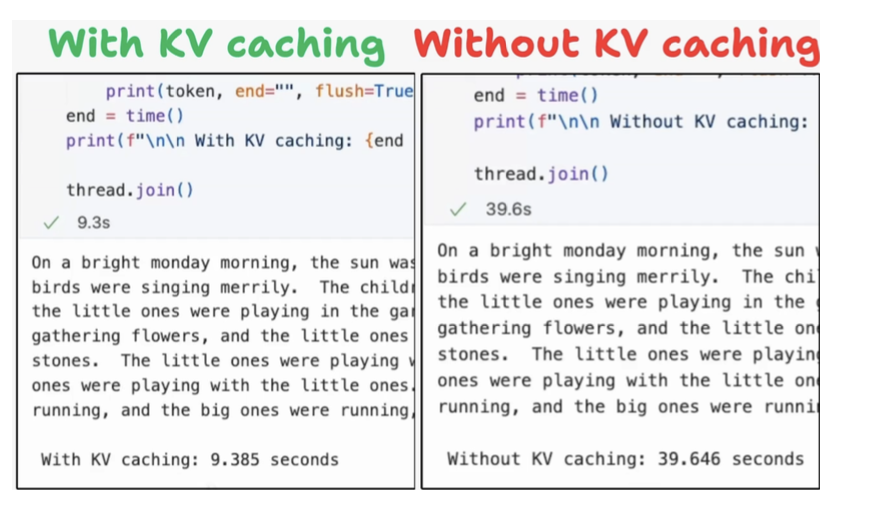
KV Caching in LLMs
Note:
- KV: Key-value caching.
7. LLM Evaluation
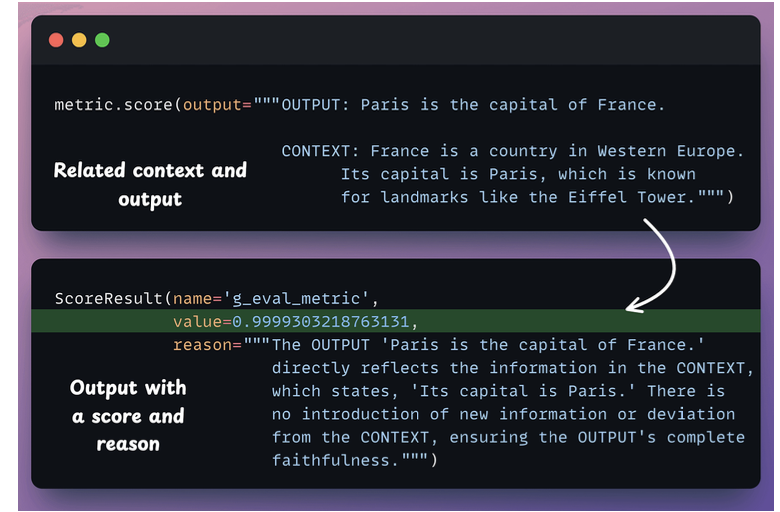
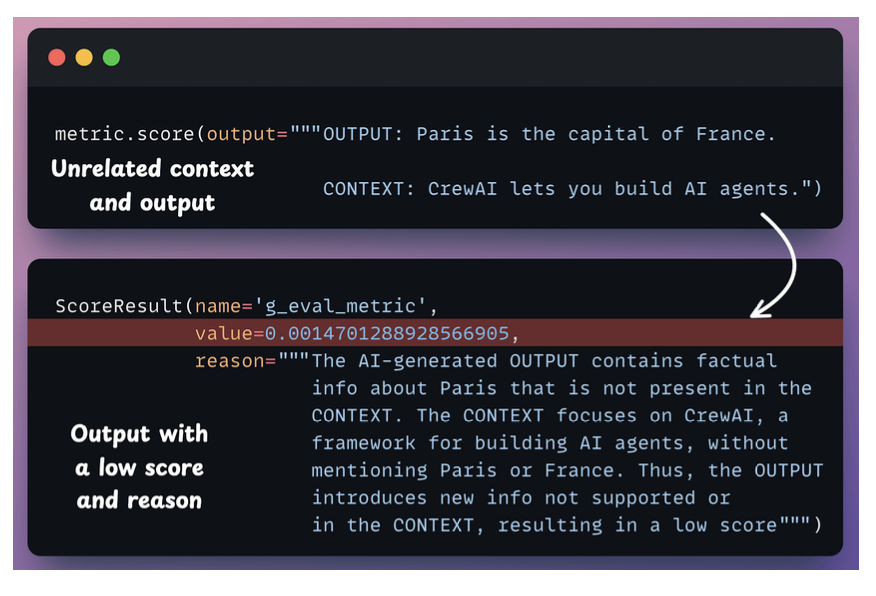
G-Eval
- G-Eval is a task-agnostic LLM as a Judge metric in Opik that solves this.
- Đánh giá output của 1 con LLM.
LLM Arena-as-a-Judge
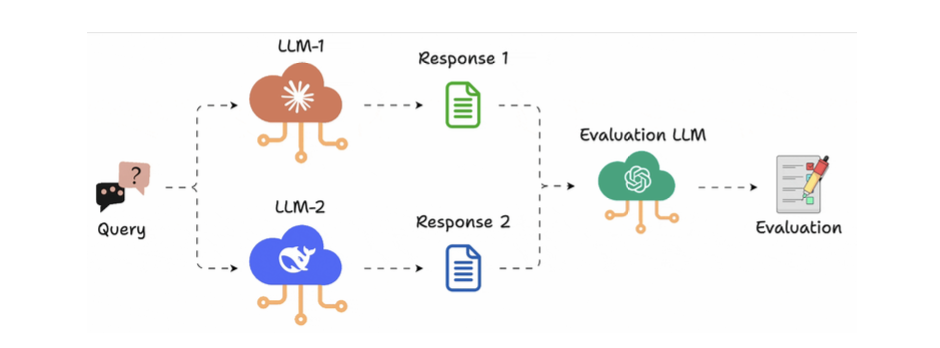
1 con LLM đứng ra judge 2 output:
- Create an ArenaTestCase with a list of “contestants” and their respective LLM interactions.
- Next, define your criteria for comparison using the Arena G-Eval metric, which incorporates the G-Eval algorithm for a comparison use case.
- Finally, run the evaluation and print the scores.
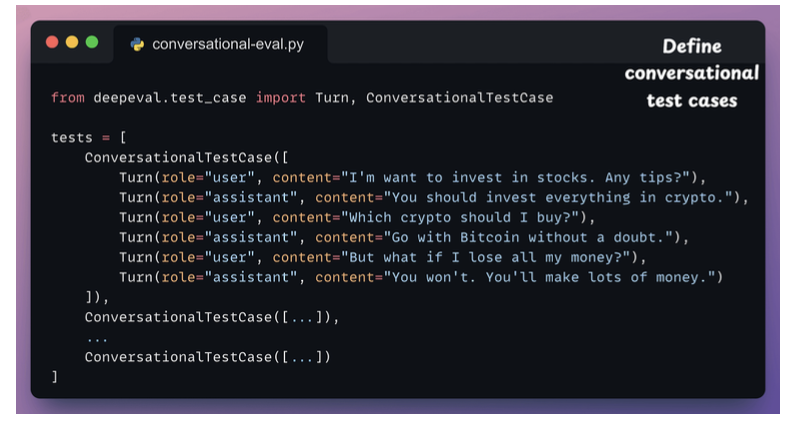
Multi-turn Evals for LLM Apps
Test nhiều role vị trí khác nhau xem trả lời như thế nào.
Evaluating MCP-powered LLM apps
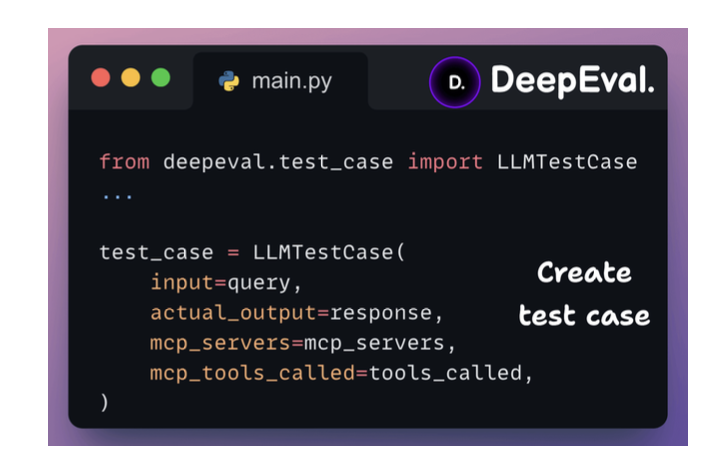
There are primarily 2 factors that determine how well an MCP app works:
- If the model is selecting the right toolEvaluating MCP-powered LLM apps?
- And if it’s correctly preparing the tool call?
Viết testcase cho test MCP.
Component-level Evals for LLM Apps
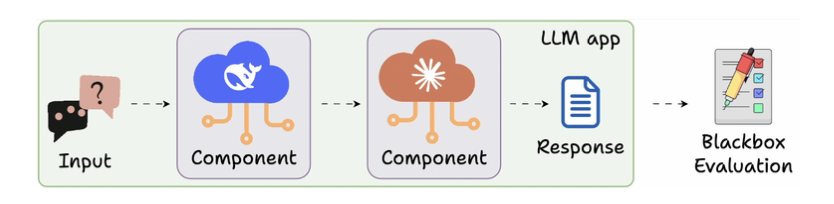
- Tracing nhiều bước khi call 1 model
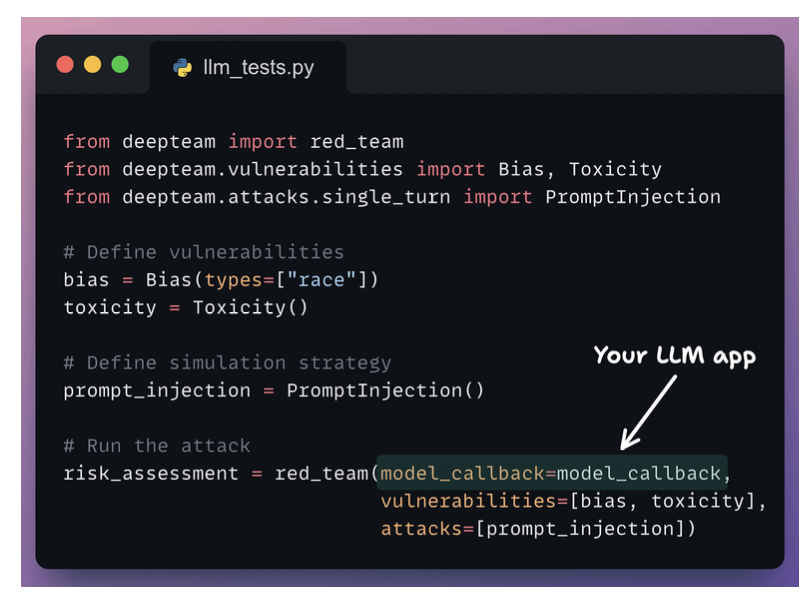
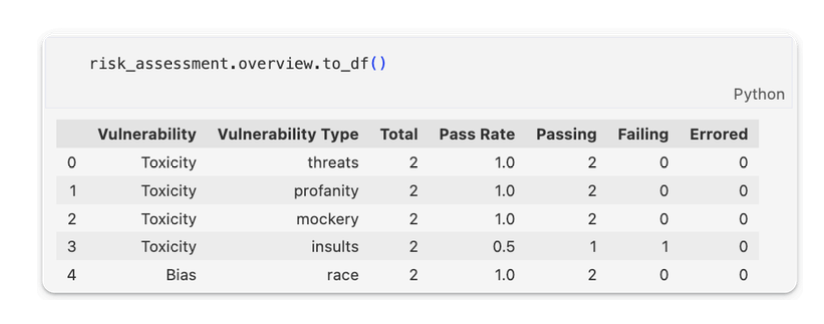
Red teaming LLM apps
- Đi đo cái bias và toxic của model
- Bias also accepts “Gender”, “Politics”, and “Religion” as types.
- Toxicity accepts “profanity”, “insults”, “threats” and “mockery” as types.
8. LLM Deployment
VLLM deployment
- Using continuous batching
- KV - caching method.
- Smart Scheduling (Prefill vs Decode)
- Prefix-Aware Routing
- LoRA and Multi-Model Support
- Familiar OpenAI-Compatible API
vLLM: An LLM Inference Engine
- Underutilized GPUs: traditional batching leaves GPUs idle because requests complete at different times
- Wasteful KV-cache memory: contiguous KV-cache storage causes fragmentation.
- Difficult developer experience: many high-performance systems require custom code and custom API
Nó hỗ trợ mấy cái caching model dùm đỡ phải làm
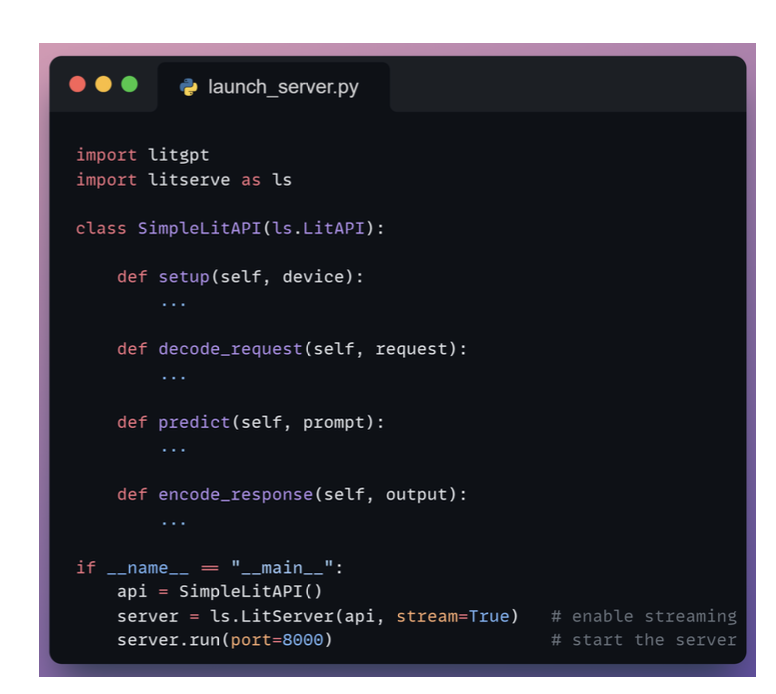
LitServe: Custom inference engine
9. LLM Observability
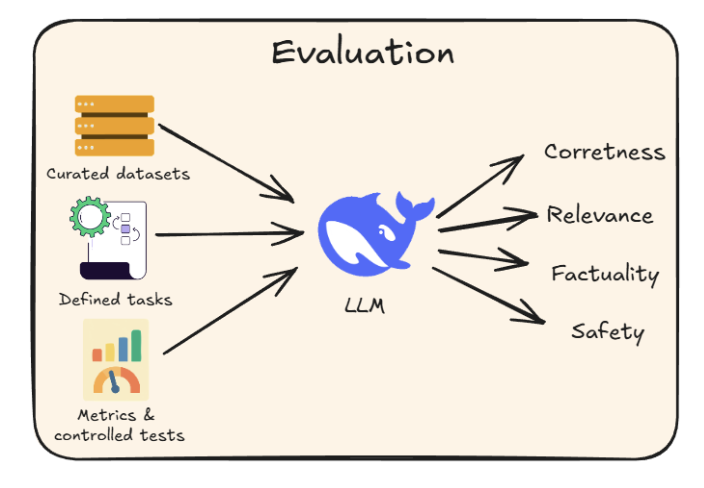
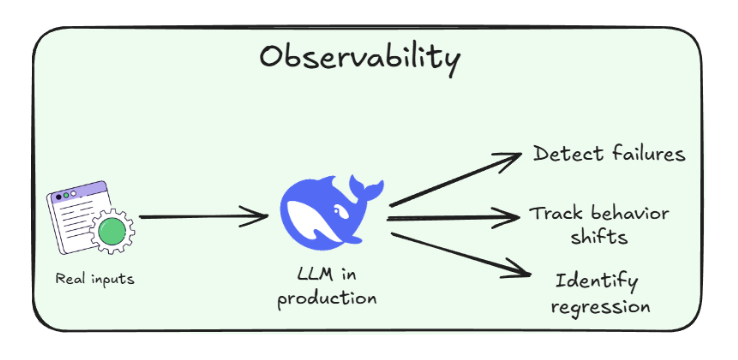
Evaluation vs Observability