



Research about Kafka
Here is some research about Kafka features and configurations.
References: https://kafka.apache.org/43/configuration/broker-configs/
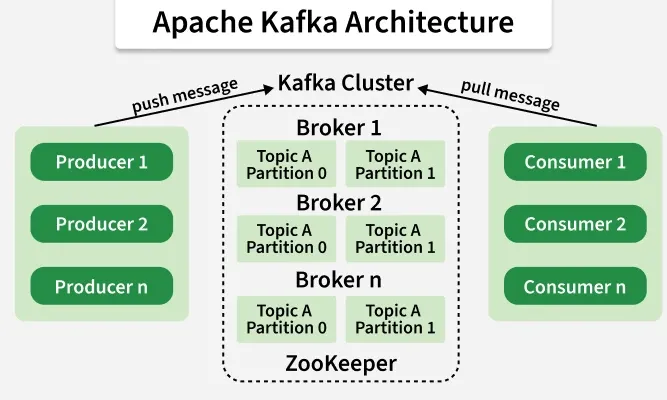
1. Architect
2. What is brokers ?
- Broker: a broker is a server that store Kafka topics, partitions.
2.1. What fields are needed to configure a Kafka broker? ?
| Configuration | Purpose |
|---|---|
broker.id |
Unique ID for each broker |
listeners |
Network address/port the broker listens on |
advertised.listeners |
Address clients use to connect |
log.dirs |
Directory where Kafka stores data |
num.partitions |
Default number of partitions for new topics |
default.replication.factor |
Default replication factor |
offsets.topic.replication.factor |
Replication factor for consumer offsets topic |
log.retention.hours |
How long messages are kept |
log.segment.bytes |
Size of each log segment file |
zookeeper.connect |
ZooKeeper connection (older Kafka setups) |
process.roles |
Role in KRaft mode (broker, controller) |
controller.quorum.voters |
Controllers in KRaft mode |
inter.broker.listener.name |
Listener used between brokers |
auto.create.topics.enable |
Automatically create topics or not |
delete.topic.enable |
Allow topic deletion |
message.max.bytes |
Maximum message size |
replica.fetch.max.bytes |
Max data replicas fetch at once |
2.2. What is example of configuration file ?
broker.id=1
listeners=PLAINTEXT://localhost:9092 advertised.listeners=PLAINTEXT://192.168.1.10:9092
log.dirs=/var/lib/kafka/logs
num.partitions=3 default.replication.factor=3
log.retention.hours=168 log.segment.bytes=1073741824
auto.create.topics.enable=true delete.topic.enable=true
message.max.bytes=1048576
2.3. What is important about configurations ?
- broker.id
broker.id=1
- Unique identifier for each broker
- No two brokers should share the same ID
- listeners
listeners=PLAINTEXT://0.0.0.0:9092
Defines where Kafka listens for connections.
Format: PROTOCOL://HOST:PORT
Example protocols:
- PLAINTEXT
- SSL
- SASL_PLAINTEXT
- SASL_SSL
- advertised.listeners
advertised.listeners=PLAINTEXT://kafka.example.com:9092
- This is the address sent back to clients.
Very important in:
- Docker
- Kubernetes
- Cloud deployments
If configured incorrectly, clients cannot connect.
- log.dirs
log.dirs=/data/kafka-logs
Location where Kafka stores:
- topic data
- partitions
- offsets
- num.partitions
num.partitions=3
Default partitions for newly created topics.
More partitions:
- higher parallelism
- better throughput
But:
- more overhead
- log.retention.hours
log.retention.hours=168
How long Kafka keeps messages.
Example: 168 = 7 days
After expiration, old logs are deleted.
- default.replication.factor
default.replication.factor=3
How many copies of data Kafka keeps.
Example:
- replication factor 3
- data stored on 3 brokers
Improves fault tolerance.
- auto.create.topics.enable
auto.create.topics.enable=false
If true:
-
Kafka automatically creates missing topics
-
Production systems often disable this.
- message.max.bytes
message.max.bytes=10485760
- Maximum message size allowed.
Example:
10485760 = 10 MB
- Producer and consumer configs must also match.
- KRaft Mode (Modern Kafka)
New Kafka versions can run without ZooKeeper.
Important configs:
- process.roles
- process.roles=broker,controller
Defines node role:
- broker
- controller
or both
- controller.quorum.voters
- controller.quorum.voters=1@node1:9093,2@node2:9093
2.4. What is KRaft Mode and how producer and consumer in Kafka replace it ?
Zookeeper in the past:
| Component | Responsibility |
|---|---|
| Broker | Stores data and handles producer/consumer requests |
| Controller | Manages cluster metadata and coordination |
- Broker Responsibilities
-
Store messages
-
Handle reads/writes
-
Manage partitions
-
Replicate topic data
-
Serve producers and consumers
- Controller
-
Elect partition leaders
-
Monitor broker health
-
Manage cluster metadata
-
Coordinate replicas
-
Handle failover
2.5. listeners and advertised.listeners different
-
listeners defines where the broker listens for connections.
-
advertised.listeners defines the address shared with clients for connecting to the broker.
3. What is topic ?
-
Use case: named stream of messages/events.
-
Can be configure for:
- retention
- partitioning
- replication
- compression
- cleanup behavior
- message size
- performance
4. What is partition ?
- What: A partition is a smaller chunk of a topic.
5. What is replication ?
- What: Kafka copies partitions to multiple brokers.
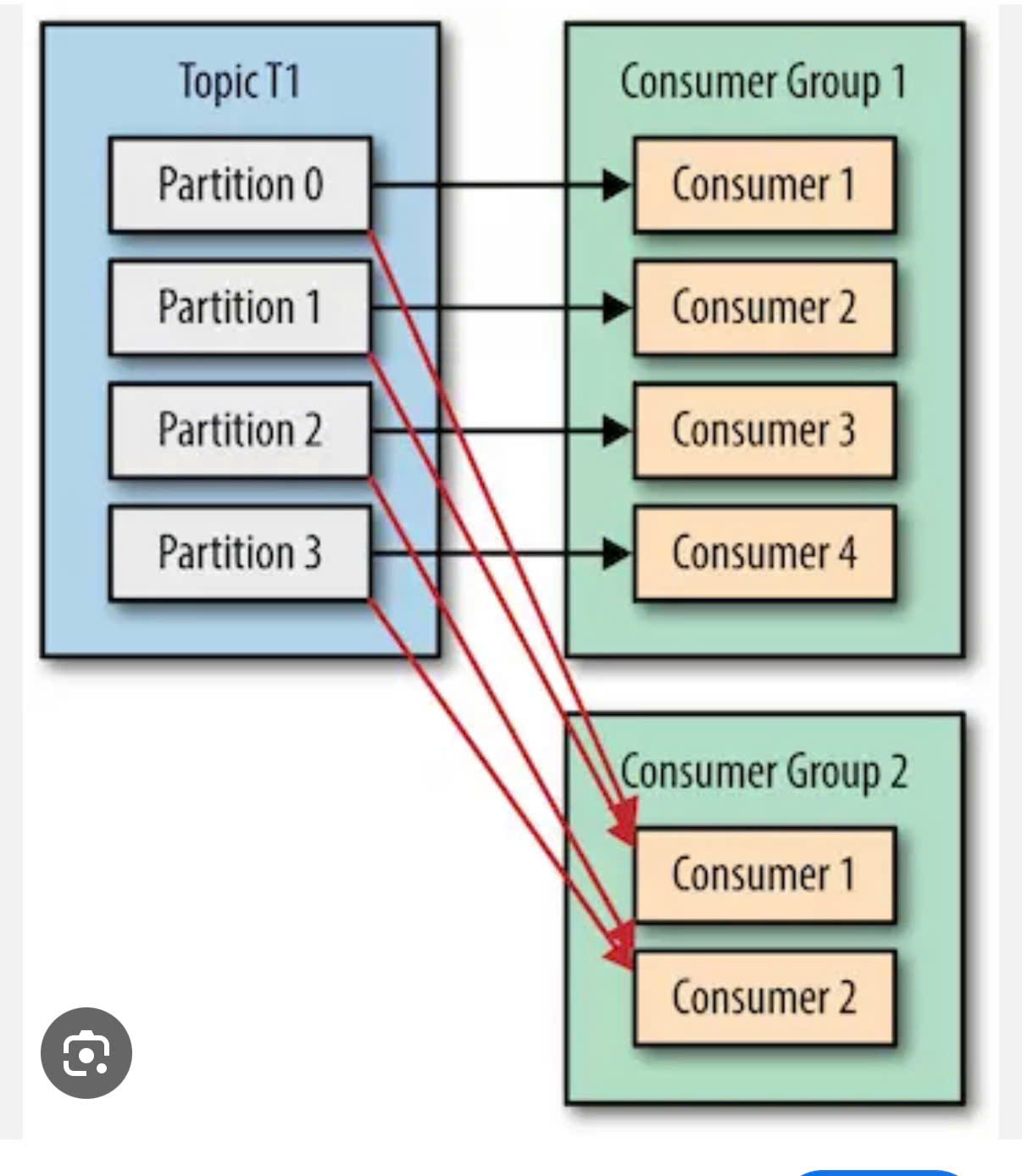
6. What is consumer group ?
-
What: a consumer group is a set of consumers that work together to read a topic.
-
Same topic: different topics is ok.
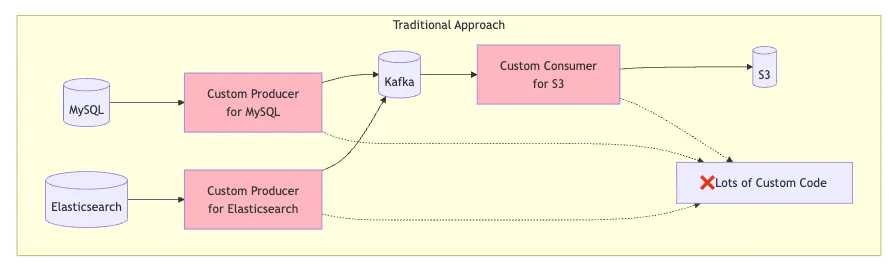
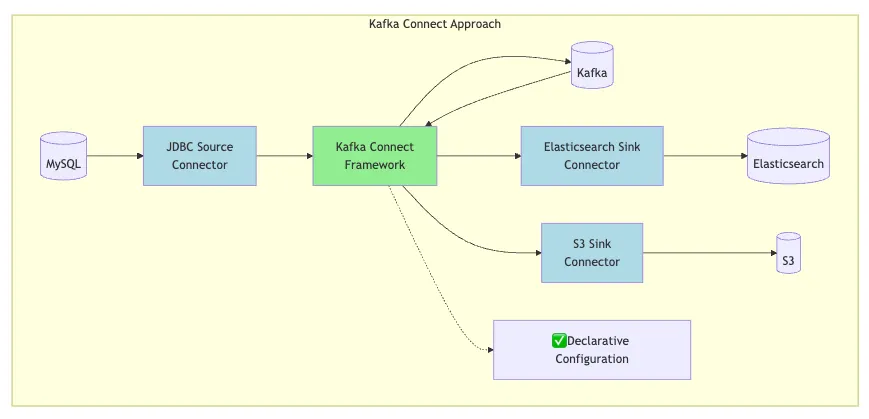
7. What is Kafka Connect ?
-
What: used to move data between Kafka and external systems without writing custom producer/consumer code.
-
It helps integrate Kafka with:
- databases
- data warehouses
- search engines
- cloud storage
- message queues
- SaaS tools
-
Visual: Traditional vs Kafka Connect
8. What is Kafka Stream ?
-
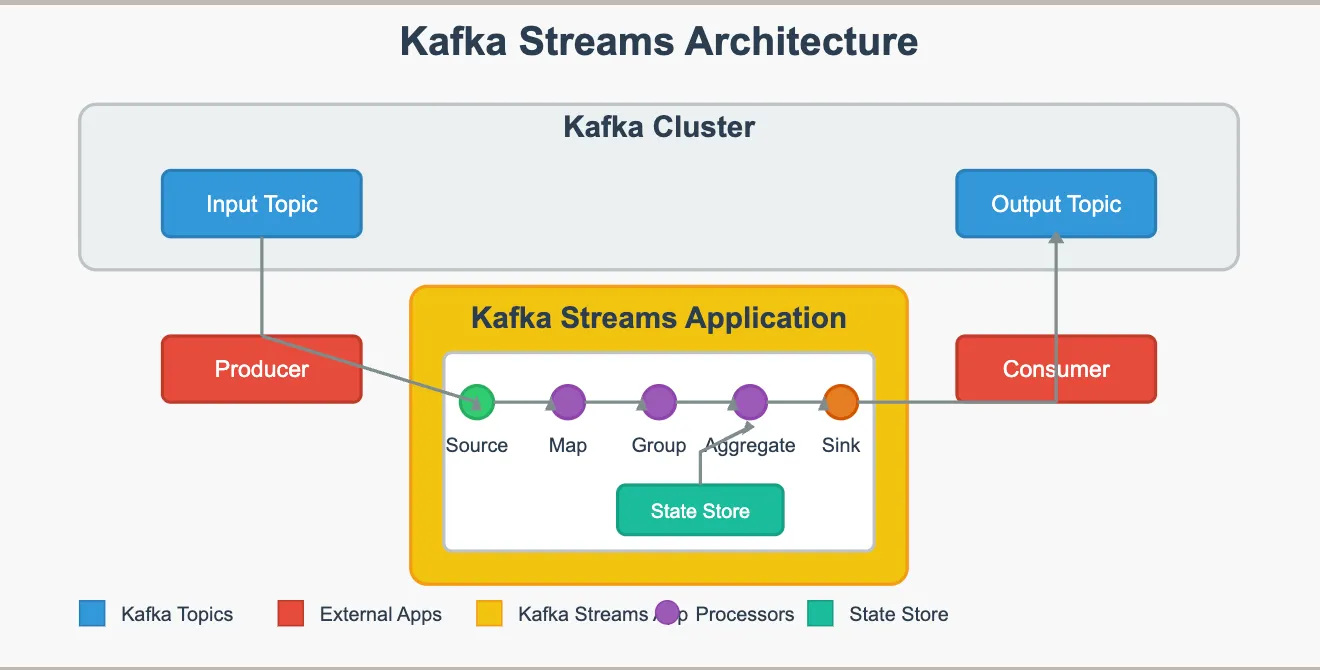
What: to build applications and microservices that process, analyze, and transform data stored in Apache Kafka in real-time
-
It lets you:
-
read data from Kafka topics
-
process/transform data
-
write results to another topic
-
9. Consumer and number of paritions of a topic
10. Admin Configs in Kafka
-
What: In Apache Kafka, Admin Configs are configuration settings used by Kafka administrative tools and clients to manage the cluster.
-
They are mainly used with:
- AdminClient
- brokers
- topics
- partitions
- ACLs
- consumer groups
- cluster operations
11. MirrorMaker Configs
-
What: In Apache Kafka, MirrorMaker (especially MirrorMaker 2 / MM2) is used for replicating data between Kafka clusters.
-
Example: Cluster A -> Cluster B
12. System Properties in Kafka
-
What: System properties = JVM-level or broker startup properties used to control how Kafka runs at the process level.
-
Example:
- KAFKA_HEAP_OPTS=”-Xmx2G -Xms2G”
- KAFKA_OPTS=”-Djava.security.auth.login.config=/etc/kafka/jaas.conf”
13. Tiered Storage Configs
- What: Tiered Storage in Apache Kafka is used to separate compute from storage by dividing data into local and remote layers.
14. Configuration Providers
- What: Configuration Providers let Kafka fetch config values dynamically from external systems instead of hardcoding them.
15. Kafka Producer
-
Ensure message in order: fire in the same paritition.
-
Decouple 1 service into consumer and producer ⇒ by split it into producers and consumers and scale independently.
-
Producer
- ACK = 0: fire and forget
- ACK = 1: only when the first partition receive messages, do not wait for this sync to all the partitions.
- ACK = N: wait until it sync message to all partitions.
- Using ProducerID + sequence number ⇒ So that when the producer send duplicate message to Kafka but old sequenc, Kafka can reject to receive it.
16. Kafka Consumer
- Idea: consume message by pull-based model
- In consumer group:
- 1 Partition responsible by 1 consumer.
- if 1 consumer downtime (can not health check) → Parition to assign to another consumer.
- At most once
- Commit when receive message
- Can be processed failed.
- At least once
- Commit after process message.
- Can be duplicate
- Notes: Handle by controling the processing ⇒ Add 1 transaction id hoặc message id in database -> handle duplicate downstream.