



Design Notification Service - Follow-up questions - Intuition First, Need more How
Here is solutions for Design Notification Service - Follow-up questions.
Main topic:
-
Cascading failures called to third party: retry + backpressure + jitter.
-
Fan-out notification: based on user segment -> build push-based and pull-based model.
-
Outbox: using outbox patterns + distributed locked + kafka partition -> single consumer to single notification.
1. Patterns for Design Notification Service
-
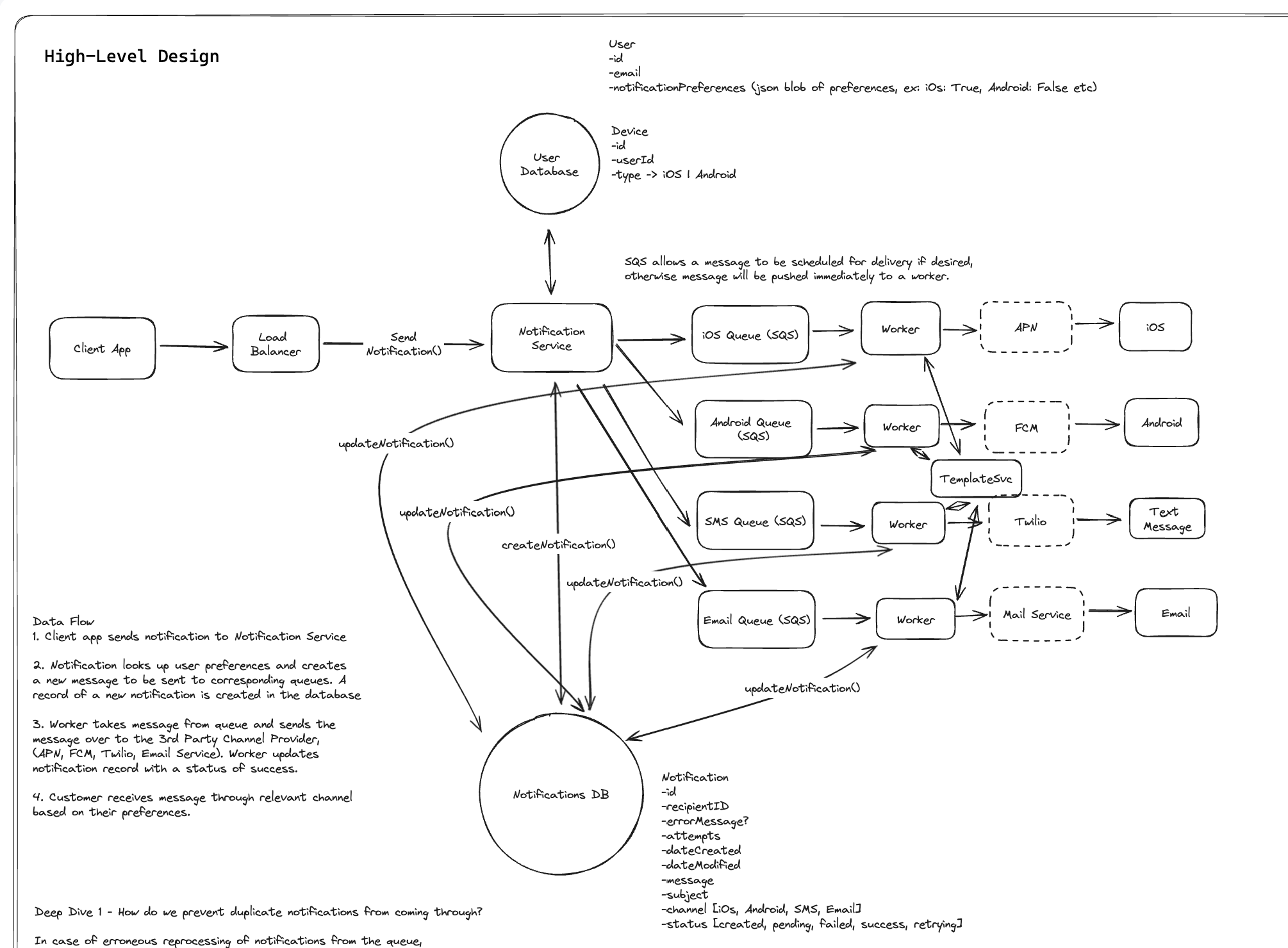
3 queue (SMS, Email, Mobile): Using separate SQS queues for each notification channel (iOS, Android, SMS, Email) provides excellent isolation and allows independent scaling of workers based on channel-specific load patterns
-
Outbox Deduplicaton: The duplicate prevention strategy using notification ID lookups before sending prevents erroneous reprocessing, which is crucial for maintaining user trust in a notification system
-
Circuit Breaker (Jitter): Including circuit breakers for third-party provider failures shows good defensive programming and will prevent cascading failures when external services experience issues
-
Distributed Lock + Kafka Partition (Consumer Group): Race Condition in Duplicate Prevention, two workers processing the same notification simultaneously could both read “pending” status and proceed to send duplicate messages
-
User Preference Lookup Caching: User preferences change infrequently, making them ideal candidates for caching to reduce database load
-
Have Retry Limit for Dead Letter Queue: Without a retry limit and dead letter queue, permanently failing notifications will cycle indefinitely.
- How do you handle the scheduled notification feature mentioned in requirements?
-
Store the request with a scheduled_at timestamp + dispatcher: in a durable store and run a small “dispatcher” service that continuously pulls due items (scheduled_at <= now, status=scheduled) via an indexed query.
-
RabmitMQ: Delay Queue
-
Redis TTL: Trigger to run.
-
Idempotency: re-dispatch after crashes doesn’t double-send.
-
- What happens when a user updates their notification preferences while messages are already in the queues?
- Check preferences right before send. The worker fetches the current prefs (from cache with fallback to DB) and drops a send if that channel is now disabled.
- How do you ensure the 1-second delivery SLA when third-party providers like APNS or FCM might have variable latency?
-
Define the SLA as “handed off to the provider” within 1s, not device receipt.
-
Minimize per-request work: cache prefs/templates, avoid synchronous DB writes on the hot path, and keep small message sizes.
-
Set tight provider timeouts, parallelize sends, and isolate slow channels with separate queues and circuit breakers so they don’t drag others past the budget.
-
- How does your system handle partial failures where some channels succeed but others fail for the same notification?
- Model per-channel delivery records under a parent notification. Each channel has its own state machine, retries with exponential backoff and a max-attempts + DLQ.
- What’s your strategy for handling notification templates beyond email? Push notifications often need titles, bodies, and custom data
-
Use a versioned Template Service that renders per channel.
-
Cache templates on workers with TTL/ETag and invalidate on publish. Keep payload generation fast and deterministic so retries don’t change content unless the template version changes.
-
-
How does the promo fanout handle segments containing millions of users without overwhelming downstream systems?
Having the scheduler do fanout is good, but avoid live “joins” over massive segments at send time.
- Batching:
-
Static Segment: Snapshot segments at schedule time (materialized list or an immutable membership snapshot pointer) and page through in controlled batches.
-
Dynamic Segment: If segments are dynamic, page the membership stream with strict throttles: campaign-level concurrency, per-channel tokens, per-tenant quotas. The scheduler only expands, say, 5k–20k users/sec per campaign to avoid explosions.
-
-
Split into multiple queues (Android, iOS, SMS)
-
Backpressure with jitter the scheduler should stop expanding when downstream queues hit high-water marks.
-
Watermark/Cursor: track the latest timestamp
- Providers are one downstream, but so are your internal queues, template cache, and execution DB. Use hierarchical rate limits:
- Global per-channel, per-tenant, per-campaign token buckets.
- Provider/domain/carrier-aware limits (e.g., Gmail domain throttles, carrier-country limits).
- A slow-start ramp (like TCP) to avoid immediately hitting provider limits; increase tokens as success rate stabilizes.
- Batching:
- What specific mechanism prevents promotional notifications from being sent after their expiration time?
-
Add expiration in Kafka/DynamoDB/Redis: for the expiration time of campaign.
-
Worker double check when processing it: the worker will double check expired time when process this message.
-
- How do you partition the execution DB to handle 1M writes/second across multiple tables?
-
Execution DB scalability bottleneck: 40k writes/s per table sounds wrong. With extensive sharding on the bucket+0…N as the primary key we can achieve a good distribution across multiple partitions.
-
Potentially switch to Cassandra but higher ops load unless managed. Could also switch to multiple tables 0…N
Why Cassandra difficult to manage ?:
-
It shard by key and a hash, when a node crash -> data will move the next/prev node.
-
But when the node back again -> resharding will be difficult.
-
- What happens when SQS queues back up and promotional notifications risk missing their delivery window?
-
Scale workers.
-
Pre-calculate required worker capacity for each scheduled campaign and pre-scale before the send window.
-
Priority Camapaign/Rules
-
- How do workers determine the appropriate retry strategy and backoff for different provider failures?
- We can configure rate limit per strategy: token bucket + exponential backoff + jitter plan
-
SES can employ batching.
-
For SMS we can multiple short codes. Use token bucket and reduce token count when 429s are received.
-
- We can configure rate limit per strategy: token bucket + exponential backoff + jitter plan
- What’s your strategy for handling provider rate limits (e.g., SMS providers limiting to 100 msgs/second)?
- For SMS we can multiple short codes. Use token bucket and reduce token count when 429s are received.
- What components in schedule notification system ?
-
campaign = job definition
-
schedule time = trigger time
-
scheduler service = due job scanner
-
promo fanout = job expansion step
-
execution records = child tasks
-
channel workers = executors
-
expiryTime = deadline after which execution is invalid
-
Campaign store holds promotional job definitions
-
Execution store holds actual user-level sends
-
Workers:
- push workers
- email workers
- SMS workers
-
- How to write 300M records to outbox table ?
-
Solution: streaming or batching.
-
If the product truly requires per-user status for all 300M deliveries, then yes, you need to store them, but you’d do it via append-heavy batched writes and probably asynchronous status aggregation.
-
- If million of scheduling campaign fall into a single bucket, the bucket becomes a hot partition, what happens in that case
-
A single time bucket can become a hot partition. So don’t model it as one partition per minute.
-
Add a shard dimension. Instead of bucket#10:00, use something like bucket#10:00#shard-0..999
-
-
A tsunami warning to 100M users in under 5 seconds -> emergency broadcast problem - Pull-based trigger ?
Common approaches are:
-
write only final status, not every intermediate state
-
batch status updates
-
separate hot delivery pipeline from cold analytics/status store
-
keep detailed per-attempt logs in an append-only stream, then compact later
-
store campaign/partition counters separately from per-user rows
You try to avoid per-user DB writes on the critical path. Instead:
-
precompute target cohorts if possible
-
use regional shards
-
stream directly to push gateways in parallel
-
rely on provider multicast/topic capabilities where available
-
record aggregate delivery state first, then backfill detailed status asynchronously if needed
-
- Three type of broadcast/fan-out/unicast notification
-
Critical unicast: low-latency per-user send.
-
Promotional campaign: scheduler + partitioned fanout + lower-priority bulk delivery.
-
Emergency broadcast: specialized pre-partitioned broadcast pipeline optimized for massive parallel fanout, with minimal synchronous persistence.
-
Fan-out on write: for simple posts.
-
Fan-out on read: for celebrity posts.
-
-