
Grab Engineering - Catwalk Gateway - Serving Machine Learning Models at Scale
Here is my notes about the blog https://engineering.grab.com/catwalk-serving-machine-learning-models-at-scale
1. Overview
In a nutshell, Catwalk is a platform where we run Tensorflow Serving containers on a Kubernetes cluster integrated with the observability stack used at Grab.
2. High-level Architecture
-
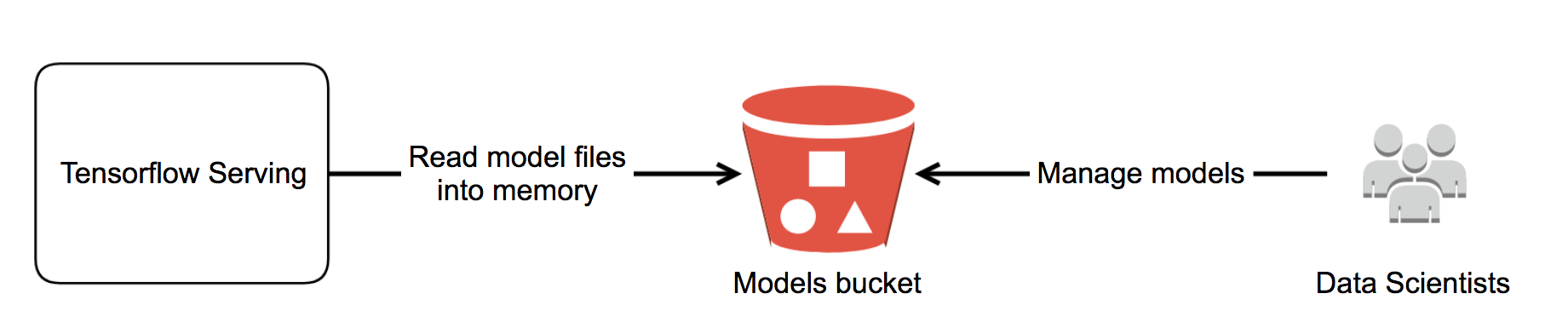
Data scientists export the model using tf.saved_model API and drop it to an S3 models bucket. The exported model is a folder containing model files that can be loaded to Tensorflow Serving.
-
Data scientists are granted permission to manage their folder.
-
We run Tensorflow Serving and point it to load the model files directly from the S3 models bucket. Tensorflow Serving supports loading models directly from S3 out of the box. The model is served!
-
Data scientists come up with a retrained model. They export and upload it to their model folder.
-
As Tensorflow Serving keeps watching the S3 models bucket for new models, it automatically loads the retrained model and serves. Depending on the model configuration, it can either gracefully replace the running model version with a newer version or serve multiple versions at the same time.
3. How TensorFlow Serving Works
TensorFlow Serving provides a production-ready inference server for TensorFlow models. Its primary responsibility is to load trained models, manage model versions, and expose prediction APIs over REST or gRPC.
The deployment workflow is as follows:
Step 1. Train a TensorFlow Model
First, train your machine learning model using TensorFlow.
Training Data
      │
      ▼
TensorFlow Training
      │
      ▼
Trained Model
Step 2. Export the Model as a SavedModel
TensorFlow Serving expects models to be exported in the SavedModel format.
It does not typically serve raw checkpoint files (.ckpt) or standalone .h5 files directly.
A typical model directory looks like:
models/
└── my_model/
    └── 1/
        ├── saved_model.pb
        └── variables/
            ├── variables.data-00000-of-00001
            └── variables.index
Where:
saved_model.pbcontains the model graph and metadata.variables/stores the trained model weights.1is the model version.
TensorFlow Serving supports multiple versions of the same model:
models/
└── my_model/
    ├── 1/
    ├── 2/
    └── 3/
This enables safe deployments and rollbacks without interrupting serving.
Step 3. Start TensorFlow Serving
TensorFlow Serving is started by pointing it to the model directory.
Example using Docker:
docker run \
  -p 8500:8500 \
  -p 8501:8501 \
  -v "$PWD/models/my_model:/models/my_model" \
  -e MODEL_NAME=my_model \
  tensorflow/serving
This command:
- Mounts the model directory into the container.
- Registers the model name as
my_model. - Starts:
- gRPC server on port 8500
- REST API server on port 8501
Step 4. Send Prediction Requests
Applications send inference requests to TensorFlow Serving instead of loading the model themselves.
REST API
POST http://localhost:8501/v1/models/my_model:predict
Example request:
{
  "instances": [
    [1.0, 2.0, 3.0],
    [4.0, 5.0, 6.0]
  ]
}
gRPC API
localhost:8500
The gRPC API is commonly used in production because it provides:
- Lower latency
- Higher throughput
- Efficient binary serialization
- Strongly typed interfaces
End-to-End Flow
              Train Model
                    │
                    ▼
        Export as SavedModel
                    │
                    ▼
       models/my_model/1/
                    │
                    ▼
      TensorFlow Serving Server
         REST (8501) / gRPC (8500)
                    │
                    ▼
        Prediction Request
                    │
                    ▼
           Load Model Version
                    │
                    ▼
          Run TensorFlow Inference
                    │
                    ▼
          Return Prediction Result
Why Version the Model?
TensorFlow Serving organizes models by version number:
models/
└── my_model/
    ├── 1/
    ├── 2/
    └── 3/
This allows it to:
- Deploy new model versions without downtime
- Roll back to a previous version if necessary
- Serve multiple versions simultaneously for testing or canary deployments
4. How the model is deployed
-
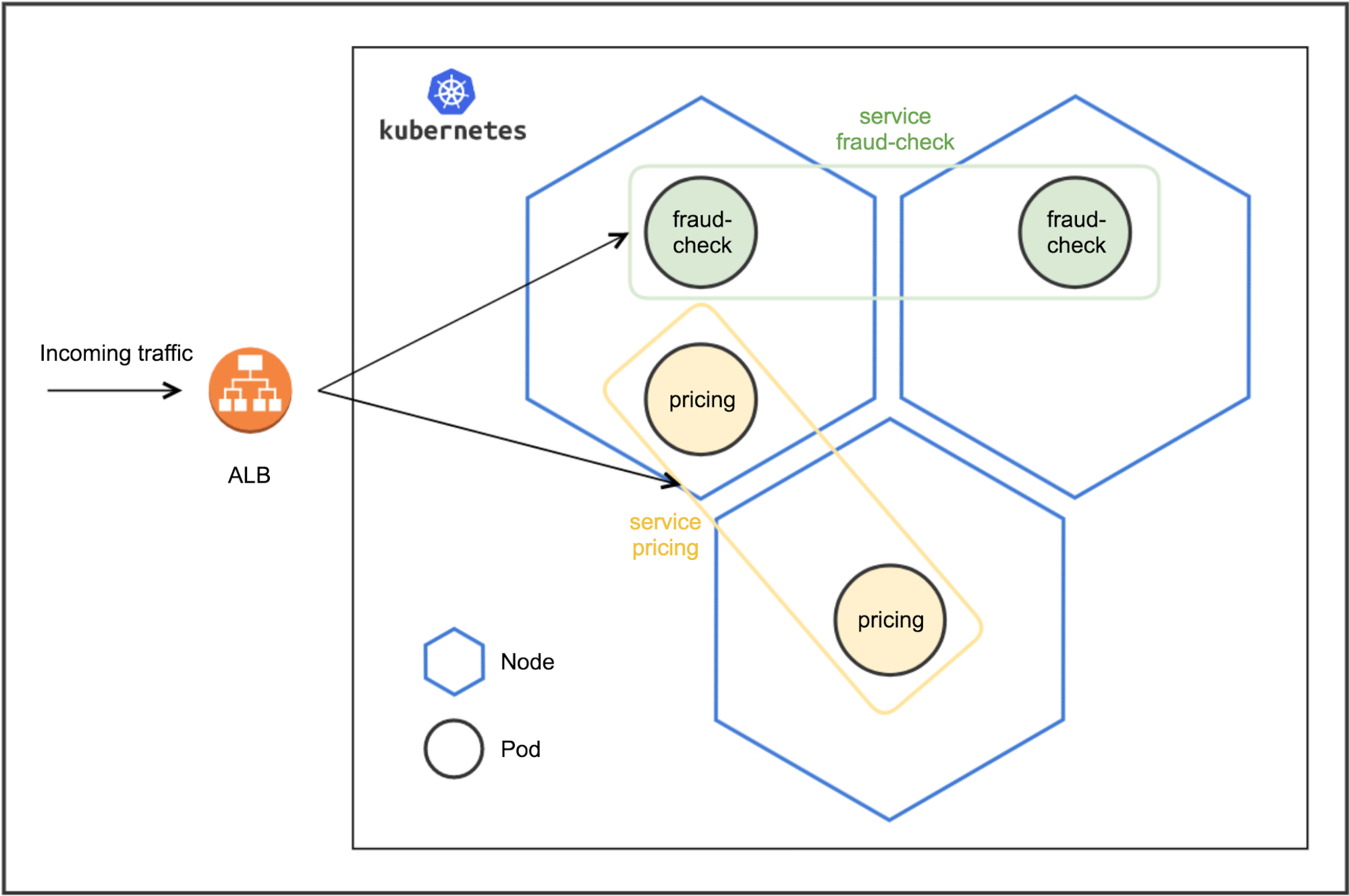
Cluster - a cluster of nodes running Kubernetes.
-
Node - a node inside a cluster.
-
Deployment - a configuration to instruct Kubernetes the desired state of an application. It also takes care of rolling out an update (canary, percentage rollout, etc), rolling back and horizontal scaling.
-
Pod - a single processing unit. In our case, Tensorflow Serving will be running as a container in a pod. Pod can have CPU/memory limits defined.
-
Service - an abstraction layer that abstracts out a group of pods and exposes the application to clients.
-
Ingress - a collection of routing rules that govern how external users access services running in a cluster.
-
Ingress Controller - a controller responsible for reading the ingress information and processing that data accordingly such as creating a cloud-provider load balancer or spinning up a new pod as a load balancer using the rules defined in the ingress resource.
5. Learning Notes
Some concepts from the article connect nicely with software engineering patterns:
- TensorFlow Serving is analogous to an application server that loads model artifacts instead of application code.
- SavedModel plays a role similar to a deployable binary or Docker image—it is the artifact promoted through environments.
- Model versioning resembles API versioning or blue/green deployments, enabling safe rollouts and rollbacks.
- Catwalk acts as an internal Platform-as-a-Service (PaaS) for machine learning, abstracting away Kubernetes and infrastructure details so data scientists can focus on building models rather than operating serving infrastructure.