






Research about Elastic Search
Here is some research about Elastic Search.
Refererence: https://ngnthilakshan.medium.com/a-comprehensive-guide-on-understanding-elasticsearch-full-text-search-f6f1765e525b
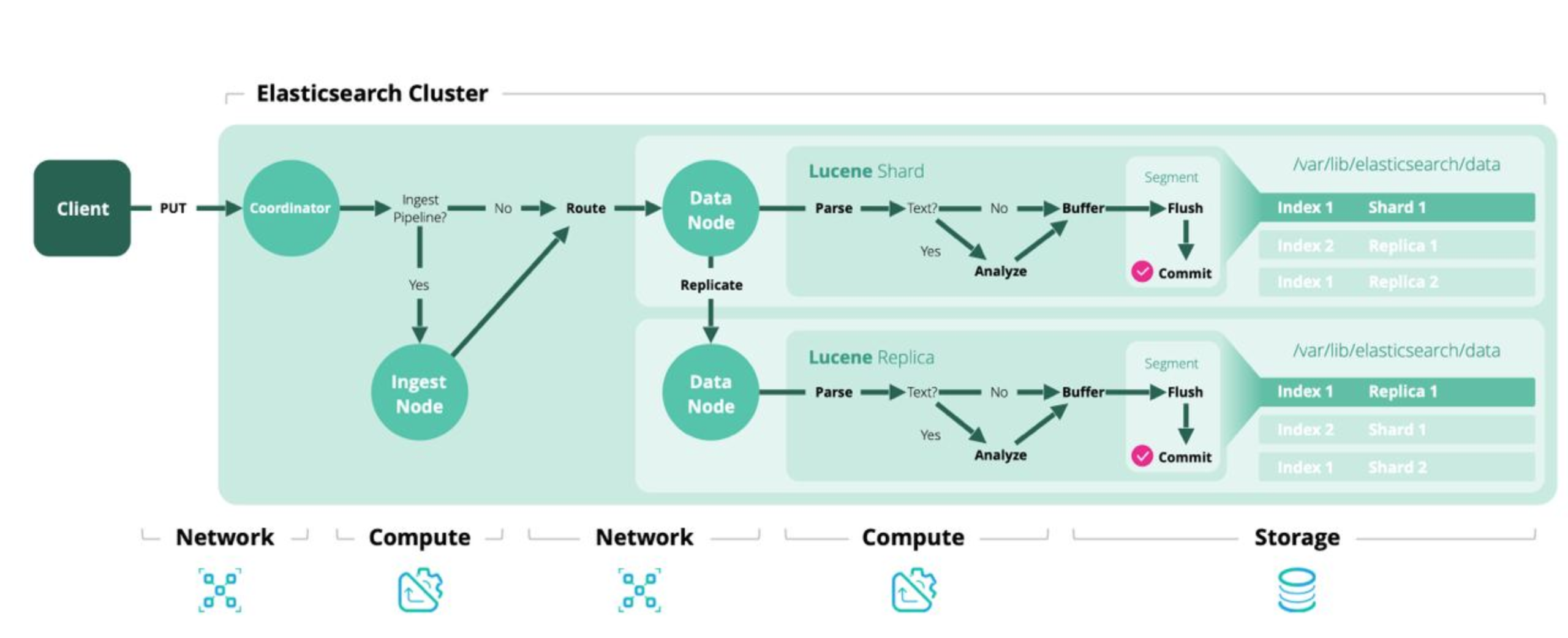
1. Architecture
2. Use case
- Full-text search.
3. Sample mapping
3.1. Create settings
// PUT /books { “settings”: { “number_of_shards”: 1, “number_of_replicas”: 1 } }
3.2. Create mapping
// PUT /books/_mapping { “properties”: { “title”: { “type”: “text” }, “author”: { “type”: “keyword” }, “description”: { “type”: “text” }, “price”: { “type”: “float” }, “publish_date”: { “type”: “date” }, “categories”: { “type”: “keyword” }, “reviews”: { “type”: “nested”, “properties”: { “user”: { “type”: “keyword” }, “rating”: { “type”: “integer” }, “comment”: { “type”: “text” } } } } }
4. What is different type text and keyword in ES
-
Text: used for full-text search.
-
Keyword: exact match.
5. Another type for search geo_point and geo_shape
{ “properties”: { “name”: { “type”: “text” }, “location”: { “type”: “geo_point” }, “delivery_zone”: { “type”: “geo_shape” } } }
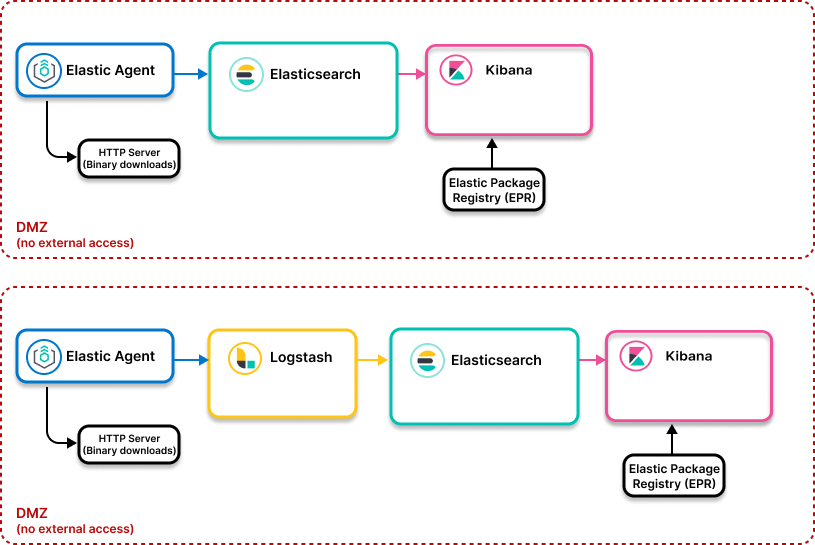
6. Ingest Pipeline
Ref: https://dev.to/lisahjung/part-6-set-up-elasticsearch-for-data-transformation-and-data-ingestion-4m2c
6.1. Elastic Agent
Elastic Agent is the collector.
It runs on servers/machines and gathers:
- logs
- metrics
- system data
- security events
Examples:
- CPU usage
- application logs
- nginx logs
- Docker metrics
Think of it as:
Server → Elastic Agent → send data
6.2. Logstash
-
Transform Data
-
Filter Data
-
Enrich Data
-
Route Data
6.3. Elasticsearch
Elasticsearch is the storage + search engine.
It:
- indexes data
- stores documents
- enables fast search
6.4. Kibana
-
Kibana is the UI/dashboard layer.
-
It connects to Elasticsearch.
7. Custom Logic
- We can custom logic in Logstash, Kibana.
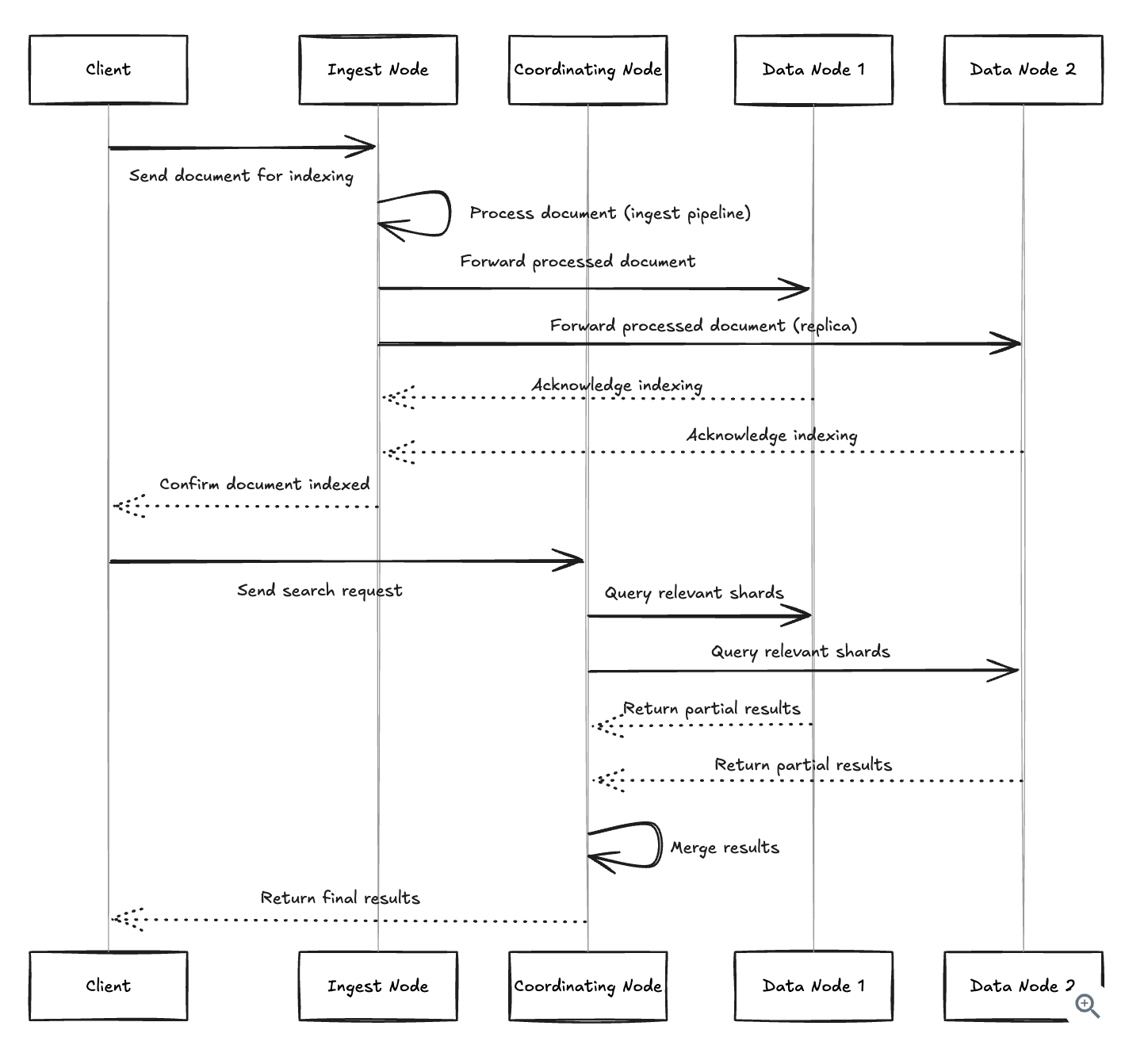
8. Search Node
9. How to create a full-text search with ES ?
9.1. Basic Index Creation
PUT /products { “settings”: { “number_of_shards”: 3, “number_of_replicas”: 1 } }
9.2. Create Index Templates
PUT _index_template/products_template { “index_patterns”: [“products-*”], “priority”: 1, “template”: { “settings”: { “number_of_shards”: 2, “number_of_replicas”: 1, “index.lifecycle.name”: “products_policy”, “index.lifecycle.rollover_alias”: “products” }, “mappings”: { “properties”: { “product_id”: { “type”: “keyword” }, “name”: { “type”: “text”, “fields”: { “keyword”: { “type”: “keyword”, “ignore_above”: 256 } } }, “category”: { “type”: “keyword” }, “price”: { “type”: “double” }, “stock”: { “type”: “integer” }, “created_at”: { “type”: “date” }, “updated_at”: { “type”: “date” } } }, “aliases”: { “products”: {} } } }
9.3. Index Mapping
Elasticsearch offers two approaches to defining field types
-
Dynamic mapping: Elasticsearch automatically detects and assigns field types based on the data you index.
-
Explicit mapping: You predefine field types before indexing any data.
PUT /products/_mapping { “properties”: { “name”: { “type”: “text”, “fields”: { “keyword”: { “type”: “keyword”, “ignore_above”: 256 } } }, “description”: { “type”: “text”, “analyzer”: “english” }, “price”: { “type”: “float” }, “category”: { “type”: “keyword” }, “created_at”: { “type”: “date” } } }
9.4. Controlling Dynamic Mapping
- Dynamic templates: Define custom mapping rules based on field names or data types
PUT /products { “mappings”: { “dynamic_templates”: [ { “strings_as_keywords”: { “match_mapping_type”: “string”, “mapping”: { “type”: “keyword” } } }, { “location_fields”: { “match”: “*_location”, “mapping”: { “type”: “geo_point” } } } ] } }
- Dynamic setting: Control whether new fields are added automatically
PUT /products { “mappings”: { “dynamic”: “strict”, // Options: true, false, strict “properties”: { // defined fields here } } }
9.5. Analyzers - The Text Processing Pipeline
-
Character filters: Pre-process raw text (e.g., strip HTML tags)
-
Tokenizers: Split strings into individual tokens (e.g., breaking on whitespace)
-
Token filters: Modify tokens (e.g., lowercasing, stemming, synonyms)
PUT /products { “settings”: { “analysis”: { “analyzer”: { “product_analyzer”: { “type”: “custom”, “tokenizer”: “standard”, “filter”: [“lowercase”, “asciifolding”, “my_synonym_filter”] } }, “filter”: { “my_synonym_filter”: { “type”: “synonym”, “synonyms”: [ “laptop, notebook”, “phone, smartphone, mobile” ] } } } } }
9.6. Create search template
- Can be: single_match or multi_match.
POST /_scripts/product_search { “script”: { “lang”: “mustache”, “source”: { “query”: { “bool”: { “must”: { “multi_match”: { “query”: “”, “fields”: [“name^2”, “description”] } }, “filter”: [
        {
          "range": {
            "price": {
              "gte": "",
              "lte": ""
            }
          }
        },


        {
          "term": {
            "category": ""
          }
        }

      ]
    }
  },
  "size": "",
  "from": ""
}   } }
9.7. Search sample
POST /products/_search/template { “id”: “product_search”, “params”: { “query_text”: “wireless headphones”, “price_range”: true, “min_price”: 50, “max_price”: 200, “category”: “electronics”, “size”: 10, “from”: 0 } }
9.8. Search Queries - The Query DSL
9.8.1. Match Query
GET /products/_search { “query”: { “match”: { “description”: “wireless bluetooth headphones” } } }
9.8.2. Multi-Match Query
GET /products/_search { “query”: { “multi_match”: { “query”: “wireless headphones”, “fields”: [“name^3”, “description^2”, “tags”], “type”: “best_fields” } } }
9.8.3. query_string
GET /products/_search { “query”: { “query_string”: { “query”: “title:python AND author:guido” } } }
9.8.4. Compound Queries
GET /products/_search { “query”: { “bool”: { “must”: [ { “match”: { “name”: “headphones” } } ], “should”: [ { “match”: { “description”: “wireless” } }, { “match”: { “description”: “bluetooth” } } ], “must_not”: [ { “match”: { “description”: “wired” } } ], “filter”: [ { “range”: { “price”: { “lte”: 200 } } }, { “term”: { “in_stock”: true } } ] } } }
9.9. Boosting Techniques for Relevance Tuning
9.9.1. Field Boosting
GET /products/_search { “query”: { “multi_match”: { “query”: “bluetooth headphones”, “fields”: [ “title^3”, “product_name^2.5”, “description”, “tags^0.5” ] } } }
9.9.2. Term Boosting
GET /products/_search { “query”: { “query_string”: { “fields”: [“title”, “description”], “query”: “bluetooth^2 wireless headphones noise^1.5 cancelling” } } }
9.9.3. Document Boosting with Function Scores
Goal: Higher-rated products get boosted.
GET /products/_search { “query”: { “function_score”: { “query”: { “multi_match”: { “query”: “wireless headphones”, “fields”: [“title”, “description”] } }, “functions”: [ { “field_value_factor”: { “field”: “average_rating”, “factor”: 1.2, “modifier”: “sqrt”, “missing”: 1 } }, { “filter”: { “term”: { “featured”: true } }, “weight”: 1.5 }, { “gauss”: { “release_date”: { “origin”: “now”, “scale”: “365d”, “decay”: 0.5 } } } ], “score_mode”: “multiply”, “boost_mode”: “multiply” } } }
9.9.4. Context-Aware Boosting with Rescore
Goal:
- This happens after the initial search.
Process:
-
Elasticsearch finds top candidate documents
-
Then rescoring adjusts rankings
GET /products/_search { “query”: { “match”: { “description”: “wireless headphones” } }, “rescore”: { “window_size”: 100, “query”: { “rescore_query”: { “bool”: { “should”: [ { “term”: { “brand”: { “value”: “sony”, “boost”: 1.5 } } }, { “term”: { “brand”: { “value”: “bose”, “boost”: 1.4 } } }, { “range”: { “sales_rank”: { “lte”: 100, “boost”: 2.0 } } } ] } }, “query_weight”: 0.7, “rescore_query_weight”: 0.3 } } }